Showing posts with label Transformations. Show all posts

Friday, December 5, 2025

Executing BW transformation in on-prem/cloud based system

There is a different call of ABAP method that executes the BW transformation introduced for cloud based BW systems. It can be spotted in method TRANSFORM of class CL_RSTRAN_TRFN_CMD. First there is a check if the BW is cloud based system. If so the request parameter (i_r_request) that is passed to a method call is l_r_request_cloud. In case it is on-premise based BW system the value of the same parameter is l_r_request.


The two request are generated by a same class and different method call:

cl_rsar_function=>set_request_cloud( i_r_request = l_r_request_cloud ).

cl_rsar_function=>set_request( i_r_request = l_r_request ).


In case cloud system the request is instance of IF_RSBK_REQUEST_PROXY_CLOUD.

For on-prem request it is instance IF_RSBK_REQUEST_ADMINTAB_VIEW.

Both the interfaces provide access to runtime attributes of a data load request during its processing. It acts as a bridge between an infoprovider admin screen/tab (in the class called as - IPRO Admin Tab) used for monitoring and administration of requests) and the request object itself in the BW system.


Thursday, March 30, 2023

No Routine (ROUT) objects in BW4 transport of transformations

You may notice that in BW4 based systems transporting of Transformation is simplified. In classic versions of BW there were usually objects like Routine included in the transport requests in case particular Transformation contained them. The objects (OBJECT = ROUT) represent either formula in transformation rules or Start/End/Expert Routine. Such transport requests look like below one:


Routine objects of the Transformations are stored in table RSTRANSTEPROUT (Rule Type: Routine). They still are there in the table in case of BW4 systems.

However, in BW/4 based systems there are no transport entries like that anymore. Reason is that, routines and formulas are embedded with transformation metadata. The table RSTRANSTEPROUT has a column CODE that contains all the code of a particular routine and formula. Because of that the ROUT object are not necessary anymore. This change is in place since SAP BW/HANA 1.0 SP04.


More information:

2548884 - Formula handling and transport related problems in BW/4HANA

Thursday, November 24, 2022

BW Transformation tech name different across systems

Once BW transformation is created there is a technical ID associated with it. The tech ID is generated by the system and it is a hash value of some transformation attributes like source object and its type and subtype, target object its type and subtype. The tech ID is stored in table RSTRAN and field TRANID.  

Now the transformation is moved across the systems in BW landscape via the BW transport. Normally one would expect that the same tech ID of the transformation is replicated into target system of the transport. However, there are some checks executed in the target system that decides about the ID of the transformation. Following situation can occur the target BW system. The tech ID of the transformation can be different. This means that table entry RSTRAN-TRANID is different in source and the target BW system of the transport.

Why would the BW system generate the new tech ID? In this case, the TRFN is based on DataSource. The DS name is different because it depends on source system abbreviation. Obviously, the DS associated with the DEV (D) BW system has different name, as is the DS associated with the QAS (Q) BW system. As the DS name is among the attributes of the TRFN that is used to generate the TRFN tech ID also the generated tech ID must be different. Therefore, that’s the reason why the same TRFN has different tech ID in D and Q systems.

Original TRFN name from source system (D in this case) is stored in column ORGTRANID for a record associated with the new TRFN tech ID in table RSTRAN.


More information:

2774555 - Technical names of Transformations

2117773 - Transformation is not deleted in complex landscape

Failed transport contains objects related to new source system

Tuesday, February 22, 2022

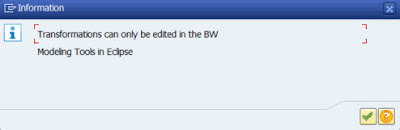
Transformations can only be edited in the BW Modeling Tools in Eclipse

While working with a newer versions of SAP BW like e.g. BW4/HANA 1.0 SP08 on HANA you may encounter following information message popping up:


Transformations can only be edited in the BW Modeling Tools in Eclipse

Message no. RSTRAN898

Diagnosis

The SAP GUI Editor for a transformation is used to display/change a transformation.

System Response

Change mode can't be enabled.

Procedure

Use the Editor in the BW Modeling Tools in Eclipse to edit the transformation. Using the SAP GUI Editor is not allowed, as it could cause inconsistencies in the transformation.

If you get this message, it means that you are still glued to SAP GUI. As BW development/modelling moved to Eclipse and similarly BW administration moved to web it is a high time to abandon good old SAP GUI and start to use those tools too. The Eclipse tools for developing BW objects are called BW Modeling Tools (aka BWMT). It is a plugin into the Eclipse IDE that can be downloaded from tools.hana.ondemand.com/#bw


On other hand, you may also get below message that is slightly similar to above one. 
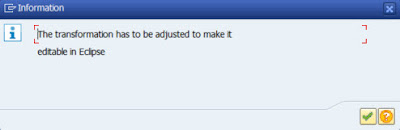

The transformation has to be adjusted to make it editable in Eclipse

Message no. RSTRAN899  

Diagnosis

The transformation cannot be edited in Eclipse because it contains incompatible rules

System Response

The transformation is opened in the SAP GUI Editor instead

Procedure

Please check if the transformation contains any rules or settings that are described here. Change the transformation as suggested below to make it compatible for the Eclipse Editor:

•In an ABAP routine, the second global part is used

◦Please move the code of the second global part to the first global part, so that the second global part does not contain any coding

•The ABAP Routines contain coding that is not compatible for ABAP Objects (for example internal table definitions with header lines)

◦Please change the coding and substitute the code to make it compatible with ABAP objects

•Rule type 'Routine with Unit' is used.

◦This rule type is not supported in the BW Modeling Tools. Use rule type 'Routine' instead and fill the currency/unit via a constant (this new feature is only available in Eclipse). If that is not possible because the field has to be filled dependent on other fields, use an end routine to fill the field.

•For more details, see SAP Note 2639435


In most of the cases, this message is appearing during migration projects to BW4/HANA. While classic BW objects are being converted to BW/4 objects. This means that the transformation in question contains some parts (e.g. rules) that are not editable in in the Eclipse yet. Such rules are not compatible with the BW/4 (mostly ABAP code not compliant with ABAP OO) and need to be adjusted before the transformation can be maintained in the Eclipse.

In short, the t-code RSTRANGUI can still be used to in display mode to see the transformation. While editing it can only take place in the Eclipse BWMT.


More information:

2766760 - Transformations can be edited only in the BW modeling tools (no editing in SAP GUI)

2639435 - Transformations are opened in SAP GUI instead of in Eclipse

2654109 - Conversion of ABAP/AMDP routines/exits in SAP BW/4HANA to the processing in Eclipse


Thursday, December 30, 2021

BW Transformations: HANA runtime

In a BW system that runs on HANA (BW on Hana = BWoH or BW for HANA = BW/4HANA) a transformations can either be running directly in HANA database or in BW application server. In a former case the when the transformations is performed in SAP HANA all data processing happens in the database therefore it is considered as a faster because no data transfer from/to DB to app server is needed. In the latter case, there is an overhead of moving data from DB to app server then data is processed there and finally it need to be moved back to DB - which makes whole processing slower. Now let us have a closer look at processing BW’s transformation in HANA DB that was introduced as of SAP BW 7.4 SP04.

Within the BW transformation a routine called "SAP HANASQLScript" can be created. That is basically HANA SQL script. In BW’s view, the DB script is implemented as a method in AMDP (ABAP managed database procedure) class. Sometimes the script is called as "SAP HANA Expert Script" or "BW-generated Stored Procedure". To create this in SAP GUI (t-code RSTRANGUI) you can use menu Edit -> Routines -> Create SAP HANA Expert Script. This menu path is valid for BW 7.4 based systems. In case of BW 7.5 based systems the menu path was moved to Edit -> Routines -> Expert Routine -> AMDP Script.

To create the same in SAP HANA Studio particularly in "BW Modeling Tools" follow on General tab -> Start/End/Expert Routine  Create.

Creating/editing of code of the script takes place in SAP HANA Studio particularly in "ABAP Development tools for SAP NetWeaver (ADT)".

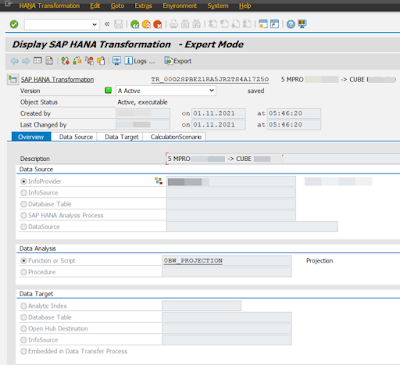
How does the processing of the TRFN in HANA DB it work technically? All business logic that is in TRFN is included in so called "CalculationScenario (CalcScenario)". Meta data of the CalculationScenario are stored in SAP HANA transformation. This object is identified by technical name TR_<ID_for_TRFN> (e.g. TR_00O2SPBEZ1RA5JRZTS4A17Z5O). The TR_* object is also sometimes called as "Analysis Process" or HAP – SAP HANA Analysis Process. It can be seen in t-code RSDHATR. The CalcScenario is embedded into a ColumnView. For data selection from the transformation source when DTP runs it creates SQL SELECT statement based on the ColumnView. Furthermore, during biz logic processing the CalcScenario applies all transformation rules on selected data. While the data is shifted from source to target it is done in single processing step by implementing as an INSERT AS SELECT statement that reads from the ColumnView and inserts into the target database object. While you would observe the HAP in the t-code RSDHATR notice that it is purely a runtime object. That means it can’t be created/modified in the t-code it-self. The CalcScenario can be seen in the t-code as well while switching Expert Mode on/Off in menu Extras. There are an XML representation and Script Definition tabs available.

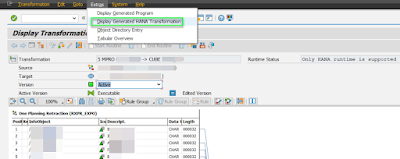
It is also possible to jump from TRFN definition means t-code RSTRANGUI to HAP. While in the RSTRANGUI select menu Extras -> Display Generated HANA Transformation. This jumps to t-code RSDHATR.


More information:

HANA based BW Transformation

Differences Between ABAP and SAP HANARuntime

First Guidance... Using SAP HANA SQLScript in SAP BW Transformations

2057542 - Recommendation: Usage of HANA-based Transformations

Thursday, December 10, 2020

Reading master data – Transformation Rule type for Open Hub

Within transformation in SAP BW there is a set of so called Rule Types. One of them is called Read Master Data. This rule type serves to read master data table of a characteristic from the source with a key and a value and contains the corresponding InfoObject as an attribute. The attribute of the IO is read and assigned to target InfoObject.

However, availability of this rule type depends on type of destination. In case the destination type is Open Hub the Read Master Data rule type is not available. Reason why it is like that is explained in SAP Note 1083266. It points to technical reason. Whatever it means the fact is that as long as the destination is the Open Hub it is not available.


More information:

1083266 - Rule type for reading master data for open hub destination

Online docu

Thursday, February 27, 2020

BW transports: Transformation consistency check

BW transports are one of pain points in BW area. Many issues may popup during move of BW objects between SAP systems. I blogged about many of them already. This time I focus on topic of transporting BW transformations.

One issue that may occur with regards of transporting the BW transformations is that method execution phase of the transport does not save and activate the transformation. Instead, only warning messages are shown in the transport log. This the BW developer expects that the transport went fine but it reality it is other way round.

Similarly, same situation can happen in other scenario. In case system dependent transformations of the source system is not mapped or incorrectly mapped in table RSLOGSYSMAP then again only warning is present in the transport log

To solve this there is a RSADMIN parameter available to influence how the BW system shall react. The name of the parameter is RSTRAN_CONSISTENCY_CHECK. Below are values of the parameter that set the system behavior either to raise an error or warning in the transport log.

X = Error shown in the log and it forces the system to cancel the processing of the affected transformations
‘’ = Warning


More information:
1377342 - Check for consistency of transformations in the transport

Monday, December 3, 2018

BW/4HANA: Custom ABAP code in transformations

In BW/4HANA there are some changes with respect to a usage of ABAP code in transformations. In classic BW there are areas called "1st and 2nd global declarations" (*$*$ begin of global ... *$*$ end of global) available where to place ABAP routines. Normally we can use both of the global declaration areas in the classic BW. It only makes a difference in case that the ABAP code shall be able to be reached globally in the transformation we go for 1st global area. The 2nd one is originally used for the transformations which are migrated from an update or transfer rules.

In the BW/4HANA only the first global area is respected. The 2nd global area is not supported by the BW/4HANA – it no longer exists. In reality there is just one global area – called global part but the global part is not supposed to be used, it is optional. All custom code shall be placed in the local part of the routine. The ABAP routine is a methods of a local ABAP class that consist of a predefined definition and an implementation area.

For existing transformations this also means that the transformation that uses 2nd global area won’t be displayed in the Eclipse - in the BW Modeling tools. SAP GUI will be opened instead. Then a manual migration needs to happed in the SAP GUI and code from 2nd global area must be moved to 1st global area in order to migrate such transformation to the BW/4HANA.

Another point is that existing custom ABAP code that shall in BW/4HANA must be ABAP OO compatible. Means statements that are non-compatible with ABAP OO coding needs to be removed and the code must be refactored to be the ABAP OO correct. Examples of non-compatible things can be: obsolete statements used in the code like internal tables with header, includes, etc. Again such transformations will be opened in SAP GUI to make required changes.

No need to mention that all this is only valid in case the transformation is being executed by ABAP runtime. This is to be selected in Runtime Properties of the transformation. Of course there can be routines in SAP HANA SQLScript in case the transformation is being executed by SAP HANA runtime.

More information:
2654109 - Conversion of ABAP/AMDP routines/exits in SAP BW/4HANA to the processing in Eclipse
2639435 - Transformations are opened in SAP GUI instead of in Eclipse
2462639 - BW4SL - Interfaces and Customer-Specific ABAP Development
ABAP Routines in Transformations

Wednesday, April 12, 2017

ABAP inline declaration doesn’t work in SAP BW

Since I started to use ABAP inline declarations I liked it much. Naturally I’m using it in all SAP NetWeaver environments where I do ABAP programming. However in case of SAP BW I recently faced problem applying the inline declarations.

In particular I programmed a Start routine within SAP BW’s transformation. I used the inline declarations in the Start routine. If I put the same code I had in the routine into standalone ABAP program - the code seemed to work. But if I placed the same code into the routine I got error message while trying to activate the transformation – “Error in Start Routine”.

The transformation couldn’t not be activated. I tried to do hopeless thing – to remove the inline declarations. So I redid the code w/o it. And surprisingly it worked!

The version of the SAP BW system I used was:

SAP_BW                  740     0009   SAPKW74009  SAP BW
SAP_ABA                 740     0009   SAPKA74009  Cross-Application Component
Kernel release          742
Compilation              AIX 1 6 00F79A484C00 use-pr20160324 Mar 30 20
Sup.Pkg lvl.             329
ABAP Load               1981
CUA load                 40


As the inline declarations are available in NW release 7.40, SP05 I assume it should work in SP09. However turned out that BW doesn’t really work with it. In case it is used standalone (e.g. ABAP report or FM) without encapsulating it into BW object like the transformation it doesn’t. I need to try to upgrade my system perhaps to BW 75 to see if it is solved in there :)

Saturday, December 31, 2016

How to find in which TRFN particular ABAP INCLUDE is used

In order to decouple of application logic used in BW’s Transformation ABAP code is sometimes not placed into the Transformation’s Start/End Routine directly but instead this an ABAP INCLUDE is used. So custom logic is complete placed into the INCLUDE that is included in the particular routine.

One may wonder how to find out what is/are Transformations where that ABAP INCLUDE is used. To find out this below is procedure:

1. Display INCLUDE in t-code SE38 and perform either Where-Used function (CTR:+SHIFT+F3 or icon on toolbar) or syntax check shows a list of GP* programs where the ABAP INCLUDE is used.

2. Particular GP* program shall be looked up in table RSTRAN in field TRANPROG. Notice that has to be the GP* program ID used but w/o prefix of GP. In field of TRANID field an ID of Transformation is then found.

Or

3. Display the GP* program in t-code SE38.

4. Move up in the ABAP editor into beginning of the GP* program where comment having Tran ID information is display (e.g. at line 31)


5. Take Tran ID information and use Find function of RSA1 to find a particular Transformation.


Tuesday, November 3, 2015

How to determine simulation mode of DTP

Simulation mode of DTP is quite useful function of BW. When there are some issues with the data in target of transformation we can use it to see how actually the data was transformed. In particular we can see in the debugger what is going on with the data within the transformation.

For debugging of the DTP we use Simulation of the DTP.  While using system basically jumps into debugger. For details how to use it see this wiki or online documentation.

While the DTP is running in Simulation mode no data is uploaded into the data target. This basically means that no data is changed. Sometimes there is ABAP code within the transformation where we manipulate further data e.g. in custom tables. Of course running in the Simulation mode we want to avoid manipulating the data in custom tables. As these are the custom tables by SAP standard it is not guaranteed that data is not saved as it is not saved into the BW data targets. So it is up the BW developer to ensure that no data is changed in in custom tables.

To implement it we can leverage the attributes of Simulation mode of the transformation – means Simulation of the DTP. In custom coding we can easily identify heather the DTP is running in the simulation mode. The attribute of simulation DTP carries value "DTPR_SIMULATION" in the request. Here’s example ABAP coding:

    IF request NE 'DTPR_SIMULATION'.
      MODIFY dbtab …
    ENDIF.


This fragment of code can be used in any of start/end/expert routines.

Tuesday, June 30, 2015

How to find TRFN concerned in ABAP dump?

ABAP dump is common place where monitoring team of SAP systems are talking look. Even Basis people usually observe tcode ST22 and they inform particular BW people about possible issues. So what actually we can read from the ABAP dump concerning BW failed transformation?
The ABAP dump related to failed BW transformation looks like following:

Category               ABAP Programming Error
Runtime Errors         GETWA_NOT_ASSIGNED

ABAP Program           GP00O2SPBAQDZP8PDSDOGUNVDYB


Afterwards an description of particular error follows. Main thing what we get out of it is just GP* report. It is generated report which contains whole logic of the BW transformation. The problem of the dump is that from the log that is provided we can't see what corresponding transformation is where issue occurred. This information must be lookup up. There is a table called RSTRAN which usually can be used to look up this info. The GP* report from the dump must be entered into field TRANPROG on selection screen of the table selection screen. Note that important is to remove first 2 letters "GP" from the name of the GP* report.


Here we go -> we got the transformation ID:


Now by using value in field TRANID we can look up the transformation in RSA1:


Here we go; the TRFN is found:


However this method doesn't work for all types of TRFN/loads.

Monday, March 9, 2015

BW upgrade: not possible to display generated program for Transformation

After physical import of support packages into the BW system in case of SAP BW upgrades there may all kinds of errors occur. One of very common ones are related to the transformations. During the upgrade the transformations are reset which means generated programs behind them need to be regenerated. This can be done via ABAP report called RSDG_TRFN_ACTIVATE. This report can be used to reactivation of transformations which means the GP* will be reactivated or to just check what transformations are inactive.


There is a functionality within the UI of transformation (weather it is TA RSA1 or RSTRANGUI) which allows to see the GP* which is behind the particular transformation. It is accessible via menu Extras -> Display Generated Program.


While accessing this function for transformation which is broken we can run into the following error:

Unable to find a tool to process the request
Message No. SEU_MANAGER026

To solve this first it is necessary to have a look at what stage the transformation is. If there are errors (e.g. Transformation XYZ contains invalid rules Message No. RSTRAN344) with the transformation indicated by Check function then most likely the TRFN has no GP* generated and it even can’t be generated because there is no entry in table TRDIR for the transformation. In this case solve the issue within source and target objects of the transformation. Afterwards see the transformation itself.

In case all objects around the transformation look okay see if there are any SAP Notes applicable. This is especially valid for lower releases of BW than 7.0.

Wednesday, July 30, 2014

Difference between 1st and 2nd global declarations in BW routines

Savvy BW developer may notice that there are two areas when it comes to global data declaration in transformation’s routines. Start/end (and also Expert) routines are quite heavily used within the transformation. The routines are generated as per templates. While coding in ABAP we following areas reserved for us:

1st area for ABAP code:
*$*$ begin of global - insert your declaration only below this line  *-*
... "insert your code here
*$*$ end of global - insert your declaration only before this line   *-*

2nd area ABAP code:
*$*$ begin of 2nd part global - insert your code only below this line  *
... "insert your code here
*$*$ end of 2nd part global - insert your code only before this line   *

3rd area for ABAP code:

*$*$ begin of routine - insert your code only below this line        *-*
... "insert your code here
*--  fill table "MONITOR" with values of structure "MONITOR_REC"
*-   to make monitor entries
... "to cancel the update process
*    raise exception type CX_RSROUT_ABORT.


*$*$ end of routine - insert your code only before this line         *-*


While purpose of 3rd area is clear – it serves for real code which encapsulated the business logic of routines in case of other areas it is not that clear. The 3rd one is actually where the routine begins. It is either end_routine, start_routine or expert_routine METHOD begins. Why they are two areas for data declaration? If we have a look into SAP documentation available here or here we can found out:


This would suggest that: if data is declared in the 1st area then the data is available across all datapackage. If the same is declared in the 2nd area then the data is only available for the actual package. But this may not be really true.

Let’s see what else we can say about first two. One of theories to solve this can be that 1st area is used for data declaration according ABAP OO paradigm. 2nd one would be used for data declaration of pre-OO (or non OO) ABAP standards. But this again may not be true.
According SCN post in forum available here there was someone who got back to SAP with regards this mystery. If we can trust this post here’s what SAP said:

In the first global part you can write your declaration or code you want to be able to reach globally in the transformation.
The 2nd global part will be used for those transformations which are migrated from an update or transfer rule. Routines used there will be automatically generated into the 2nd global part.

Sunday, April 6, 2014

Performance optimization: how to check if index is used?

While developing complex BW transformations where the data manipulation is involved using ABAP - performance is crucial.  The transformations must perform as fast much as possible. This is because in future there may be a lot of data and even it run smoothly now it may not be the case in future.

It is very common in BW to use look-ups of data (e.g. from DSO objects) while data transformation happens. Once we retrieve the data from DSO for sake of look-up tables we shall involve DSO’s table index within the SELECT statement. The index makes data retrieval much faster than w/o usage of index. In case of every transparent database table there is so called primary index in place. This index comprises of all key fields within the table.
To employ usage of the index by SELECT statement you need to ensure following. WHERE condition of the SELECT must contain as much fields from the index as possible. Or let’s say key fields of the table in case of primary index.


E.g. my DSO (C*) below (its active table is /BIC/AC*00) has following primary keys; 0MATERIAL, 0PLANT, 0ORDERITEM, 0BUS_EVENT, 0PRODORDER, 0FISCVARNT


Now let’s have a look into two SELECT statements. One which does utilize the primary index on top of C* DSO and other one which does’t?

    SELECT plant prodorder gr_qty planordqty
      
INTO TABLE lt_mat
      
FROM /bic/acxxxx00
      
FOR ALL ENTRIES IN result_package
      
WHERE prodorder result_package-prodorder
        
AND plant     result_package-plant.

    SELECT plant prodorder gr_qty planordqty
      
INTO TABLE lt_mat
      
FROM /bic/acxxxx00
      
FOR ALL ENTRIES IN result_package
      
WHERE material  result_package-material
        
AND plant     result_package-plant
        
AND prodorder result_package-prodorder
        
AND fiscvarnt result_package-fiscvarnt.


Can you guess which SELECT is it? It is the second one. Actually in the first one there is first field from index 0MATERIAL missing in the WHERE condition. Therefore database optimizer will not use the primary index for the search operation and a full table scan is performed. In case of second SELECT there are four out of six fields are used in WHERE therefore optimized will use primary index.


Finally we would like to know if index was really used during our BW load. What can be done is that before kicking out the load we start SQL trace. This is done in TA ST05. You can set trace with filter on e.g. your user name and table from where we retrieving the data. Then just run a load. After the load is finished deactivate the trace and go to Display Trace in TA ST05. Display the trace result and for operations like OPEN or FETCH click Explain button from the toolbar. You will get a screen similar to below screenshot. Picture on left side shows situation with my 2nd SELECT – index was used and on right side is my 1st SELECT – on index usage. We can clearly recognize by key words INDEX RANGE SCAN that index was used. Also notice what estimated costs (e.g. CPU) are for both SELECTS.


One more point regarding how system finds suitable indices for particular SQL SELECT. If WHERE condition is written in same sequence as key are specified then index is found faster. Therefore always try to align your WHERE condition as per sequence of index’s fields.

More information can be found: