Showing posts with label HANA runtime. Show all posts

Tuesday, April 19, 2022

Debugging End Routine in HANA runtime of BW Transformation

In BW’s Transformation that are set to be executed in HANA mode there is still possible to have an ABAP End Routine. Here’s a short guide on how to debug ABAP code in such End Routines.


Technically a place that where the ABAP code of the End Routine is embedded into overall code of the HAAP process is a generated ABAP class. As an example if HAAP name (variable I_HAAPNM) is TR_ZQPTTP4YE36NYCQEVA6P_A then the ABAP class name is /BIC/ZQPTTP4YE36NYCQEVA6P_A (variable R_CLASS_NAME). In that ABAP class there is a method called GLOBAL_END where it code is located.

There are two environments where such an End Routine can be debugged.


1. in SAP HANA Studio – First open the transformation and display the End Routine code. Do a right click on some executable ABAP statement and set the breakpoint via choosing "Toggle Breakpoint" context menu item. 


While being in BW Modeling perspective open respective DTP and via button on DTP’s toolbar called "Start execution of data transfer process" select "Simulate in Dialog" item. This action open an RSDTP t-code embedded in SAP HANA Studio. Here hit a Simulate button and continue as you would do the debugging in SAP GUI as described below.


2. in SAP GUI – The debugging is still possible in SAP GUI if one prefer to do so. While being in RSDTP t-code set a "Processing Mode" to "Serially in the Dialog Process (for Debugging)" position, check out "Expert Mode" checkbox and hit Simulate button.


Next, a following pop-up called "Debug Request" is shown. Here enable "Before Transformation" checkbox. After that run it.


After a while, an ABAP debugger screen of SAP GUI is presented. Follow to Break./Watchpoints tab of the ABAP Debugger. Create a new breakpoint here pointing to ABAP objects:


Class name       CL_RSDHAR_TGT

Method Name      IF_RSDHAR_TGT~EXTRACT

Once the new breakpoint is created, it is visible like below:


Run the debugger until the new breakpoint is reached. There may be few more stops caused by hardcoded BREAK-POINT ABAP statements until it is reached to. If the ABAP debugger finally stops at IF_RSDHAR_TGT~EXTRACT (CL_RSDHAR_TGT) breakpoint just scroll a little bit down to a place where a call of method o_execute_abap_endrout is located and place a another breakpoint there.


Once that new breakpoint at the call of method o_execute_abap_endrout is reached, you came into the point where the ABAP code of custom End Routine is executed.

Thursday, December 30, 2021

BW Transformations: HANA runtime

In a BW system that runs on HANA (BW on Hana = BWoH or BW for HANA = BW/4HANA) a transformations can either be running directly in HANA database or in BW application server. In a former case the when the transformations is performed in SAP HANA all data processing happens in the database therefore it is considered as a faster because no data transfer from/to DB to app server is needed. In the latter case, there is an overhead of moving data from DB to app server then data is processed there and finally it need to be moved back to DB - which makes whole processing slower. Now let us have a closer look at processing BW’s transformation in HANA DB that was introduced as of SAP BW 7.4 SP04.

Within the BW transformation a routine called "SAP HANASQLScript" can be created. That is basically HANA SQL script. In BW’s view, the DB script is implemented as a method in AMDP (ABAP managed database procedure) class. Sometimes the script is called as "SAP HANA Expert Script" or "BW-generated Stored Procedure". To create this in SAP GUI (t-code RSTRANGUI) you can use menu Edit -> Routines -> Create SAP HANA Expert Script. This menu path is valid for BW 7.4 based systems. In case of BW 7.5 based systems the menu path was moved to Edit -> Routines -> Expert Routine -> AMDP Script.

To create the same in SAP HANA Studio particularly in "BW Modeling Tools" follow on General tab -> Start/End/Expert Routine  Create.

Creating/editing of code of the script takes place in SAP HANA Studio particularly in "ABAP Development tools for SAP NetWeaver (ADT)".

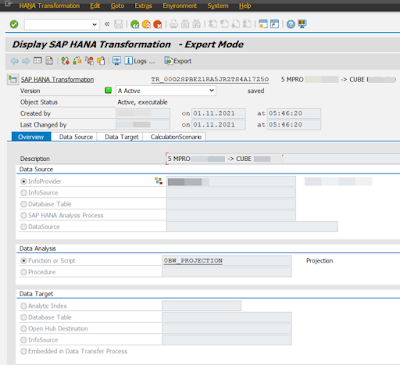
How does the processing of the TRFN in HANA DB it work technically? All business logic that is in TRFN is included in so called "CalculationScenario (CalcScenario)". Meta data of the CalculationScenario are stored in SAP HANA transformation. This object is identified by technical name TR_<ID_for_TRFN> (e.g. TR_00O2SPBEZ1RA5JRZTS4A17Z5O). The TR_* object is also sometimes called as "Analysis Process" or HAP – SAP HANA Analysis Process. It can be seen in t-code RSDHATR. The CalcScenario is embedded into a ColumnView. For data selection from the transformation source when DTP runs it creates SQL SELECT statement based on the ColumnView. Furthermore, during biz logic processing the CalcScenario applies all transformation rules on selected data. While the data is shifted from source to target it is done in single processing step by implementing as an INSERT AS SELECT statement that reads from the ColumnView and inserts into the target database object. While you would observe the HAP in the t-code RSDHATR notice that it is purely a runtime object. That means it can’t be created/modified in the t-code it-self. The CalcScenario can be seen in the t-code as well while switching Expert Mode on/Off in menu Extras. There are an XML representation and Script Definition tabs available.

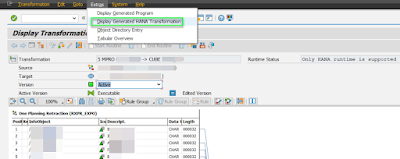
It is also possible to jump from TRFN definition means t-code RSTRANGUI to HAP. While in the RSTRANGUI select menu Extras -> Display Generated HANA Transformation. This jumps to t-code RSDHATR.


More information:

HANA based BW Transformation

Differences Between ABAP and SAP HANARuntime

First Guidance... Using SAP HANA SQLScript in SAP BW Transformations

2057542 - Recommendation: Usage of HANA-based Transformations