Showing posts with label tools. Show all posts

Tuesday, October 31, 2023

BW/4HANA obsolete tools

In SAP BW4/HANA many tools that were present in earlier releases of BW became obsolete. This is has few reasons. Mostly it is because the BW/4 uses less objects comparing to classic BW. The BW/4 is simplified in many ways – see details about it here.

Below I tried to compile a list of the obsolete tools in BW4/HANA. This blog post complements my earlier post about t-codes that are obsolete in BW/4.


1. DB table consistency tool

Program RSDU_TABLE_CONSISTENCY is deprecated with SAP BW/4HANA, source code removed. See more information about the tool here.


2. aDSO tool for Activating/Repairing DataStore Objects

These are the ABAP programs that check and regenerates aDSO objects in the case of technical incompleteness or inconsistency of metadata without creating a transport.

RSDG_ODSO_ACTIVATE - obsolete

RSDG_ADSO_ACTIVATE this to be used in BW/4

RSDG_ADSO_ACTIVATE only works in dialog only RSDG_ADSO_ACTIVATE_ALL works in background too.


3. InfoSet tool

Program RSQ_ISET_MASS_OPERATIONS doesn't exists in BW4


4. Tool to activate inactive communication structures

Program RS_COMSTRU_ACTIVATE_ALL does not exists in BW4


5. Tool to activate transfer structures for a source system

Program RS_TRANSTRU_ACTIVATE_ALL does not exists in BW4


6. Tool to activate inactive update rules

Program RSAU_UPDR_REACTIVATE_ALL does not exists in BW4


7. Print a list of InfoProviders available in system with their layout

Program SAP_INFOCUBE_DESIGNS – obsolete as FM RSD_CUBE_MULTI_GET_ONLY_DB reads from RSDCUBE table that is empty in BW/4


8. Undo of DSO conversion to SAP HANA-Optimized DataStore Object

Program RSDRI_RECONVERT_DATASTORE - obsolete on BW4 (ASSERT 1 = 0.)


9. Program for Mass activation of Non-Badi SPOs

Program RSDG_LPOA_ACTIVATE - obsolete on BW4 (ASSERT 1 = 0.)


10. Optimize Conversion of Standard Objects to SAP HANA

T-code RSMIGRHANADB or program RSDRI_CONVERT_CUBE_TO_INMEMORY - obsolete on BW4 (ASSERT 1 = 0.)


11. SAP HANA Partitioning of DataStore Objects

Program RSDU_WODSO_REPART_HDB - obsolete on BW4 (ASSERT 1 = 0.)


More information:

Action canceled. Not supported in BW4HANA edition.

Converting BW system to BW/4HANA

BW on HANA - tables consistency check program

SAP BW/4HANA (B4H) – what is it?

SAP BW/4HANA (B4H) versions

SAP BW4/HANA related t-codes


Saturday, March 5, 2022

ABAP programs to copy BW objects

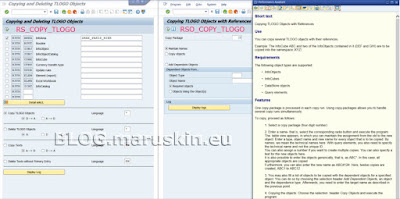
Similarly, to BW objects deletion program there are few more tools for different operations on the BW’s object. For a copy operation there are following ABAP programs available:

RS_COPY_TLOGO                  Copying and Deleting TLOGO Objects

RSO_COPY_TLOGO                Copying TLOGO Objects with References


RS_COPY_TLOGO – serves for purposing of copying a different types of BW objects between its Business Content Delivered (D) version to/from its Active (A) and modified (M) versions. For an overview of supported objects, see the program’s selection screen. It ca also delete the A, D or M versions of the selected objects. In addition, it can copy and delete texts associated with the objects. The operations executed by the report are is technically performed by a call of function module RSTLOGO_DELETE_TLOGO_MULTI_OBJ. The program it self is with the BW for a long time since the year 2003.

RSO_COPY_TLOGO – purpose is to copy BW (TLOGO) objects with its references. So called copy package is prepared that is executing the copy task. Within the package details like the objects names and objects types needs to be specified. The copy operation within the report is technically handled via ABAP class CL_RSO_COPY.

As always, use extreme cautions while working with those programs. Always test the scenario what do you need to achieve in sand box type of the WB system before you process for real.


More information:

RS_DELETE_TLOGO program to delete BW objects

What is TLOGO in SAP BW terms?

Wednesday, March 2, 2022

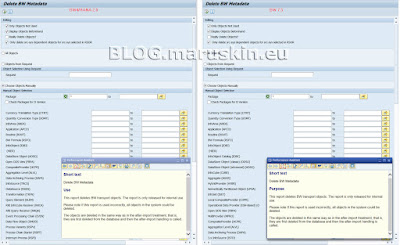
RS_DELETE_TLOGO program to delete BW objects

Normally BW developers use dedicated IDE to work with the BW’s objects. Whether in an old BW’s world it is SAP GUI’s t-code like RSA1 or in case of reporting BEx tools like Query Designer to delete the BE objects that re not needed anymore. Or in a new BW’s world, it is an SAP HANA Studio where the BW objects can be deleted. In case of the BW object there is a TLOGO term used that refers to transportable BW object type.

There may a situations popping up from time to time that may result in automating the deletion of not needed BW’s objects. To do that SAP is providing an ABAP program called RS_DELETE_TLOGO. Needless to say that as with any deletion it needs to be used with a great amount of a caution! What the program does is to delete BW objects not needed anymore. As an examples a scenarios of mass deletion can be covered with the program. Another example can be that as currently many customers are moving their BW’s deployment to BW4/HANA there is a necessity to delete old objects as well.


The program deletes an active (A) version of particular BW objects. If the objects that needs to be deleted was activated from the Business Content and a delivered (D) versions should be deleted then there is another program to be used: RS_DELETE_D_VERSION_FOR_TLOGO.

One thing to remember while working with those deletion programs is that sequence of objects deletion is important. It is important in order to be kept away from situations when it is not possible to delete some object due to its dependency. One of the way that can help to explore the object’s dependency is Transport Connection. Other way can be a various Where-Used functions for particular BW object.

Examples of some object’s dependency can be:

Process Chains cannot be deleted if objects used in them (DTPs, InfoPackages) are not deleted. Sequence would be, delete DTPs, InfoPackages prior the PC deletion.

Correction (Thanks to comment from a reader of the blog):

Particular objects like DTPs, InfoPackages included in the Process Chain cannot be deleted if the objects are used in them PC. Sequence would be delete the chain prior the DTPs, InfoPackages etc. deletion.

InfoSource or transfer structure must not be deleted before corresponding data sources are deleted. Otherwise it won’t be possible to delete the InfoSource/transfer structures.


More information:

2390883 - Clean up system to migrate to B4HANA

1112972 - RS_DELETE_TLOGO using BI InfoSets

2478346 - BW4SL - Other Front-end Objects


Friday, December 17, 2021

t-code RSDS_PROPOSE - Find InfoObjects for DataSource

While BW developer is creating a new DataSource soon there a question what are an InfoObjects that are supposed to be used to map the DataSource’s fields. In most cases, there are the InfoObjects present in BW system and no new InfoObjects need to be created. However, how to find those IOs in relatively reasonable time manner?  

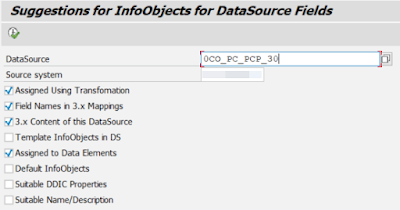
Since BW version 7.3 (for comprehensive list of 7.3 t-codes see here) there is a t-code called RSDS_PROPOSE – which does what is says = Finds InfoObjects for DataSource. What needs to be entered on its selection screen is a particular DS name and corresponding source system. Furthermore, there is a bunch of checkboxes available that represents criteria for proposed IOs. The proposal can be based on e.g. existing IOs assignments in TRFNs, field names in 3.x datasource mappings, 3.x Content datasource, template IOs as specified in DataSource, assigned IOs to DDIC data elements, suitable name and/or description, etc.

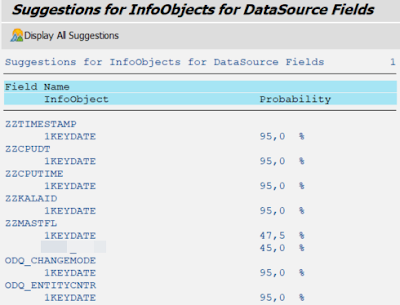
The logic behind the t-code is analyzing existing IOs based on selection screen’s parameters. Proposed IOs are presented with % probability of match. There are top three choices. Also all possible matches can be reviewed too – by hitting button “Display All Suggestions”.


Technically the t-code runs ABAP program RSD_MAPPING_FOR_DS_FIND and it is delivered in development package RSD_MAPPING (Mapping Service for InfoObjects).

The t-code discussed is a great help to BW developers as it saves a time while trying to search for existing IO to be leveraged in new BW flows being created.


More information:

New transaction codes in BW 73

BW 7.3


Thursday, February 20, 2020

Conversion of basic cube into transactional (real time) one

 Once you create a basic cube in t-code RSA1 there is nothing within that t-code that would enable BW developer to change the cube to transactional (real time) one. However, there is an ABAP report, which supports such a conversion. It is called SAP_CONVERT_NORMAL_TRANS Conversion: Normal <--> Transactional InfoCube. The report also support backward conversion from transactional to basic (normal).


Here is brief overview of the report UI and its output:


Monday, February 17, 2020

Suppressing messages generated by BEx Queries

Update on 04JUL2022:

In case of BW4 systems there is no button called Messages available in a toolbar of the RSRT or in RSRT1 t-codes. However, same functionality is still available over the menu Environment -> Messages.

Original post:

BW (formerly BEx) queries are normally raising many messages either information, warning or errors. Sometimes some of them may confuse end users. Therefore, it might be useful to get them suppressed. There is a nice way how to do it via t-code
RSRT. The RSRT serves as the query monitor. The BW queries can be tested, checked, and managed. Many technical things can be setup for the queries like regeneration of the queries, checks or change the query properties, displaying technical information, monitor the query cache etc.
One of the RSRT features is to suppress messages of the BEx queries. There is a button called Messages available in the RSRT. Thru a screen available on that button one can determine which messages for the chosen query are not to be shown to the user in the front end.

On the left-hand part of screen area, there are listed message categories via them one can navigate between the messages. The catalogers includes the messages related to: Generation, Hierarchy, Variables, Key Figures, Calculate As, Other, Planning, Data Integrity etc. Further, on right hand side of the screen area there are particular messages listed. Each of them can by suppressed by ticking off corresponding check box. Moreover, on bottom part of the screen area a long text of the particular message that is highlighted is displayed.

If you need more sophisticated solution to suppress the messages, you may consider implementing exit/enhancement into the FM RRMS_MESSAGE_HANDLING that is handling all the messages for the BEx queries. Using this approach an customer specific logic related to the messages processing can be implemented or customer messages can be added.

In addition, in some specific cases you may need to call FM like RRMS_MESSAGE_OFF_RESET which enables the message display by resetting the suppression of the messages. This might be needed in case the messages are not popping up. There is also FM RRMS_MESSAGE_OFF available which suppressing the messages completely.


More information:

2007609 - Display Message in Variable Customer Exit doesn't Work for a BW Query


Friday, August 4, 2017

T-code ST14 – all you ever wanted to know about your BW system

Today I ran into t-code ST14 which was very much of surprise to me. Actually the t-code provides all information about the BW system someone would ever be interested to know. Mostly all the information are from area of Data Volume Management (DVM) but they are very interesting I must emphasize. Normally one would need to dig into the system and use many reports, functions etc to collect all the information that the t-code provides. The t-code is called as Application Analysis tool.

The code itself is not only dedicated to BW systems. At introduction popup while t-code is started one can decide whether it shall be information about Basis, Security, CRM (if you run it on top of CRM system) and BW systems shown. In next I just focus on the BW option.
There are 4 main areas of the provided information:

·         Basis Information / Dataflow – info about many TOP 30 items like: Top 30 PSA analysis, ODS/DSO Objects (Active Data view), E or F -Fact or Dimension Tables, Aggregates, Master Data Tables, Other BW Tables, Other Tables, ODS/DSO Objects (Change Log view), ODS/DSO Objects (Total Size View), Cubes, Objects, InfoProviders with BWA index, HybridProviders (as of BW 7.30), Semantically Partitioned Objects (as of BW 7.3).

·         BW Evaluation / Customizing – info like follows: Total Size BW Objects, BW namespaces used in the system, Top 30 Cubes: result of SAP_INFOCUBE_DESIGNS, Top 30 Cubes: InfoCube Compression Rates, PSA: Age of Requests, PSA that contain REQU older than 4 months, Partitioning of E-fact tables, BW Archiving Objects, Upload from source systems (last 5 weeks), Overview InfoProviders, InfoProviders not loaded during last 4 months, InfoProviders with suspicious keywords in text, InfoProviders w/o suitable time characteristics

·         ABW Technical Processing Information – info about the tool itself, A – means application (analysis) for BW

·         HANA Tables – only in case the BW system is on HANA, info like Top 30 Tables within ROWSTORE

Additional areas of information:
·         Extended Checks
·         BW Planning
·         Standard Tables
·         BPC Analysis
·         HANA Feasibility Check
·         BPC Monitoring Statistics

In case you are curios how the data into the tool is gathered. Here’s an explanation. A background job can be scheduled within the code to collect all the information. The job has name e.g. BW APPLICATION ANALYSIS 0x (x in case it run in parallel). Depending on the BW system size runtime of the job may differ. Once you have a data all different types of analysis are possible as described above.

It is a great tool which saves a lot of time as all useful information can be found at one place.
Needless to say that t-code is part of “Service tools for Applications ST-A/PI” (see my other blog here). Also the functions behind the t-code can be leveraged by Solution Manager while the data from the t-code can be downloaded to the Sol Man and further reported and analyzed there.

More information:

Thursday, February 11, 2016

ABAP Tools Menu

I recently found one interesting transaction. It has very curious name thought. It is called AMEN - ABAP Tools Menu. It may be useful for ABAP programmers as it servers as central point to run few not very known ABAP tools. User interface of the code looks really prehistoric (created on 27.08.2002) however it is still intuitive. Whichever tool one would want to run it just needs to double click on respective line.

Following tools are available in the t-code AMEN:

General tools:
SYNT            Syntax Trace Analysis on Program Check
SAMT            ABAP Program Set Processing
SCI               SAP Code Inspector
SCOV            Coverage Analyzer

Verification tools:
UCCHECK       Unicode Check with Long Text
SLIN             ABAP Program Extended Syntax Check
SM31            Maintenance view for table T100 Message Maintenance
SE30             Runtime Analysis (replaced by tcode SAT)
RSHOWTIM    Runtime of ABAP Objects Statements
SE33             Context Builder

RABAX Texts:
RSNAPDOK    Maintenance view for table SNAPT – ABAP Runtime Errors
SM31            Maintain Syntax Error Messages

BSP Display Tools:
BSP_SHOW_SOURCE Display Page Source Display (Internal/External)

Syntax Diagrams:

RSXBNFDP     Display Syntax Diagrams for Keyword

Tuesday, January 19, 2016

How to manually implement SAP Notes

A little while ago I wrote blog post about useful report that can be leveraged while implementing several SAP Notes. With help of the report it is possible to load multiple SAP Notes corrections into the system where the t-code SNOTE can pick them up from.

I had few inquiries from readers of my previous blog. They were interesting on topic how to actually download SAP Notes corrections from SAP Service Marketplace (SMP) before they can use the report mentioned. I’m going to elaborate it in more details in this blog post. Usually it all starts at SMP.

Once the SAP Note that has a correction that needs to be implemented is found it needs to be downloaded. Usually the Notes with correction have a Download button on the Note’s screen at the SMP – in Notes application: service.sap.com/notes.


Once someone clicks on the button a new pop-up windows is opened. It informs about adding the object into basket of SAP Download Manager application.


Normally the object can be downloaded via the Download Manager. However in case there are just few objects that are being download the download can be simply done over HTTP protocol. So someone has just click on “Download Basket” button and content of the basket is displayed. From here just a simple click is needed on the particular object and browser displays dialog to save the file locally on user’s machine.


Once all objects from SAP Notes are downloaded to local machine like one above then they need to be uncompressed (usually they are in form of ZIP files). Now the report mentioned in my previous post takes place. Simple run the ZSCWN_NOTES_UPLOAD report in e.g. t-code SE38. On its selection screen enter path where the files with the Notes corrections were stored. After report ran there is a message “Files loaded” appearing in status bar of SAP GUI.


Finally t-code SNOTE is used to implement the corrections of the SAP Notes.
 

Tuesday, December 15, 2015

Little help while implementing SAP Notes

Implementing SAP Notes is not an easy task. Although it is automated we can’t still talk about full automation of the task. There are still many tasks which need to be manually performed by someone who does the implementation. For some part I think there is no possibility to fully automate them.  However there are areas while SAP Notes processing which can be nicely automated.

Recently I read and blog post which address one of most painful parts. It is downloading the SAP Notes itself. We all know it. A bug in spotted in the system and SAP Note is found to fix it. Then someone (usually SAP Basis or ABAP programmer) is asked to do so. In case the Note is just one correction without any manual activities it is piece of cake. The Note is just simply downloaded in SNOTE (Note Assistant) tcode. Then it is implemented. Once it is tested it just needs to be confirmed in the SNOTE that implementation is okay.

However many times we are facing the SAP Notes that are having either many corrections, or they have may other SAP Notes as prerequisites or are having many manual steps. To address download of prerequisites Notes there is a tool that enables to upload multiple notes into SNOTE at one shot. You can easily download the Notes from SAP marketplace via Download Manager into local machine. Then via using this tool you can upload all the Notes form the workstation to SNOTE.

The tool is delivered via ABAP program ZSCWN_NOTES_UPLOAD - Load multiple notes files into SNOTE. More details about the tool see in blog: Report-zscwnnotesupload--load-multiple-notes-files-into-snote.


I found this tool very useful. I applaud Frank Buchholz who seems to be an author. Good job!

Wednesday, September 3, 2014

Run time comparison of Process Chains

There is an easy way of how to compare PC’s runtimes. The comparing function is available in TA ST13. I already blogged about the TA here. Basically it contains a set of useful tools for not only for BW. One of the tool - BW-TOOLS enables BW administrator to easily compare runtimes of PCs. It is possible to filter dates on which the PC ran and based on this analyze it.


Other posts on ST13 topic:

Thursday, August 14, 2014

Report RSOS_CHECK_REPAIR Check and Repair of BW Search Settings

Basically what the report RSOS_CHECK_REPAIR does is check of TREX Searches for BW Repository Objects. Technically it is searching following tables and tries to find:

RSOSCHNOBJQUEUE - Queue for changed Objects (Search), records which do have no change done to search attributes

RSOTLOGOSEARATR - Searchable attributes for Object Types, records which do have attribute of a TLOG Object for Advanced Search equal to space


Subsequently entries that are found in those two above mentioned tables are looked up in table RSOBJS_OBJ_TYPES. That’s the table which holds object types of BW objects like infoproviders (infoobjects, multiproviders, cubes, DSOs, etc), BEx elements (queries, workbooks, web items, etc), infopackages/DTPs, etc. basically all the BW objects.

If there are some BW’s search objects that are not search-relevant but they have entries in those two tables means those should be removed. You can do this clean up by running same ABAP report with Repair flag enabled.

Sunday, June 10, 2012

Suite of helpful BW programs – BW Tools (ST13->BW-TOOLS)


I do not remember when was it for 1st time when I found this tool mentioned in SDN’s forums. I think it was related to process chains analyses. This tool covers analyses of process chains run time as well. 

Basically tool is indented to be used predominantly by SAP Active Global Support Team to support performance analysis in the areas of BW-IP (Integrated planning); BW reporting etc. Customers are free to use this tool too (according PPT attachment to note 1035990). Don’t be surprised if TA ST13 is not present in your system. The thing is that tool is coming with ST-A/PI component (Service Tools for Applications Plug-In). ST-A/PI component is so called Service Software Framework used to handle so called SAP EarlyWatch/GoingLive sessions. I was blogging about those sessions before here and here

Depending on version of ST-A/PI that you have deployed in your BW system selection screen of TA ST13 may look like:


From this screen kindly observe that those are BW tools available in ST13. More details about particular tools are here:

BIIPTOOLS - BI-IP Performance Toolset This tool has following components:

Planning Activities Overview – TOP x: planning sequence/functions/buffers executed.

BW Statistics Analysis – Provides a list of activities done in system related to BW-IP

FOX Analysis – Analyses FOX codes; recommendations to tune FOX coding

Characteristic Distribution - to analyze how data is distributed in cube’s fact tables

Technical Query Settings – Similar to TA RSRT, difference is that you can check multiple queries

BW Performance Benchmark – As planning functions cannot be distributed to several CPUs of your server this helps to decide either CPU should be upgraded

Prefill OLAP Cache for planning sequence – For OLAP cache pre-filling with required selections of characteristics, done by report ZBPPOIP


BPSTOOLS - BW-BPS Performance Toolset Similar set of reports just for BPS based planning


BW-TOOLS - BW Tools This was very first part of ST13 that I discovered a long time ago. It has advanced Process Chain monitoring (several chains in one view with its status, run time, end date/time, drill down to RSPC1,...)


BWATOOLS - BWA Support Tools This is sol called BWA Support Toolkit where you can analyze various standpoint related to your BWA status. See (note 1517326, introducing blog)


BWQUAC_CUST - BW Query Alert Collector Customizing, used for in the Solution Manager Business Process Monitoring.


BW_QUERY_ACCESSES - BW: aggregate/InfoCube accesses of queries Not sure what is purpose of this. I was not able to find any data in this tool.


BW_QUERY_USAGE - BW: query usage statistics Not sure what is purpose of this. I was not able to find any data in this tool.


Update 02/05/2016 for particular tool: the data is read from BI Statistics 3.x table RSDDSTAT which is obsolete in NW 7.x based BW systems. Therefore this tool is not providing any data. 


Update on 10/05/2015:

In case tool names are not visible in the popup selection of tcode ST13 you may follow up as described in following post: Uncommenting reports /SSA/* - Service tools for Applications ST-A/PI

Update on 07/12/2016:

ABAP program which is behind t-code ST13 -> BW Tools is /SSA/BWT

Used sources: