Showing posts with label RSADMIN. Show all posts

Sunday, March 20, 2022

BW4 - Parameters of RSADMIN table

Many BW’s functional parts can be influenced by parameters. BW has few tables that store those parameters. Most prominent among them is RSADMIN one. With the introduction of BW/4HANA a suite of new parameters were introduced in the RSADMIN table.


Some of the RSADMIN parameters valid for BW/4HANA are having a BW4 prefix. However, that can’t be an guiding rule to distinguish between parameters valid for BW4 and prior BW’s versions. Thus there is a wide range mix of the parameters introduced in older BW versions that are still valid for BW/4HANA based systems.

Below I just mention few most important params that I came across.


ADSO_NE__XYZ (2950922) if values is set to X a zero elimination during aDSO request activation is activated. XYZ stands for particular aDSO technical name. This is same as param ADSO_NULL_ELIM__XYZ (2931468) that is valid for BW 7.5 systems.


ADSO_MDC_MODE_FOR_BEXFL_NEVER (3024244) parameter to decide what master data check mode is to be used by default for an InfoObjects in aDSO if the source object is a classic DSO.


Overview of BW/4HANA’s RSADMIN table parameter can be found in SAP Note: 2769125 - Composite Note: RSADMIN Parameter for SAP BW/4HANA


Related posts:

Parameters of RSADMINC table

Parameters of RSADMINA table

How to work with RSADMINA, RSADMINC and RSADMINS tables

How to work with RSADMIN table

Finally there is a list of RSADMIN table parameters (classic BW)

Tuesday, March 15, 2022

Do not want to run RSPC t-code as part or RSA1?

This is a quick hint is valid for Classic BW systems (not BW4/HANA based systems). As of BW version 7.4 RSPC t-code that serves for maintaining Process Chains start as a part of RSA1 t-code (Administrator Workbench - AWB). If one does not wish the RSPC to be a part of the RSA1 this default behavior can be disabled and the RSPC can run in standalone mode.

There is a RSADMIN table parameter that influences a starting behavior of the RSPC t-code. The param comes in two flavors:


Param                            Value           Meaning

RSPC_NO_AWB                X                  Valid for all user in the BW system.

RSPC_NO_AWB_user        X                 Valid for particular user in the BW system.


If the param is set in this way then the RSPC t-code won’t be embedded the RSA1 t-code anymore. The param is available starting in BW 7.4 systems SP 20 or by implementing SAP Note 2618764.


More information:

2618764 - P20; RSPC: Transaction RSPC starts as part of Admin Workbench

How to work with RSADMIN table

Monday, May 31, 2021

Table RSADMIN parameter analysis

Over the years t-code ST13 -> BW tools has been developed a lot. It was introduced since BW 3.5 SP19 and as SAP BW was enhanced in my features a new features were adding into it.

Here’s how the t-code looks like in the recent versions.

BW 74 or 75:


BW4 2.0:


In this blog post, I would like to explore a ST13 BW tools’ feature called “RSADMIN Parameter Analysis”. The feature is coded in routine called RSADMIN_ANALYSIS within ABAP program /SSA/BWT. There is almost 6k of ABAP code lines that are populating many parameters/values of table RSADMIN. The routine output structure corresponds into the ALV grid that is displayed in the t-code after the analysis:


OBJECT              RSADMIN parameter name itself. E.g. /SAPAPO/DEBUG_FLAG

DEFAULT_VALUE  parameter value, e.g. L or R = Read; S or W = write;

NOTE1               Related SAP Note No, e.g.  302937

NOTE2                as above, if there are more SAP Notes related to the same param

TEXT1                Text related to param, e.g. Debugging APO/SEM/CRM/BPC read/write interface in BW 3.x,7.x

TEXT2                 as above                           

AREA                 BW App area of the param on SAP ONE support site, e.g. SAP BW-BEX-OT-DBIF

VERSION_LOW    Lowest BW version that the param is valid from, e.g. 30+

VERSION_HIGH   Highest BW version that the param is valid to, e.g. 700

CATEGORY          Analysis


The feature it-self enables to see if particular param is applicable for the system. Those which are not are displayed as disabled items in the output grid. It allows to quickly displaying relevant SAP Note that describes the particular param in more detail. There is an overview of the default values for the params, from/to BW version that param is valid for, category, etc.

Although the tools is not very dynamic (as all the RSADMIN table are hardcoded); it also doesn’t allow analysis of what current param values are present in the RSADMIN table it is a nice tool that provides a brief overview of the params.

More information:

Suite of helpful BW programs – BW Tools (ST13->BW-TOOLS)


Thursday, February 27, 2020

BW transports: Transformation consistency check

BW transports are one of pain points in BW area. Many issues may popup during move of BW objects between SAP systems. I blogged about many of them already. This time I focus on topic of transporting BW transformations.

One issue that may occur with regards of transporting the BW transformations is that method execution phase of the transport does not save and activate the transformation. Instead, only warning messages are shown in the transport log. This the BW developer expects that the transport went fine but it reality it is other way round.

Similarly, same situation can happen in other scenario. In case system dependent transformations of the source system is not mapped or incorrectly mapped in table RSLOGSYSMAP then again only warning is present in the transport log

To solve this there is a RSADMIN parameter available to influence how the BW system shall react. The name of the parameter is RSTRAN_CONSISTENCY_CHECK. Below are values of the parameter that set the system behavior either to raise an error or warning in the transport log.

X = Error shown in the log and it forces the system to cancel the processing of the affected transformations
‘’ = Warning


More information:
1377342 - Check for consistency of transformations in the transport

Saturday, December 15, 2012

Why process chain gets triggered after transport?

Having process chain’s start variant set to "Immediate start" may cause you troubles. Especially in case when you transport this PC to further system in your SAP BW landscape. By default system triggers such a PC and this causes its execution. Really such a PC is simply executed right after import of transport is finished in the target system.

There are few possibilities how to prevent this. Starting with really silly solution: That would be to transport PCs w/o starting variant. But who would do that? I want all my PCs be runnable and consistent across whole system landscape.

Other would be to schedule PC to some data/time which is really far in the future. Again; why I would bother myself with this if usually I had my PC tested to run in specific time.

Fortunately SAP considered this issue and is offering solution. To be precise since SP#19 for BW 7.0 there is a parameter in RSADMIN table. Parameter is called:

NO_TP_SCHEDULE_IMMEDIATE and to enable it must have a value X.

Parameter is available via SAP Note: 1233327 - Correction: Scheduling of immediate start for transport.

To learn how to setup parameters in RSADMIN table click here.

Monday, July 11, 2011

Customizing of BW frontend version

You can force your user to use BEx 3.x or either 7.x version of BW frontend.  This means that while users execute TA RRMX or RRMXP (for workbooks), it will open for them specific BEx Analyzer version.

Notice that possibilities described below are only valid for SAP BW frontend (so called BI Add-On) within the following range: 700X.X.XXXX.525. 

If you are running BW 7.x with Support Package 10 and above:

1. Central customizing: TA SPRO -> Display -> SAP Customizing Implementation Guide -> SAP NetWeaver -> Business Intelligence -> Settings for Reporting and Analysis -> General Settings for Reporting and Analysis -> Set BEx Analyzer Version -> Choose the version of BEx Analyzer you want. Notice that above mentioned customizing path can be accessible via TA RRMX_CUST.

2. Manual customizing 1: Setting done as described in central customizing section above can be overridden for specific users: by maintaining parameter ID RRMX_VERSION (Version of BEx Analyzer used by transaction RRMX) in user’s master data (System -> User profile -> Own data -> Parameters). Here’s values for parameter:
a.    : starts BEx Analyzer depending on object version (e.g. workbook)
b.    3.x: starts the 3.x version of the BEx Analyzer
c.    70: starts the SAP NetWeaver 7.0 version of the BEx Analyzer

3. Manual customizing 2: Modifying of settings on level of operating system. Within OS Windows here’s registry entry: KEY_CURRENT_USER\Software\SAP\BEx\Analyzer. Notice that registry modification is not very advisable.

3. Manual customizing 3:  Modifying parameter QD_EXCLUSIVE_USER of table RS_FRONTEND_INIT. Here you can specify list of user for whom SAP NetWeaver 7.0 version of the BEx Analyzer shall be allowed. This parameter has a limitation of 30 characters. If you need to specify longer list of users proceed with workaround as described in SAP Note 962530 - NW04s: How to restrict access to Query Designer 2004s (FM RS_SYSTEM_INFORMATION modification). Wildcard (*) can be used and several user must be separated by comma.

If you are running BW 7.x below Support Package 10:

1. Central customizing: maintain parameter RRMX_VERSION_CUST in table RSADMIN.

Monday, July 4, 2011

How to work with RSADMIN table

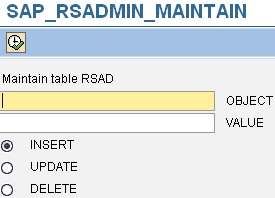
RSADMIN table is important table from BW system customizing point of view. It does contain a lot of crucial parameters which are influencing BW system. For list of all parameters of consult to note 912367 - Composite Note: RSADMIN Parameter.

In case you need to either insert/update/delete any parameter of RSADMIN table you can use following ABAP report: SAP_RSADMIN_MAINTAIN


If you need to read parameter’s values on the fly e.g. from your routines in transformation you can use following function module: RSA2_RSADMIN_GET. 

There are couple of methods in ABAP classes which do the same however most of them are private one (e.g. CL_RSDRI_INFOPROV->_RSADMIN_PARAM_READ). Anyway nothing stops you to write short ABAP code snippet which would look like:

  SELECT SINGLE value INTO lv_par_value
    
FROM  rsadmin
    
WHERE object = lv_param.


- 08/03/2013 update – 

Best practice is to maintain parameters in the table separately in every BW system in your landscape. Simply speaking you should not have a necessity to transport entries of the table. However if for some reason you want to do it, it is possible:

Use TA SE10 -> Create new transport. Edit new transport manually with following entries:

Prog ID:        R3TR
Object Type: TABU 
Object Name: RSADMIN
Object Key:   names_of_parameters_that_you_want_to_transport

- 06/12/2022 update –

There is a dedicated ABAP class CL_RS_SWITCH and method GET_VALUE that can be used for reading an RSADMIN table entries. This class is used in reading the entries in most case s of BW4/HANA systems. Here’s an example how to use it:

  DATA:
    l_switch 
TYPE rsadmin-object VALUE 'BW_USER',
    l_value  
TYPE rsadmin-value.
  
  cl_rs_switch
=>get_value_with_initial_check(
    
EXPORTING
      i_switch 
= l_switch
    
IMPORTING
      e_value  
= l_value ).

OR

IF NOT cl_rs_switch=>get_value( 'RSPC_DYNAMIC_PREDICTION' ) = abap_true.

    RAISE not_possible.

ENDIF.

Thursday, September 30, 2010

Finally there is a list of RSADMIN table parameters

Have you ever wondered why there is no some collective SAP Note describing all the parameters available in system for RSADMIN table? For me it would be logical to have such a note. In some of SDN forum’s it is mentioned that was such a note but over the years it became internal and therefore not accessible for SAP’s customers and event no for partners. If you imagine that according google there are 364 pages on the internet referencing to this note it would be very appreciated by SAP community that this note would be is available again. Might be that after lobbing of BW folks in SDN forums people at SAP decided to release it back to customers. That happen precisely on 20th of August 2010 when version 25th of this note suddenly appeared on OSS. 

Ladies and gents here it comes:

912367 - Composite Note: RSADMIN Parameter

P.S.: Many thank to Colum Cronin to announce that at this SDN forum thread.


- Update 20/02/2016 -

Adding one more SAP Note related to parameters of RSADMIN table this time there are parameters related to BEx like Business Explorer Tools BEx Precalculation Server


1878949 - Collective Note: RSADMIN parameters

- Update 20/MAR/2022 –

For BW4/HANA based systems see SAP Note 2769125 (Composite Note: RSADMIN Parameter for SAP BW/4HANA) to get an overview on valid RSADMIN params.


Related posts:

Parameters of RSADMINC table

Parameters of RSADMINA table

How to work with RSADMINA, RSADMINC and RSADMINS tables

How to work with RSADMIN table

BW4 - Parameters of RSADMIN table