Showing posts with label performance. Show all posts

Tuesday, October 31, 2023

BW objects - Differences between DDIC and DB

BW system generates a lot of temporary database objects while it is running e.g. during query execution, or other processes that read data from BW infoproviders. These objects can be database views or tables. Mostly they are placed in '/BI0/0' namespace.

I wrote some information about the BW temporary objects here. In that blog post I mentioned that program SAP_DROP_TMPTABLES can be used to remove these type temporary objects. However if some of those temporary objects are reported as inconsistent via t-code DB02 there is another program that should be executed. It is program SAP_UPDATE_DBDIFF. The program makes a copy of an information about differences between definitions in ABAP DDIC and in database catalog to table DBDIFF. The DB02 t-code than includes the DBDIFF  table when checking for inconsistencies.


More information:

Deletion of temporary database BW objects

Monday, March 7, 2022

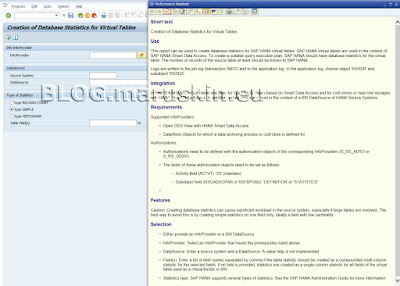
SDA - Database Statistics for Virtual Tables

In order to speed up data processing for objects leveraging HANA Smart Data Access (SDA) there need to be a database statistics build. It is a concept known in many databases. Once the table is indexed, no of records is known, meta data is described etc. the processing of that table is much faster.  It is valid for tables consumed in SAP HANA or SAP BW based on SDA. As the SDA doesn’t store the data in HANA DB persistently it uses virtual tables instead also those can be indexed in order to run the SQL statements in efficient manner – so called efficient query plan.  

In SAP BW there is an ABAP program called RSSDA_CREATE_TABLE_STAT to be used to create database statistics for HANA Virtual Tables. BW’s objects like InfoProviders (aDSO and Open ODS Views) and DataSources are supported by the report. There are three types if the DB statistics that can be generated by the program:


1. Record Count – very basic one, providing only no of records

2. Simple - basic statistics like min, max, null count, count, and distinct count

3. Histogram – most detailed type, it estimates a data distribution in a single-column data source


To incorporate the DB statistics creation for SDA based data sources in BW use ABAP process type in process chains. Higher versions of BW 7.5 even have a new process type (SSDA_CREATE_TABLE_STAT under category 'Other') available for including the creation of statistics in BW Process Chains.


More information:

1990181 - BW HANA SDA: Create Database Statistics for Virtual Tables of Open ODS Views and Near-Line Storage (NLS) Archives

SAP HANA SQL and System Views Reference

Friday, February 7, 2020

BW jobs/work processes hanging within program SAPLSENA

BW system may face a strange situation where there are many jobs or work processes hanging and obviously doing nothing. They are called zombie processes and then hanging with ABAP programs like SAPLSENA, SAPLRSSM, SAPLRSSM_LOAD, SAPLRS_G or SAPLRS_GENERAL etc. During situations like this the BW systems gets slower, loads are not being finished etc. In addition, an unusual number of locks may be observed in t-codes like SM12. Issue is that the system entered into dead lock. One may try to kill those work processes manually in t-codes like SM66, SM50 or killing jobs in SM37. However, it will not help as they start to pile up again quite soon.

Generally speaking; a reason why the system entered into such a state is that massive run of parallel delta loads caused a long wait time of locks. This can be also observer in table RSREQDONE field LOCKWAIT and in tables RSREQDONE or RSICCONT. Other symptom can be that infoproviders involved within the data loads are carrying heavy numbers of requests. Consequently, an enqueue management of the load request administration is not up to date.

To prevent such a situation the key is to have the enqueue management of the BW system always up to date. There are many points to be considered in order to achieve this. They mostly vary on BW version. But generally speaking parallel delta loads need to be kept on reasonable level same as the number of requests in the administration of the infoproviders are to be kept reasonable.
For details per particular BW version see SAP Note 1827854.


More information:
1827854 - Enqueue/Lock during parallel data loads
653996 - Analysis of lock situations

Wednesday, August 23, 2017

Sequence of loading data in SAP BW

While loading data into SAP BW systems one aspect of it comes to the picture. It is the one related to sequence of data loading. Normally in general the data loading sequence shall be like following. Master data loads come first followed by transactional data loads.

Loading sequence within the master data (MD) shall be as follows. First to load MD attributes then texts and finally hierarchies. But the attributes and texts can be loaded in parallel. Due to more complex operation while loading of the hierarchies are going on I suggest to put the hierarchy loads as last step of MD loads.

Now on topic of loading MD before transaction data (TD). All MD shall be loaded before TD is loaded. If it is not the case the TD loads triggers insertion of MD rather empty master data entry. What is meant by insertion here is that SID needs to be generated for the characteristic attributes, and new records have to be inserted in the MD tables. 

This can cause performance issues as the load can take twice as much due to inserting the MD during load of TD. Also if there are parallel loads in place there may locks appear in SID table update. Another issue that can happen is while there are master data lookup in the transformation of the TD. If the MD is not present then there is nothing to be looked up and as a result there is a data quality issue.

More information:
652856 - Loading hierarchies with process chains

1597364 - FAQ: BW-BCT: Extraction performance in source system

Friday, December 30, 2016

Scalability – scale out/in vs up/down

One of important aspects of computer system is scalability. It is a capability of the system to handle expanding amount of tasks that need to be completed by the system. Prerequisite is that the system must function in same way after scaling as it was before the scaling. The system in this terms can be computer, network etc. Scalability is sometimes referred as extensibility.

There are two basic approaches to scaling of the computer systems. It is horizontal and vertical scaling.

In first case – horizontal scaling it means to add or remove a computing unit (node) to/from the system. This is so called quantitative change. As example a new computer can be added into distributed system. The horizontal scaling is also called as scale out/in.

The latter case – vertical scaling it means to change a property of the existing system by adding or removing resources to/from the computing unit (the node) of the system. This is so called qualitative change. As example it can be about adding more CPUs or memory to existing node. The vertical scaling is also called as scale up/down.

Difference between the two can be noted on following example. There can be a system of having an 8TB of memory in total in one node – a scale up approach. While as scale out example there can be 8 nodes having 1TB of memory each.


In terms of scaling of SAP HANA both approaches can be used as the HANA is designed for scale up and as well for scale out since the beginning.

Thursday, November 3, 2016

Further checking of broken BEx queries 3 – performance

With regards to BEx query performance it is beneficial to know where is a bottleneck during the query execution. This is especially useful while investigating cases where one user is complaining about the query whereas for other it runs okay.

Wihtin t-code RSRT there is a quick way how to display statistics information about date of query runtime. You can switch this on after hitting “Execute + Debug” button.


RSRT -> enter query -> Hit "Execute + Debug" button -> new popup -> check "Display Statistics Data" -> 


After the query output there is a screen called "Statistics Data for Query Performance" displayed with 2-3* tabs (see below) having information on how much time the query execution took at different processing levels. More information about how to read the screen can be found here.

- Front-end/Calculation Layer
- Aggregation Layer
- Aggregation Layer Cluster Info
* - no of tabs may vary depending on BW system release


Wednesday, December 30, 2015

Hangman.vbs

Hangman is one of SAP tools to analyze a hang situations on an SAP system. In order to be able to analyze this several types of information needs to be collected. The "Hangman" tool helps with that. It stores following information into a log file:

- SAP work process list of all application servers
- SQL Server process list
- Windows process list of all application servers
- Windows process list of the database server
- SQL Server database locks
- SQL Server configuration and log files
- extract from the SAP dev_* traces of all application servers

Log file generated by the Hangman can help to understand root cause of the problems with SAP instance. The tool supports both stacks (ABAP & JAVA) of NetWeaver. However main database type of the Hangman is MS SQL Server.


More information:
948633 - Hangman.vbs

541256 - Hangman 4.1

Sunday, October 18, 2015

Performance: Function Module interface check

In case there is an integration scenario for which a function module (FM) is exposed to external applications an performance point of view is important to be considered. It may happen that the FM with complex interface occurs performance issues.
What is meant by complex interface? Basically if there are any complex or nested data types within IMPORT/EXPORT/CHANGING parameters of the FM.

Complex data types - are made up of other data types. A distinction is made here between structured types and table types.

Nested structures – are structures that in turn contain one or more other structures as components.


To identify the FM which may have performance problem you can use report RSRFCXC. The report should be used before exposing the FM. Output of the report is evaluation of every FM’s parameters whether it may have a problem and also how to correct it.


More information:
744664 - Checking RFC-compliant FMs for complex parameters

Sunday, April 6, 2014

Performance optimization: how to check if index is used?

While developing complex BW transformations where the data manipulation is involved using ABAP - performance is crucial.  The transformations must perform as fast much as possible. This is because in future there may be a lot of data and even it run smoothly now it may not be the case in future.

It is very common in BW to use look-ups of data (e.g. from DSO objects) while data transformation happens. Once we retrieve the data from DSO for sake of look-up tables we shall involve DSO’s table index within the SELECT statement. The index makes data retrieval much faster than w/o usage of index. In case of every transparent database table there is so called primary index in place. This index comprises of all key fields within the table.
To employ usage of the index by SELECT statement you need to ensure following. WHERE condition of the SELECT must contain as much fields from the index as possible. Or let’s say key fields of the table in case of primary index.


E.g. my DSO (C*) below (its active table is /BIC/AC*00) has following primary keys; 0MATERIAL, 0PLANT, 0ORDERITEM, 0BUS_EVENT, 0PRODORDER, 0FISCVARNT


Now let’s have a look into two SELECT statements. One which does utilize the primary index on top of C* DSO and other one which does’t?

    SELECT plant prodorder gr_qty planordqty
      
INTO TABLE lt_mat
      
FROM /bic/acxxxx00
      
FOR ALL ENTRIES IN result_package
      
WHERE prodorder = result_package-prodorder
        
AND plant     = result_package-plant.

    SELECT plant prodorder gr_qty planordqty
      
INTO TABLE lt_mat
      
FROM /bic/acxxxx00
      
FOR ALL ENTRIES IN result_package
      
WHERE material  = result_package-material
        
AND plant     = result_package-plant
        
AND prodorder = result_package-prodorder
        
AND fiscvarnt = result_package-fiscvarnt.


Can you guess which SELECT is it? It is the second one. Actually in the first one there is first field from index 0MATERIAL missing in the WHERE condition. Therefore database optimizer will not use the primary index for the search operation and a full table scan is performed. In case of second SELECT there are four out of six fields are used in WHERE therefore optimized will use primary index.


Finally we would like to know if index was really used during our BW load. What can be done is that before kicking out the load we start SQL trace. This is done in TA ST05. You can set trace with filter on e.g. your user name and table from where we retrieving the data. Then just run a load. After the load is finished deactivate the trace and go to Display Trace in TA ST05. Display the trace result and for operations like OPEN or FETCH click Explain button from the toolbar. You will get a screen similar to below screenshot. Picture on left side shows situation with my 2nd SELECT – index was used and on right side is my 1st SELECT – on index usage. We can clearly recognize by key words INDEX RANGE SCAN that index was used. Also notice what estimated costs (e.g. CPU) are for both SELECTS.


One more point regarding how system finds suitable indices for particular SQL SELECT. If WHERE condition is written in same sequence as key are specified then index is found faster. Therefore always try to align your WHERE condition as per sequence of index’s fields.

More information can be found:


Monday, April 23, 2012

Deletion of temporary database BW objects

It might happen that because of upgrade of BW system, maintenance activities, inconsistencies etc. you need to reorganize temporary BW objects. These kinds of objects are starting with following name convention: 

/BI0/0X*

Where X means different temporary object given by specifics circumstances which occurred when the object was created. E.g. /BI0/06* are tables used during BEx query processing. Refer to SAP Note 449891 for more object types.

If you face situation that you are running out temporary objects you can delete temporary object. You can use report SAP_DROP_TMPTABLES to reorganize them. Report deletes them pretty straight forward with checking either they are used at the runtime of report. Therefore it is advisable to run this report as a part of maintenance activities in defined time frame when no regular activities are happening in the BW system. Make sure no user is running queries, no data load is happening, no compression is in place etc.

Notice that report’s runtime is depended on how big your system is. In general if you going to run it for first time it might be that it will run for several hours.

Furthermore you can use function module RSDDTMPTAB_CLEANUP (while specifying input parameter I_NAMETYPE = 03) for the same as well.

See other SAP notes on topic of Temporary database objects in BW:
1139396 - Temporary database objects in BW 7.X
449891 - Temporary database objects in BW 3.x
659946 - FAQ: Temporary tablespaces

Tuesday, July 26, 2011

Parameters of table RSFRONTENDINIT


Within this post I want to introduce few interesting facts about this table. A first fact (and very obvious one) is that table is dedicated to frontend requirements of particular BW system. The minimum frontend requirements for any backend Support Pack are stored here. Below see description of parameters stored in the table. Most of them are not documented at all. The case might be that are supposed to be used only internally by SAP. We all know that sometimes even internal settings may help in specific situations. That was also my motivation to write this blog post. 

I used to analyze SAP BW standard code in order to explore parameters meaning. Might be that I’m not always right about their meaning. Therefore I would encourage you to share your experience with the parameters. On other hand there is at least one SAP note discussing some of parameters - 1510916 - Collective Note: RS_FRONTEND_INIT parameters. Notice that in the most cases listed below parameters set to X means it is switch ON – enabled.


1.    Values in this table are being customized by calling transaction RS_FRONTEND_INIT.

2.    Table validation from Solution Manager (SolMan) – content of this table can be validated from SolMan by Configuration Validation functionality. By this values are compared and validated between one reference system and several target systems.

3.    Meaning of parameters: VER_MIN_ANA*:

a.    VER_MIN_ANA:        minimum revision of BExAddin.dll, e.g. 140
b.    VER_MIN_ANA_3X:   minimum revision of sapbex.xla
c.    VER_MIN_ANA_7X:   minimum revision of BExAnalyzer.xla
d.    VER_MIN_ANA_SAPBEX0: minimum revision of RRMX launcher (sapbex0.xla)

4.    Meaning of parameter ANA_CTX_SENS_DBL_CLK: activation of context sensitive double click functionality within navigation over hierarchy nodes in BW report’s output. 1345468 - BExAnalyzer: context sensitive double click on hier. nodes

5.    ANA_FLAG_EXAMPLE – setting of BEx Query Analyzer? , e.g. Y
6.    ANA_SINGLEDPREFRESH – If you have a workbook with several queries and you aim to refresh single query set this to X. , e.g. X
7.    ANA_USE_INPUT_TABLE - setting of BEx Query Analyzer, e.g. X
8.    ANA_USE_SIDGRID - setting of BEx Query Analyzer, e.g. X
9.    ANA_USE_TABLE - setting of BEx Query Analyzer, Performance improvement for frontend/backend communication, 1179647 - Performance: Network load in BEx Analyzer, e.g. X
10. BUFFER_CONTAINS_DATA – Special usage of note 1094799 - Corrections in the BEx Analyzer server runtime, e.g. X
11. OS_FLAG_EXAMPLE - ? , e.g. Z
12. QD_EXCLUSIVE_USER - setting of BEx Query Designer, used to restrict access to Query Designer 7.x. By this you can protect your BW 3.x based queries from accidental and unwanted migration to 7.x version. 962530 - NW04s: How to restrict access to Query Designer 2004s
13. QD_FLAG_EXAMPLE - setting of BEx Query Designer, ? , e.g. X
14. SERVER_VERSION – version of SAP BW backend, format: XXXYY, XXX – BW version, YY – Support Pack level, e.g. 70019
15. TEXT_VERSION - allows to force text cache update on all frontends, e.g. 0002
16. VER_ACT_ANA - actual version of BEx Query Analyzer, e.g. 140
17. VER_ACT_OS - actual version of BEx Query Analyzer, e.g. 0
18. VER_ACT_QD - actual version of BEx Query Designer, e.g. 229
19. VER_ACT_RD - actual version of BEx Query Report Designer, e.g. 132
20. VER_ACT_SEL - actual version of BEx Query Analyzer, e.g. 0
21. VER_ACT_WAD - actual version of BEx Web Application Designer, e.g. 154
22. VER_MIN_OS - minimum version Operation System, e.g. 0
23. VER_MIN_QD – minimum version of BEx Query Designer, e.g. 229
24. VER_MIN_RD - minimum version of BEx Report Designer, e.g. 132
25. VER_MIN_SEL - ? , e.g. 0
26. VER_MIN_WAD - setting of BEx Web Application Designer, e.g. 143
27. WAD_OBJ_VERSION - setting of BEx Web Application Designer, e.g. 3