Showing posts with label DTP. Show all posts

Sunday, May 31, 2026

ABAP Program to report on DTPs - RSBK_DTP_PROPERTIES

ABAP program RSBK_DTP_PROPERTIES is a standard program in BW  used to analyze and retrieve various properties related to Data Transfer Processes (DTPs).


Here are some details about the DTP properties the program deals with:

1. Retrieving DTP Properties in Bulk:

   - The report fetches and displays various technical properties of one or more DTPs.

   - It allows administrators to interactively check DTP-specific settings across a system.

2. Supporting Operational and Debugging Tasks:

   - You can use this program to troubleshoot data transfer issues by verifying the settings of related DTPs.

   - It helps in scenarios where a specific DTP is not performing as expected, such as issues in extraction, transformation, or loading (ETL).

3. Custom Analysis and Automation:

   - Developers can use ABAP enhancements or custom versions of the report for bulk analysis, monitoring, or automation of property adjustments.

4. Useful in Migration or Upgrade Projects:

   - During upgrades, migration, or system consolidation, this report can help identify and document all DTP properties to ensure consistent configurations.


The DTP properties retrieved vary depending on the system setup and DTP configuration. However, here are some important properties included:

1. General DTP Attributes:

   - DTP Technical Name and Description

   - Source and Target InfoProviders

   - Extraction Mode (`FULL`, `DELTA`, etc.)

   - Activation and Deletion Flags

2. Execution Settings:

   - Data Extraction Mode (e.g., `Serialized`, `Parallel Processing`)

   - Maximum Parallel Processing Options (Number of Processes/Packages)

   - Error Handling Settings (e.g., `Terminate After n Errors`)

3. Filter and Transformation Details:

   - Active Filters and Filters Fields

   - Associated Transformations (e.g., Start Routine, End Routine)

   - Semantic Key Settings

4. Error Handling:

   - Settings related to error handling, such as error handling mode (`No Reporting for Errors`, `Request Green After Errors`, etc.).

   - Error Stack Activation and Management Parameters

5. Monitor and Logging Details:

   - Log Retention Settings

   - Update Mode (`Insert`, `Overwrite`, etc.)

6. Special Runtime Properties:

   - Runtime Modes

   - Data Package Sizes

   - Threshold Limits for Data Records


Program selection screen:


Program output:


Tuesday, July 30, 2024

DTP: Track records after failed request

There is an option available for DTPs on its Update tab called “Track Records after Failed Request”. When it is checked, it means that BW systems builds cross-reference table. The cross-reference table that is built when the upload request fails. The table traces an erroneous records of the data load.


This option can only be selected when error handling is set to “Terminate request; no record tracing; no updating”, e.g. when error handling is deactivated.

This option helps performance of data load because there is no tracking of error records during data load process.

Normally when the option is checked for a particular DTP there is a warning message as below shown:

'Attribute 'Automatically Switch Record Tracking On: Value 'X' is obsolete'. RSBK453


This message is shown as there are certain checks executed by a method _CHECK_GENERAL call (of class CL_RSBK_DTP_V). This method calls another one CL_RSBK_DTP_API=>ADMISSIBLE_GET that populates the value. If the check box is enabled the values is equal to following attribute: CL_RSBK_DTP_API=>C_S_ATTRIBUTE-TRACK_RECORDS.

Just to add; SAP recommends (e.g. here for BW/4/HANA or for DataSphere) activating error handling only if errors occur during execution of the DTP. So not by default. If error handling is activated, the data records with errors are written to the data transfer intermediate storage, where they can be corrected before being written to the data target using an error DTP.


Saturday, July 27, 2024

DTP: No filter defined for mandatory selection field

There can be an error message displayed as below on attempt to run or activate the DTP:

Filter for field xxx (InfoObject xxx) is mandatory; Input a selection

No filter defined for mandatory selection field xxx


Does it mean that there can be a mandatory field on DTP filter? Well, it depends...


1. If BW is classic BW system or it is BW/4HANA 1.0 based system and if the target objects for the DTP is CompositeProvider (HCPR) - DTP Filter Routine are not checked for mandatory fields. This can be solved via implementing SAP Note 2438744 (see also Note 3375464).


2. If as source object is calculation view based on HCPR (and the BW system is based on NetWeaver or any BW/4HANA version) there are couple of Notes to be implemented. Start with the Note 2813510.


More information:

2438744 - DTP Filter Routine are not checked for mandatory fields in combination with CompositeProvider as source

3375464 - Error "Filter for field /BIC/FXXXXXXX (InfoObject XXXXXXX) is mandatory" occurs while activating the DTP.

2813510 - No filter defined for mandatory selection field

2760751 - DTP: "No filter defined for mandatory selection field XYZ" displays during the Check / Activation of the DTP which has the target as SPO.

Saturday, July 29, 2023

Repairable DTP data load request

When using Data Transfer Processes (DTPs) to load data, there is an important feature called "Reparability" If a data load request fails, it appears in red status, indicating that the data was not loaded correctly into the target destination. Such failures can occur due to various reasons, such as extraction issues, network errors, database locks, data transformation errors, or data integrity issues, such as missing master data.

The good news is that, depending on the cause of the data load error, the data
processed by the DTP can still be loaded and repaired. This means that if the
DTP data load request has a "Repairable = Yes" status on the DTP's monitor screen, the data can be fixed and reloaded.

However, this repair option is only available in specific cases, typically when the data is still present in the DTP's temporary storage. There are two particular scenarios that need to be met for successful data repair:

1. The source of the extracted data must hold the data in a table with a technical key (request, data package). Additionally, each data package in the source must be uniquely assigned to a data package extracted by the DTP. In case of incorrectly processed data packages, they can be reconstructed uniquely in another attempt using selections from the source data.

2. If the source does not have this property, there is still an option to reconstruct the incorrect data from the temporary storage created at runtime by the DTP. However, this is only possible when all the data from the source was extracted in the first attempt and when at least one temporary storage was created for all data packages.

The technical evaluation of the data load request for the "Repairable" flag is carried out using the ABAP method IF_RSBK_REQUEST~GET_REPAIRABLE in the class CL_RSBK_REQUEST_RED. The flag itself refers to the data element RSBKREPAIRABLE (Indicator: Request Is Repairable) in the data dictionary.

Inconclusion, the reparability feature of data load requests in DTPs provides a valuable way to address and correct data load failures, ensuring smoother data integration into the target destination.


Tuesday, May 9, 2023

Semantic Grouping set in a DTP or in TRFN?

Semantic Grouping enables grouping of data based on its semantics into the same data pack that is process by the BW load. In BW classic based systems, this function is normally called the Semantic Grouping whereas in BW/4 based systems it is called Grouped Extraction.

If the function is used, data records are extracted from a source as per a logical key and they processed together. The function can be switched on by selecting particular fields on DTP or in TRFN (Transformation). The DTP part was there since BW 7.0 and availability on TRFN came with BW 7.2

Why there is an option to use the Semantic Grouping / Grouped Extraction in the TRFN level as it is available at the DTP level already? Is there any difference between the DTP and TRFN?

Instead of finding a difference, it is better to looked at it as what they can do if they are combined. There can be following cases:

1. Error handing on the DTP is activated (‘Cancel Request, Track First Incorrect Record, No Update’) only the sources fields of key fields can be selected in the DTP. Grouping uses the intersection of these selected key fields and the fields selected from the transformation for semantic grouping.

2. Error handing is deactivated (‘Cancel Request, Do Not Track Records, No Update’), all the sources fields that were also selected in the transformation can be selected in the DTP. The Grouping is formed from this intersection.

3. For compatibility reasons - similar case as no 2 but no source fields have been selected in the transformation for the semantic grouping, all the source fields can be selected in DTP.

SAP is recommending (see in online doc links below) a selecting fields for grouping at the transformation level.


More information:

Online docu BW 7.3

Online docu BW4/HANA

SAP BW DTIS - Data Transfer Intermediate Storage

Tuesday, February 28, 2023

BW Background Job - Deletion of Orphaned Entries in Errorstack/Log Job RSBKCLEANUPBUFFER

Another background job that is running in the SAP BW systems is to housekeeping of orphaned entries in DTP’s error stack and execution logs. It is the background job called RSBKCLEANUPBUFFER.

It deletes any existing temporary buffers and error stack data of deleted requests for which this data still exists. The report behind this job is also called RSBKCLEANUPBUFFER. On its selection screen there are dates from/to and check/delete only requests that defines time frame for deletion itself.


More information:

1759601 - P30:DTP:Request temporary storage is deleted too soon

Monday, February 27, 2023

BW Background Job - DTP Clean Up Job RSBKCHECKBUFFER

Among many other background jobs running in SAP BW system is the RSBKCHECKBUFFER job. This job runs a ABAP program RSBKCHECKBUFFER  that cleans up the DTP Runtime Buffer. What is meant by the DTP Runtime Buffer is a temporary storage of the Data Transfer Process. Basically there are settings for the DTP (like 'Fill Temporary Storage After Following Substep' -> see details here). If those settings are maintained, they represent a retention time for how long the temporary storage should be kept in the BW system.

Now there is a function in the BW system needed that makes sure that those retention periods are fulfilled. The function is represented by the RSBKCHECKBUFFER  job. The job has to be periodically planned. If it is running, it deletes the entries, once the retention time is reached. Similarly, the job handles also the DTPs in the case if the settings of the active version of the DTP do not contain any retention time. Usually it is enough to schedule the clean up job to run every day.


More information:

Online docu

Job BI_WRITE_PROT_TO_APPLLOG not running?

Thursday, February 9, 2023

DTP ID prefixes

Some time ago I blogged about InfoPackage / DTP prefixes and BW data request's prefixes. That blog post covered most of the InfoPackage and DTP ID prefixes however; I found there are more of them.


As there are different types of Data Transfer Processes; similarly there are several DTP ID prefixes that corresponds to those DTP types.

1 DTP_* - Regular DTP ID prefix. So called 'Standard DTP'. This is a case of most of the DTPs is any given BW system. Part identified by asterisk is generated as a random string. Sometimes the standard DTPs are referred as DTPA DTPs.

2 DTPV* - So called 'Virtual DTP' is created during migration to BW/4 systems by ABAP class CL_RSBK_DTP_COLLECTION.

3 DTPT_* - So called 'Transfer DTP' is generated during migration to BW/4 system.  

4 DTPI_* - So called 'Transfer InfoPackage DTP' is generated by replacing first 5 chars of the InfoPackage ID with the prefix 'DTPI_, during migration to the BW/4. Import of InfoPackages (in the case of an remote conversion / transfer), a settings of the InfoPackages for file source systems are not replicated correctly in the DTPs replacing them. The DTPs IDs start with the prefix.

5 RSBC - So called 'Command Package'.


Following to different DTP ID prefixes there are below DTP request IDs:

1 DTPR_* - request ID as of Classic BW (pre BW/4 systems)

2 DTPR__* - new request ID as of BW/4 (or BW 7.5) systems, so called Process Transaction Sequence Number (TNS)

3 DTPR_SIMULATION – in case DTP ran in debugging (simulation) mode


All these types are stored in data dictionary in Type group RSBC (Constants for the Data Transfer Process).


More information:

A little about InfoPackage / DTP prefixes and BW data request's prefixes

BW request types: RSSM vs RSPM

My blogs about DTPs

My blogs about InfoPackages


Tuesday, November 22, 2022

DTP processing mode

Another property of a DTP packages among those like Version, Indicator (Saved/Not Saved) and Object status is Processing Mode. It describes the order in which processing steps such as extraction, transformation and transfer to target are processed at runtime of the DTP request. The processing mode also determines when parallel processes are to be separated.

The processing mode of a request is based on whether the request is processed asynchronously, synchronously or in real-time data acquisition mode (RDA), and on the type of the source object.

It also takes the number of parallel processes defined in the Background Manager into consideration. If only one process is defined there, no additional processes are separated while the DTP request is being processed.

- Asynchronous Processing - A request is processed asynchronously in a background process when a DTP is started in a process chain or a RDA request is updated. The processing mode is based on the source type.

- Synchronous Processing - A request is processed synchronously in a dialog process when it is started in debug mode from DTP maintenance. RDA requests cannot be started in debug mode.

 - RDA Processing - A request is processed in RDA mode when it is started using a real-time demon.

Technically the DTP processing mode is stored in table RSBKDTP and column PROCESSMODE. Following are types of processing identified by tech ID and name and description.


- " 0 (serial) " Serially in the Background Process

Requests are processed one by one on background.


- " 3 (par_all) " Parallel Extraction and Processing

The data packages are extracted and processed in parallel processes, meaning that a parallel process is derived from the main process for each data package. This parallel process extracts and processes the data. Maximum number of background processes that can be used for each DTP can be defined. Execution is performed in parallel background processing.


- " 4 (sync_debug) " Serially in the Dialog Process (for Debugging)

Processing of the DTP is executed in debugging mode. The request is processed synchronously in a dialog process and the update of the data is simulated.


- " 8 (sync) " Serially in Dialog Process

Requests are processed one by one in dialog (foreground) mode.


- " 9 (no_data) " No Data Transfer; Delta Status in Source: Fetched

With this processing mode a delta request is created without transferring data. This is analogous to simulating the delta initialization with the InfoPackage. The DTP is executed directly in the dialog. No data is transferred in BW, but the delta pointer is established with the initializing status. When next delta loads is triggered it fetches only those new records which are created after the delta pointer was set.


- " S (par_source) " Parallel Extraction and Processing (Flexible Preparation)

With this processing type, data transfer processes are executed that directly transfer data without a PSA from a DataSource (in the operational data provisioning (ODP) source system) to an InfoProvider. The processing mode is used if error handling is activated and the transformation does not require any semantic grouping.

The difference between this processing mode and V1 is that this processing mode has no explicit preparation phase in the program flow (see the Execute tab). During the preparation phase with ODP source systems, the system cannot find out how many data record and packages are delivered by the source. The main process does not ask whether a data package exists until after a parallel process has been spilt off.


- " I (no_data_no_i) " No Data Transfer; Delta Status in Source: Not Fetched


B) Processing the Data Transfer Process in SAP HANA

- " D (script) " Serial SAP HANA Execution

If certain prerequisites are met, you can use this processing mode for a data transfer process that can be transformed in SAP HANA.


- " E (script_par) " Parallel SAP HANA Execution

Execution is performed in parallel background processing.


- " F (mix_ser_all) " Serial Processing with partial SAP HANA Execution

In case Transformation run in HANA mode but contains ABAP End Routine. Mixed scenario.


- " H (mix_par) "      Parallel Processing with partial SAP HANA Execution

In case Transformation run in HANA mode but contains ABAP End Routine and execution is performed in parallel background processing. Mixed scenario.


- " J (script_sync)" Serial SAP HANA Execution in Dialog Process (new in BW/4HANA)


- " K (mix_sync) "  Serial Partial SAP HANA Execution in Dialog Process (new in BW/4HANA)


C) Obsolete processes:

- " 1 (par_immediate) " Serial Extraction, Immediate Parallel Processing (Obsolete)

The data packages are extracted sequentially in a process. The packages are processed in parallel processes, meaning that the main process extracts the data packages sequentially and derives a process that processes the data for each data package.

Note You can define the maximum number of background processes that can be used for each DTP.


- " 2 (par_later) " Serial Extraction, Then Parallel Processing (Obsolete)


- " 5 (realtime) " Processing Mode for Real-Time Data Package (Obsolete)

With this processing mode, you execute data transfer processes for real-time data acquisition.


- " 6 (remote) " Processing Mode for Direct Access (Obsolete)

With this processing mode, you execute data transfer processes for direct access.


- " 7 (ser_package) " Serial Extraction and Processing of Source Packages (Obsolete)

The data packages are extracted and processed sequentially in a process, the main process.


- " A (par_non_init)" Parallel Extraction and Processing Except Delta Except Delta init /  (Obsolete)

Using this processing mode, you can achieve extensive parallelization for delta DTPs that extract data from a standard DataStore object who delta initialization is not read from the change log.

When the request is created for this kind of DTP, the processing mode is set dynamically as follows: During delta initialization, the data is extracted in serial form (from the active table with or without archive), and the data packages are processed in parallel processes. The delta requests are then extracted and processed in parallel.


- " G (mix_ser_x) " Serial SAP HANA Transformation, Immediate Paral. ABAP Update (Obsolete)

Mixed scenario.

Friday, November 11, 2022

BW Object Status - OBJSTAT

Many BW objects use so called concept of Object Status. It indicates whether the object is active and is usable (e.g. executable) in the system. Let’s take an example of a DTP object. In addition to Object Version information and Indicator of Saved/Not Saved and there is the Object Status for each of the DTP in the system.


There are following values that the Object Status information can consist of:

ACT = active, executable. An object with this status can be executed or used.

PRO = productive. This status is a one step further from ACT, but is currently not yet implemented in the BW systems.

INA = inactive. The object is not executable/useable. This is the case, for example, if

·        object has been created and saved for the first time, but has not yet been activated,

·        object firstly has to be revised after changing one of the others.

OFF = switched off. The object is not useable. It was deliberately switched off so as not to appear, for example, in the list of useable objects.

DEL = logical deleted

<blank> =  DTP doesn't exist


Statuses ACT and PRO are the ones that indicate that the object is executable/useable.


Technically the BW tables contain column OBJSTAT that refers to ABAP DDIC domain RSOBJSTAT that is type of CHAR 3. In case of the DTP object the table that stores Object Status information is RSBKDTPSTAT (Status Information on Data Transfer Process).

Some other BW objects that use concept of the Object Status are BW query components, InfoSources, BW Formulas, Application components, ABAP routines, Open Hub Destinations, BPC model, BPC environment, Remodeling Rules, HANA Analysis Processes, Directory of InfoAreas, InfoObject catalogs, Directory of all InfoObjects, Open ODS View, Process Chains, Planning Sequence, Transformations, Workspaces, info cubes, etc.


More information:

Object Version

Thursday, November 10, 2022

Delete a DTP without deleting request in data target?

Normally the DTP that is not needed anymore can be deleted either from SAP HANA Studio (BW Modeling Tools), from RSDTP t-code, from RSA1 t-code etc. However, in some cases the deletion of the DTP is not possible. Such a case can be that the DTP is type of delta and it was used to load the data. The data that the DTP loaded remains in data targets. The DTP normally can’t be deleted. This would mean that even such the DTP is obsolete it is not possible to retain the data in SAP BW system and to get rid of the DTP in the same time. Because of that as DTP is still present in the system it is not possible to get rid of not used anymore objects like transformations, data sources. Reason is that those objects are still referenced by the DTP.

Luckily, there is a solution to fix this. In case that the DTP can’t be deleted via normal procedure (SAP HANA Studio, RSDTP t-code, RSA1 t-code) ABAP program RSBKDTPDELETE can be used to delete DTP like described above. Selection screen of the program needs just the DTP technical name that will be deleted to be provided. Also, one needs to be careful in case of the delta DTP. If the delta DTP is deleted the delta mechanism between source and target will be invalidated and delta would need to be reinitialized.

The program is delivered via SAP Note 2834915. It is available for BW 7.x versions also including BW4 versions of SAP BW.

What are the DTP types that the program capable to delete?

- Detached DTPs – so called DTPs without reference

- Error stack DTPs –

- Delta DTPs – It is possible to delete such the DTPs however a strict authorization must be assigned to a user.


Program RSBKDTPDELETE vs RSBKDTPDELETE2 – There is also a 2nd version if the program available. A difference between the two is that 2nd version can generate a transport request of the DTP deleted. Also a different BW’s frameworks are used to delete the DTPs. There is a cl_rsdtis_factory=>delete_all_requests_of_dtp used in ver1 and if_rso_tlogo_maintain~delete in latter one.


More information:

934492 - 70SP08: Data transfer process (DTP) cannot be deleted

2925404 - Program RSBKDTPDELETE dump

Wednesday, October 12, 2022

Type of Data Transfer Procesess

There are a few types of DTP. A purpose of the DTP or so called Data Transfer Process is to specify how data is transferred between two objects in BW system. It governs from which objects data is extracted (source object) and into which objects the data is stored to (target object.). The data transfer process forms a template for requests. When a request of this type is processed, data is loaded into a target object from a source object.

Technical name of the DTP can have different prefixes as I wrote here. However, in this blog post I discuss the type of the DTP. There are following DTP types recognized by their purpose or a context in which the particular DTP can be used:


<blank>      Standard (Can Be Scheduled)

Mostly to run in Process Chains on periodic basis (thus a term scheduled) as loading process. Also can be running manually by the user.

REAL

DTP for Real-Time Data Acquisition, A daemon provides DTPs of this type with new data from a source in regular and frequent intervals.


REMT           DTP for Direct Access

Is used to read data from a query directly from a source system using RFC. DTPs for direct access typically access highly current data that has not yet been made available in the BW system by the scheduled load processes.


EDTP            Error DTP

The DTP that serve for purposes of error handling of another DTP. The other DTP is called standard DTP. Error DTP has the standard DTP specified in table RSBKDTP and column DTP_STANDARD. In addition, the standard DTP is specified in column SRC in the same table.


Type of the DTP can be spotted in t-codes like RSDTP:


Technically the type of the DTP is stored in table RSBKDTP and in column DTPTYPE (Type of Data Transfer Process). The column definition refers to data dictionary domain RSBKDTPTYPE.

Apart of column DTP_STANDARD there is one more interesting column in the table RSBKDTP. It is DTP_ORIGINAL column. In most cases the DTP technical ID (column DTP) is equal to the DTP_ORIGINAL. However, when the DTP was copied from the DTP that was transferred from a Business Content the DTP_ORIGINAL carries the ID of the content DTP. In case the DTP_ORIGINAL column is empty there is an ABAP program RSBK_FILL_ORIGINAL_DTP that populates the column. This is needed as the DTP that has no original column maintained may fail to transport across BW systems in a landscape. 


More information:

A little about InfoPackage / DTP prefixes and BW data request's prefixes

2016048 - P34: DTP: Fill Original_DTP if field is empty

Tuesday, April 19, 2022

Run DTP as a job?

Note: for difference between ABAP program RSPROCESS and RSBATCH_EXECUTE_PROZESS see this post.

This is probably a quite silly idea to run the DTP scheduled as background job. However, I just started to wonder whether it is possible at all. I am aware that ever since there was a concept of a process chain introduced in BW this is not really necessary. Having the process chain it is a pretty much possible to run the DTP within that chain anytime we want with any frequency we want. Nevertheless, I still wondered - it is possible to run the DTP as a job without the chain? Let us have a look.

There is an ABAP program called RSPROCESS that can runs any BW Process. Be it Execute Data Transfer Process (DTP_LOAD), Delete Complete Data Target Contents (DROPCUBE), Activate Requests in advanced DataStore Objects (ADSOACT), Execute ABAP Program (ABAP), Execute Operating System Command (COMMAND), Activate Master Data (MDACTIVAT), any BPC process and so on. See overview of different BW tasks/objects within the SAP BW here.

Thus, a very first idea is to leverage this program and schedule it as the background job. On the program’s selection screen, here are input parameters that need to be provided:

Process Type                                                 DTP_LOAD

Process Variant                                              <DTP_tech_name>


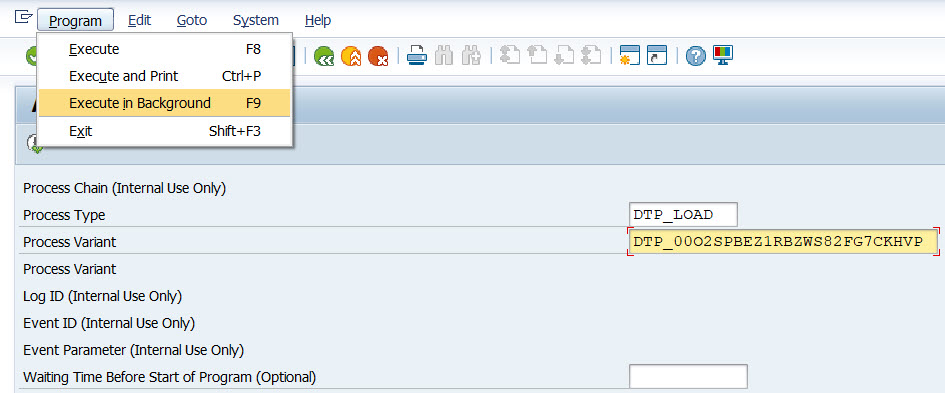
Now the program needs to be scheduled as the background job. To do that there is an item called Execute in background in menu Program:


As a next, just accept a Background Print Parameters pop-up:


Finally enter Start date/time or event which should serve as the background job’s trigger. Once done the job will be scheduled by accepting the pop-up by save button.


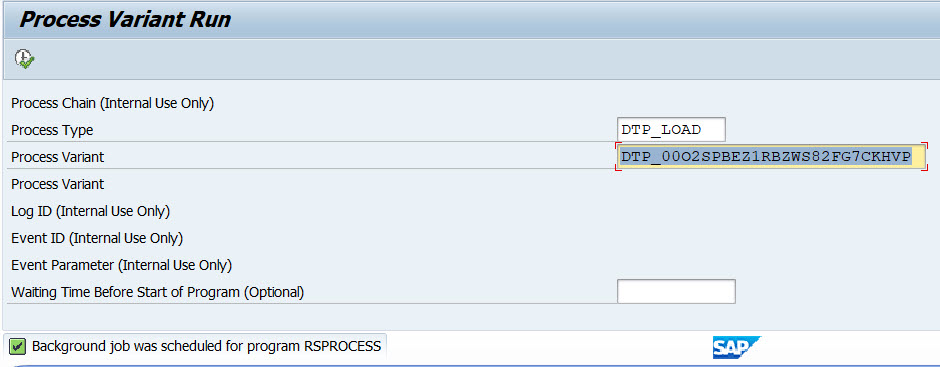
There is an information message “Background job was scheduled for program RSPROCESS” confirming the job’s schedule.


Now it is possible to observe the job’s execution in t-code SM37. Depending on DTP and BW system setup there can be several jobs found:


RSPROCESS - job that ran the program RSPROCESS itself. This one started next job(s) that represents the DTP load execution.

BIDTPR_20220419211828000002_1 – generated timestamps represents the data load request ID that can be seen in DTP’s monitor (e.g. t-code RSDTP). There can be multiple of those jobs depending on size data set that is being processed, DTP’s pack size etc. 


More information:

Thursday, December 16, 2021

SAP BW DTIS - Data Transfer Intermediate Storage

DTP or Data Transfer Process is used in SAP BW systems to manage how a data is transferred between two objects: source and target. The DTP determines what transformation(s) is used, what filters on source data is applied, how data is packaged, whether whole data load runs in parallel and many more other things. In addition, mode of the data load is given on the DTP level: whether it is a full or delta one.

DTPs were introduced in BW 7.x. Prior this BW version InfoPackages were used to manage the data loads. Over the years the DTPs were enhanced adding more features like error DTPs (sometimes called error stack). The error DTPs are special type of DTP that enables to update the records to data target. During the data load if there are any records present that is not possible to be written to the data target they are collected in the error DTP.
DTIS enhances the concept of the error DTP and takes it further. Data from source is extracted to intermediate storage and processed by the DTP from there. The intermediate storage is then used for loading of the data and for error DTP as well if error handling is active for the respective DTP.

DTIS was introduced in BW/4 1.0 SP04. Technically, it is a persistence layer represented by a table with technical key for error handling. The table is generated when the DTP is activated, or when a SAP HANA transformation is generated for each DTP source object upon generation. In case there are many DTPs for the same source object there is only one intermediate storage generated.

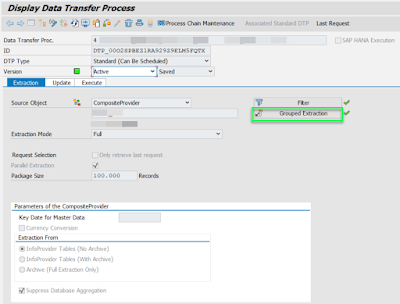
To enable the DTP to use the DTIS on Extraction tab a checkbox Grouped Extraction needs to be enabled. In older BW releases, the checkbox is called Semantic Grouping. Setting this checkebox basically the DTP is forced to use DTIS.


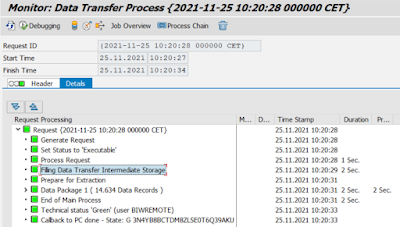
How to check whether the DTP was executed in DTIS mode? On DTP data load request monitor screen (t-code RSDTP or similar) just observe log text like “Filling Data Transfer Intermediate Storage”.


In case the DTP is not possible to get into active status due to error message like below:

Inconsistency in the DTP: DTIS can not be generated. Message no. RSBK403

Operation dp_v->GET_DTP_SHE_SUPPORT could not be carried out for NO_DTIS_POSSIBLE DTP_00O2SPBFBCP7H7ASKNPICITSZ Message no. RS_EXCEPTION120

Transformation does not exist Message no. RSTRAN010

Diagnosis

The transformation specified by transformation ID , source  and target , does not exist.

System Response

The system terminates processing.

Error while saving Data Transfer Process DTP_00O2SPBFBCP7H7ASKNPICITSZ

Then try to switch on and off following Transformation and/or DTP settings:

- -      Set the transformation execution mode to ABAP runtime

- -      Switch off parallel processing of the DTP off

- -      Switch off grouped extraction

- -      Switch off error handling

- -      Make sure DTIS supports your scenario, e.g. infoproviders involved are not BPC one (/CPMB/* namespace), etc. review the Note 3037467


More information:

Online docu

3037467 - DTIS overview

2849599 - No DTIS possible