Showing posts with label scheduling. Show all posts

Friday, October 25, 2024

Scheduling process Chain in alternate time zone

There is an option to run the process chain in different time zone available in BW systems. It is available in start variant of the PC. There is a new checkbox “Use Alternative Time Zone”. Once it is checked a new field shows up.

The feature can be useful in case BW admin is not aware of what time zone the BW system runs in. So, the alternative time zone can be used.

Once there is an alternative time zone specified for specific PC’s variant it is saved in table RSPCTRIGGER and in field TMZONE.

Same functionality is leveraged in SAP standard background jobs.


Tuesday, April 19, 2022

Run DTP as a job?

Note: for difference between ABAP program RSPROCESS and RSBATCH_EXECUTE_PROZESS see this post.

This is probably a quite silly idea to run the DTP scheduled as background job. However, I just started to wonder whether it is possible at all. I am aware that ever since there was a concept of a process chain introduced in BW this is not really necessary. Having the process chain it is a pretty much possible to run the DTP within that chain anytime we want with any frequency we want. Nevertheless, I still wondered - it is possible to run the DTP as a job without the chain? Let us have a look.

There is an ABAP program called RSPROCESS that can runs any BW Process. Be it Execute Data Transfer Process (DTP_LOAD), Delete Complete Data Target Contents (DROPCUBE), Activate Requests in advanced DataStore Objects (ADSOACT), Execute ABAP Program (ABAP), Execute Operating System Command (COMMAND), Activate Master Data (MDACTIVAT), any BPC process and so on. See overview of different BW tasks/objects within the SAP BW here.

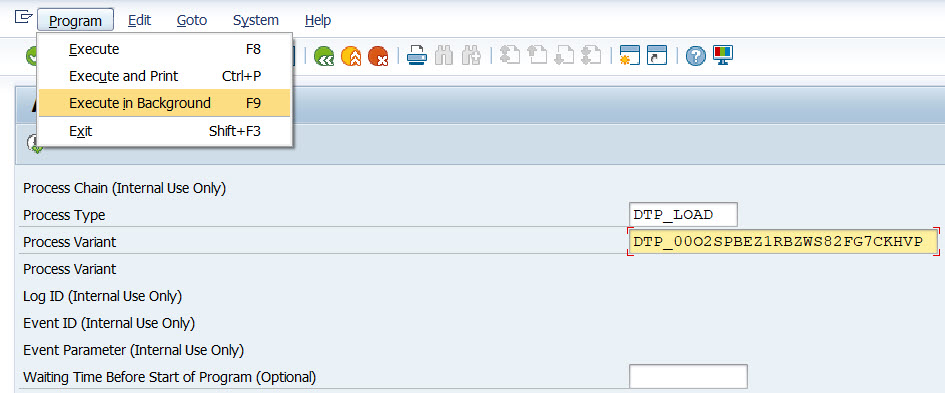
Thus, a very first idea is to leverage this program and schedule it as the background job. On the program’s selection screen, here are input parameters that need to be provided:

Process Type                                                 DTP_LOAD

Process Variant                                              <DTP_tech_name>


Now the program needs to be scheduled as the background job. To do that there is an item called Execute in background in menu Program:


As a next, just accept a Background Print Parameters pop-up:


Finally enter Start date/time or event which should serve as the background job’s trigger. Once done the job will be scheduled by accepting the pop-up by save button.


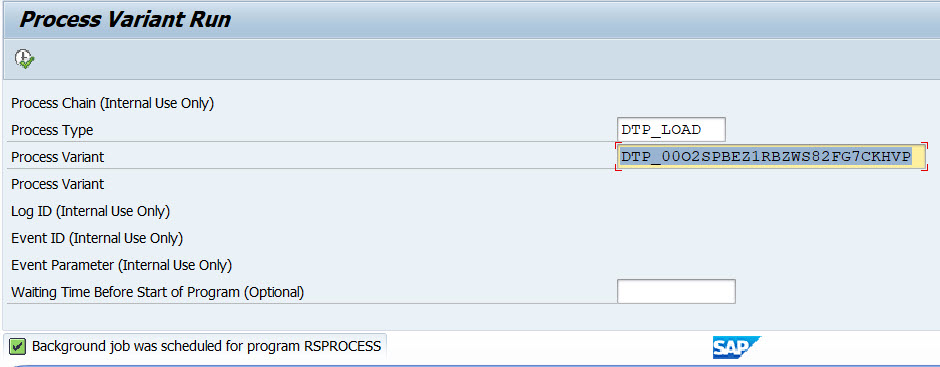
There is an information message “Background job was scheduled for program RSPROCESS” confirming the job’s schedule.


Now it is possible to observe the job’s execution in t-code SM37. Depending on DTP and BW system setup there can be several jobs found:


RSPROCESS - job that ran the program RSPROCESS itself. This one started next job(s) that represents the DTP load execution.

BIDTPR_20220419211828000002_1 – generated timestamps represents the data load request ID that can be seen in DTP’s monitor (e.g. t-code RSDTP). There can be multiple of those jobs depending on size data set that is being processed, DTP’s pack size etc. 


More information:

Sunday, October 31, 2021

Picture in monitoring/scheduling part of RSA1

There is a possibility of adding a picture to monitoring/scheduling part of t-code RSA1. The picture that can be shown needs to be customized in table RSRADIOMON. The table holds data about user settings related to BW. A field that picture name goes is called - PICNAME (Image name for monitor/scheduler). The picture needs to be stored in table RSMIME. It attributes shall be stored in table RSMIMEATTR. Unfortunately, I cannot find any standard SAP functions to store ne pictures into these tables. However, simple ABAP report that stores any picture into these tables should not be a big thing to develop.

There is a bunch (41 pictures to be precise) of picture already stored in the system. Below I took few screenshots from the pictures available in the systems. I tried BW 74, 75 and BW4 1.0 and 2.0 in all these systems the pictures are all there. 

Moreover, there is other field PICSTRETCH in the table PICNAME that allows stretching the picture over full size of part of the GUI screen.

MONITOR_MED.JPG

WASSERRAD.JPG

SAPBW_MONITOR.JPG


SAPBW_CHAIN.JPG

NETWEAVER_MONITOR.JPG

PICNAME_NETWEAVER_CHAIN.JPG

WATER_MED.JPG


Tuesday, July 18, 2017

Scheduling Process Chains via copying its jobs

In my other blog post I mentioned how to schedule Process Chains with restrictions. This basically covers scenarios that things like SAP Factory calendar is used to base the scheduling on. Also this is about scenarios when the job shall not be executed on e.g. weekends-workdays etc.

Similarly there might be requirements on how to schedule the PC several times a day but there is no periodicity of these runs. Had it been the case periodicity is there than just a settings within job’s Start Time dialog box (like every minute/hour/day/…) can be leveraged -> see mu screenshot in here. These settings can be found under Periodic Values button in that pop-up window.

However as the periodicity is not given what can be done to schedule the job? Actually there is a possibility to just schedule one job for any given specific time and once there is a job scheduled via copying the job we replicate other schedules for the same PC for different start times that we need to have the PC running. This can be achieved via t-code SM37. There in its menu called Job there is an item Repeat scheduling available.

Once the job is copied just a start condition needs to be changed in the SM37 and that it!