Showing posts with label jobs. Show all posts

Saturday, January 4, 2025

Program RSPROCESS vs RSBATCH_EXECUTE_PROZESS

In one of my earlier posts, I described ABAP program called RSPROCESS. However, there is also a program RSBATCH_EXECUTE_PROZESS. Both are serving similar purpose in SAP BW systems. They are used to managing certain BW processes. As described in that other blog post the RSPROCESS executes process variant of process chain. For various types of process variant of the PC see this post or refer to table RSPROCESSTYPES.

On other hand the RSBATCH_EXECUTE_PROZESS program is used for managing BW processes in terms of individual batch process. It is often involved in specific data warehousing activities such as data loads, DSO (DataStore Object) activations, and parallel processing. RSBATCH_EXECUTE_PROZESS is typically scheduled as a background job to handle these tasks efficiently.

Selection screen of the RSBATCH_EXECUTE_PROZESS.


Friday, March 3, 2023

BW Background Job - Cleanup of orphaned DTIS entries

DTP may run in DTIS (Data Transfer Intermediate Storage) mode. That mode works in a way that extracted data is stored in in intermediate storage before they are updated to target.

The Intermediate Storage contains many records even though the corresponding DTP requests are already deleted or are in green status without any error. Thus the intermediate storage can grow up fast and it can be a problem while having many DTPs in the BW system running in that mode.

There is an ABAP program RSDTIS_CLEANUP that can run as a job to clean up the Intermediate Storage of DTIS DTPs that belong to deleted requests.


The report can run for specific DTP or for multiple DTPs that are identified either by source object (aDSO, DataSource, Query Element, InfoSOurce, Composite Provider or InfoObject) or by Unique DTIS Number. The Unique DTIS Number (RSDTIS_NUMBER) is a sequential number that belong to specific execution of and DTP in the DITS mode. All the Unique DTIS Number are stored in table RSDTIS.

More over there is a checkbox that enables a deletion of unused DTIS tables.

More information:

2708942 - Cleanup of orphaned DTIS entries

SAP BW DTIS - Data Transfer Intermediate Storage

Wednesday, March 1, 2023

Collections of BW Background Jobs

SAP BW (Business Warehouse) background jobs are automated tasks that are scheduled to run at regular intervals without requiring manual intervention. These jobs are used for various purposes in the BW system, including data loading, data transformation, and system maintenance. Regular SAP BW background jobs are essential for ensuring the efficient operation of the BW system. They help to automate repetitive tasks, reduce the risk of human error, and improve system performance. They can also help to ensure that critical data is available to end-users when needed.

Here are some of the most common types of regular SAP BW background jobs:

Data loading jobs: Used to load data from source systems into the BW system. They may include jobs that extract data from external systems, jobs that transform data into the correct format for BW, and jobs that load data into BW data targets.

Data transformation jobs: Used to transform data from one format to another. They may include jobs that perform data cleansing, data validation, or data enrichment.

System maintenance jobs: Used to maintain the health and performance of the BW system. They may include jobs that perform database maintenance, system backups, or system health checks.

Archiving jobs: Used to archive data that is no longer needed in the active BW system. Archiving helps to reduce the size of the active BW system, which can improve system performance.

Broadcasting jobs: Used to generate reports based on data stored in the BW system.

Here’s a list of my blog posts related regular background jobs in BW:

1. Cleanup of orphaned DTIS entries

2. Deletion of Orphaned Entries in Errorstack/Log Job RSBKCLEANUPBUFFER

3. DTP Clean Up Job RSBKCHECKBUFFER

4. Job BI_WRITE_PROT_TO_APPLLOG

5. Deletion of BW Messages/Parameters

BW Background Job - Deletion of BW Messages/Parameters

BW background management provides basic functions for functions for managing background and parallel processes in the BW system. Collection of the background management plus logs and tools is what is BW data processing all about. Simply speaking it comprises of all the tasks that runs as the background jobs that are performing BW tasks like data loading, parallelization, indexing, filling aggregates, archiving, attribute change run, broadcasting, compression, data activation, rollups, remodeling, collecting statistics, logs, messages, etc. All the BW background management jobs are visible in t-code RSBATCH.

All these tasks running all the time in the BW systems are producing a great amount of logs and messages. The table that is used to store those logs and message is RSBATCHDATA. In order to prevent the table to grow a lot there is a job that can do a housekeeping activities. The job is usually called BI_DELETE_OLD_MSG_PARM_DTPTEMP and it runs the ABAP program RSBATCH_DEL_MSG_PARM_DTPTEMP. It deletes old messages, parameters and temporary DTP Data etc. On its selection screen, it is possible to specify the no of days as a retention period (delete all records older than X days, where X is from zero to 999) for messages, logs and DTP temporary data. It usually runs on daily basis.


The job can be scheduled from t-code RSBATCH -> under Settings and Parallel Processing part -> Deletion selection.


More information:

Tuesday, February 28, 2023

BW Background Job - Deletion of Orphaned Entries in Errorstack/Log Job RSBKCLEANUPBUFFER

Another background job that is running in the SAP BW systems is to housekeeping of orphaned entries in DTP’s error stack and execution logs. It is the background job called RSBKCLEANUPBUFFER.

It deletes any existing temporary buffers and error stack data of deleted requests for which this data still exists. The report behind this job is also called RSBKCLEANUPBUFFER. On its selection screen there are dates from/to and check/delete only requests that defines time frame for deletion itself.


More information:

1759601 - P30:DTP:Request temporary storage is deleted too soon

Monday, February 27, 2023

BW Background Job - DTP Clean Up Job RSBKCHECKBUFFER

Among many other background jobs running in SAP BW system is the RSBKCHECKBUFFER job. This job runs a ABAP program RSBKCHECKBUFFER  that cleans up the DTP Runtime Buffer. What is meant by the DTP Runtime Buffer is a temporary storage of the Data Transfer Process. Basically there are settings for the DTP (like 'Fill Temporary Storage After Following Substep' -> see details here). If those settings are maintained, they represent a retention time for how long the temporary storage should be kept in the BW system.

Now there is a function in the BW system needed that makes sure that those retention periods are fulfilled. The function is represented by the RSBKCHECKBUFFER  job. The job has to be periodically planned. If it is running, it deletes the entries, once the retention time is reached. Similarly, the job handles also the DTPs in the case if the settings of the active version of the DTP do not contain any retention time. Usually it is enough to schedule the clean up job to run every day.


More information:

Online docu

Job BI_WRITE_PROT_TO_APPLLOG not running?

Thursday, August 4, 2022

Job BI_WRITE_PROT_TO_APPLLOG not running?

There is an important job in all BW systems that must always run. It is called a BI_WRITE_PROT_TO_APPLLOG or known as Background Job Log Writer. It serves to write temporarily saved logs (batch and enqueue runtime data) of lock manager for any batch processes that are running in BW system.

The job runs an ABAP program RSBATCH_WRITE_PROT_TO_APPLLOG. Logs are written into table RSBATCHDATA by the job. Periodicity of the job should be at least 1 hours if not more frequent. In case of most of the BW systems I worked with the periodicity is 10 minutes. If the BW system is being scheduled for a downtime, the job can be descheduled.

The job is very important to let the BW system functioning properly. BW developers may come across a below pop-up message RSM2 no 081, any time when t-code RSA1 is started:

Report RSBATCH_WRITE_PROT_TO_APPLLOG not planned. See long text.

This is valid for all BW 7.x systems including BW/4 systems. Whoever enters the RSA1 in case the jobs is not scheduled then the system schedules it by that user who entered the RSA1. That's why you can see your user that runs this job in t-codes like SM37.


The message informs that the job does not run means it is not scheduled. The ABAP program RSSM_PLAN_PROTWRITE_TO_APPLLOG can be used to set it up. The program runs FM of the same name (RSSM_PLAN_PROTWRITE_TO_APPLLOG) to do that. The BW system uses other FM RSBATCH_CHECK_START_LOGWRITER to check if the job is scheduled and that one can schedule it too.

In case the job is scheduled multiple times the BW system detects that too. This situation happens when a message RSM2 no 082 is displayed:

Report RSBATCH_WRITE_PROT_TO_APPLLOG planned &1 times. See long text.


More information:

wiki

1135045 - P18:Job BI_WRITE_PROT_TO_APPLLOG is scheduled several times

2495693 - POP-UP Information: Report RSBATCH_WRITE_PROT_TO_APPLLOG x is scheduled


Tuesday, April 19, 2022

Run DTP as a job?

Note: for difference between ABAP program RSPROCESS and RSBATCH_EXECUTE_PROZESS see this post.

This is probably a quite silly idea to run the DTP scheduled as background job. However, I just started to wonder whether it is possible at all. I am aware that ever since there was a concept of a process chain introduced in BW this is not really necessary. Having the process chain it is a pretty much possible to run the DTP within that chain anytime we want with any frequency we want. Nevertheless, I still wondered - it is possible to run the DTP as a job without the chain? Let us have a look.

There is an ABAP program called RSPROCESS that can runs any BW Process. Be it Execute Data Transfer Process (DTP_LOAD), Delete Complete Data Target Contents (DROPCUBE), Activate Requests in advanced DataStore Objects (ADSOACT), Execute ABAP Program (ABAP), Execute Operating System Command (COMMAND), Activate Master Data (MDACTIVAT), any BPC process and so on. See overview of different BW tasks/objects within the SAP BW here.

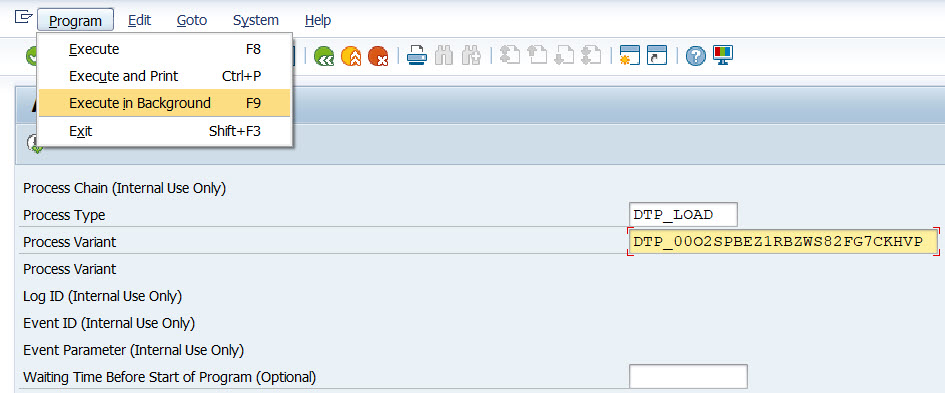
Thus, a very first idea is to leverage this program and schedule it as the background job. On the program’s selection screen, here are input parameters that need to be provided:

Process Type                                                 DTP_LOAD

Process Variant                                              <DTP_tech_name>


Now the program needs to be scheduled as the background job. To do that there is an item called Execute in background in menu Program:


As a next, just accept a Background Print Parameters pop-up:


Finally enter Start date/time or event which should serve as the background job’s trigger. Once done the job will be scheduled by accepting the pop-up by save button.


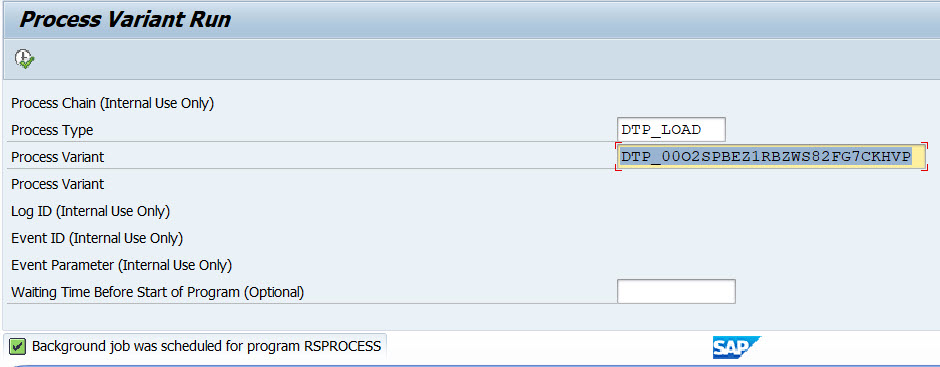
There is an information message “Background job was scheduled for program RSPROCESS” confirming the job’s schedule.


Now it is possible to observe the job’s execution in t-code SM37. Depending on DTP and BW system setup there can be several jobs found:


RSPROCESS - job that ran the program RSPROCESS itself. This one started next job(s) that represents the DTP load execution.

BIDTPR_20220419211828000002_1 – generated timestamps represents the data load request ID that can be seen in DTP’s monitor (e.g. t-code RSDTP). There can be multiple of those jobs depending on size data set that is being processed, DTP’s pack size etc. 


More information:

Thursday, September 17, 2020

Error while opening AL11 file from ABAP program

Interfacing against file system is common thing still even we are moving slowly to cloud oriented computing. There is bazillion of ABAP programs all over the world writing/reading data from/to files. There are ABAP statements like OPEN / TRANSFER / READ / GET / SET TRUNCATE / CLOSE / DELETE that supports working with the DATASET - files. The files are accessible for the users from SAP GUI via t-code AL11. Sometimes even people tend to refer to such files, as AL11 files despite physically the files are stored on OS level.

While programs like those that writes, data into the file are running as background jobs there can be following error popping up in spool of the job:

Error while opening AL11 file


It can be tricky error even when you schedule the job to run by very privileged user like DDIC or any other who is granted with SAP_ALL / SAP_NEW authorizations. Problem is that while the job runs under super privileged user the physical write on OS level is not done by the user under which the job runs. The user that deals with the file is in fact the OS level user – means the user under whom the SAP instance is running (who runs disp+work process).

Based on this the OS level user needs to be authorized to write/read particular folder on OS level.


More information:

27 - Recommendations for ABAP file interface

68718 - Problems with file authorizations and umask

Problem in file reading from al11

Sunday, February 9, 2020

How to find out who ran PC?

Today another blog post regarding process chains. It is about how to find out who ran the process chain (PC). There is a very useful t-code RSM37 that provides many useful information about BW workloads like jobs. The PCs are nothing else just a jobs from SAP basis point of view. Thus by a quick look into the RSM37 it is easy to find out who ran the PC.

Here how to do it:

RSM37 -> first search for all BW jobs -> find particular PC name by placing a filter at 2nd “Selection value” column -> if there are still many entries (because all steps in the PC are listed here) filter also process type column normally called “Value” e.g. filter as TRIGGER.


Similarly, one can go to PC log from t-codes like RSPC or RSPC1 and look at start variant of the PC. Then double click on corresponding basis job log and on that screen, again user who ran the PC is available at column called “Job Created by”.


Wednesday, July 13, 2016

RSM37 - Display of process chains with particular scheduling state

Recently I needed to list all process chains that will be executed in next 24 hours in SAP BW system. I looked to SAP basis tables like TBTCO (Job Status Overview Table) and TBTCP (Background Job Step Overview). But I didn’t succeed. Even custom ABAP report (like advised here) didn’t help me.
Then I found out that actually this requirement is covered by standard BW tcode. It is t-code RSM37. The tcode gives a jobs and corresponding process chains list with its program variants.

On selection screen as Job Name we can enter BI_PROCESS_TRIGGER because it is most common job name for the PC. The name like this comes as default and usually it is not common to change this name. Then by specifying all statuses of the job (like planned, released, ready, active, finished and cancelled) and by giving time interval we get a list which we are interested in. 


In the output screen just filter on column Selection for value equals to CHAIN and list of the PC is here. In mind it is very easy to use and useful t-code.

Example of the RSM37 tcode output: