Showing posts with label data requests. Show all posts

Thursday, August 1, 2024

What are 1972 requests in BW?

In my earlier post about RSPM (Request Status Process Management) I mentioned special data loads request numbers (so called TSN - Transaction Sequence Numbers). One of them is called housekeeping request. ID of those request starts with 1972 thus they are sometimes called as 1972 request or TSN from year 1972 or 1972-replacement request.

Request format:

{1972-XX-XX XX:XX:XX XXXXXX XXX}

Example of such a request can be:

{1972-01-01 01:00:00 001359 CET}      

Not sure why particular year 1972 was chosen. Perhaps it has something to do with a fact that SAP was founded in 1972 ? Not sure, probably not :-)

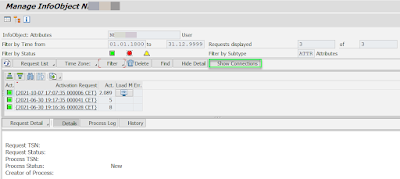
Example of the 1972 request as it was seen in RSMNG t-code:

More information:

Request Status Process Management 

BW request types: RSSM vs RSPM


Tuesday, December 26, 2023

Request Status Process Management (RSPM)

Request Status Process Management (RSPM) concept for BW request management is in place since a higher support packages of SAP BW 7.5 and also in SAP BW4/HANA. It replaces RSSM (Request Status Management) request management based on 0REQUID. The Request Status Process Management (RSPM) based on Request Transaction Sequence Numbers (TSN, 0REQTSN). Details can be found here.

However, in this post I want to mention few interesting TSNs that are used in BW systems. The TSN is referred by RSPM_TSN domain in DDIC. There are following special TSN defined in class interface IF_RSPM_CONSTANTS.


transfer_min = '18991231000000000000000' = {1899-12-31 01:00:00 000000 CET}

transfer_min_old = '19000101000000000000000' = {1900-01-01 01:00:00 000000 CET}

transfer_max= '19680120031408000000000' = {1968-01-20 04:14:08 000000 CET}

min = '19700101000000000000000' = {1970-01-01 01:00:00 000000 CET}

reorg_low_min = '19700101000000000001000' = {1970-01-01 01:00:00 000001 CET}

reorg_low_max = '19700101000000999998000' = {1970-01-01 01:00:00 999998 CET}

housekeeping_min = '19720101000000000001000' = {1972-01-01 01:00:00 000001 CET}

housekeeping_max = '19723112235959999998000' = {????-??-?? ??:??:?? ?????? UTC}

dummy = '20140206171506000000000' = {2014-02-06 18:15:06 000000 CET} - timestamp of data element RSPM_TSN

real_min = '20140206171506000001000' = {2014-02-06 18:15:06 000001 CET} - as above plus 1 µs

real_max = '28991231235959999998000' = {2900-01-01 00:59:59 999998 CET}

not_activated = '29000101000000000001000' = {not activated} - dummy TSN for not yet activated load requests

simulation_min = '29000102000000000001000' = {2900-01-02 01:00:00 000001 CET

simulation_max = '29000102000000999999000' = {2900-01-02 01:00:00 999999 CET}

reorg_high_min = '29991231235959000001000' = {3000-01-01 00:59:59 000001 CET}

reorg_high_max = '29991231235959999998000' = {3000-01-01 00:59:59 999998 CET}

max = '99991231235959999999999' = {9999-12-31 23:59:59 999999 UTC}

nc_reporting = '99999999999999000000001' = {????-??-?? ??:??:?? ?????? UTC}

nc_user = '99999999999999000000002' = {????-??-?? ??:??:?? ?????? UTC}

nc_temp = '99999999999999000000003' = {????-??-?? ??:??:?? ?????? UTC}


More information:

BW request types: RSSM vs RSPM

Saturday, July 29, 2023

Repairable DTP data load request

When using Data Transfer Processes (DTPs) to load data, there is an important feature called "Reparability" If a data load request fails, it appears in red status, indicating that the data was not loaded correctly into the target destination. Such failures can occur due to various reasons, such as extraction issues, network errors, database locks, data transformation errors, or data integrity issues, such as missing master data.

The good news is that, depending on the cause of the data load error, the data
processed by the DTP can still be loaded and repaired. This means that if the
DTP data load request has a "Repairable = Yes" status on the DTP's monitor screen, the data can be fixed and reloaded.

However, this repair option is only available in specific cases, typically when the data is still present in the DTP's temporary storage. There are two particular scenarios that need to be met for successful data repair:

1. The source of the extracted data must hold the data in a table with a technical key (request, data package). Additionally, each data package in the source must be uniquely assigned to a data package extracted by the DTP. In case of incorrectly processed data packages, they can be reconstructed uniquely in another attempt using selections from the source data.

2. If the source does not have this property, there is still an option to reconstruct the incorrect data from the temporary storage created at runtime by the DTP. However, this is only possible when all the data from the source was extracted in the first attempt and when at least one temporary storage was created for all data packages.

The technical evaluation of the data load request for the "Repairable" flag is carried out using the ABAP method IF_RSBK_REQUEST~GET_REPAIRABLE in the class CL_RSBK_REQUEST_RED. The flag itself refers to the data element RSBKREPAIRABLE (Indicator: Request Is Repairable) in the data dictionary.

Inconclusion, the reparability feature of data load requests in DTPs provides a valuable way to address and correct data load failures, ensuring smoother data integration into the target destination.


Thursday, February 9, 2023

DTP ID prefixes

Some time ago I blogged about InfoPackage / DTP prefixes and BW data request's prefixes. That blog post covered most of the InfoPackage and DTP ID prefixes however; I found there are more of them.


As there are different types of Data Transfer Processes; similarly there are several DTP ID prefixes that corresponds to those DTP types.

1 DTP_* - Regular DTP ID prefix. So called 'Standard DTP'. This is a case of most of the DTPs is any given BW system. Part identified by asterisk is generated as a random string. Sometimes the standard DTPs are referred as DTPA DTPs.

2 DTPV* - So called 'Virtual DTP' is created during migration to BW/4 systems by ABAP class CL_RSBK_DTP_COLLECTION.

3 DTPT_* - So called 'Transfer DTP' is generated during migration to BW/4 system.  

4 DTPI_* - So called 'Transfer InfoPackage DTP' is generated by replacing first 5 chars of the InfoPackage ID with the prefix 'DTPI_, during migration to the BW/4. Import of InfoPackages (in the case of an remote conversion / transfer), a settings of the InfoPackages for file source systems are not replicated correctly in the DTPs replacing them. The DTPs IDs start with the prefix.

5 RSBC - So called 'Command Package'.


Following to different DTP ID prefixes there are below DTP request IDs:

1 DTPR_* - request ID as of Classic BW (pre BW/4 systems)

2 DTPR__* - new request ID as of BW/4 (or BW 7.5) systems, so called Process Transaction Sequence Number (TNS)

3 DTPR_SIMULATION – in case DTP ran in debugging (simulation) mode


All these types are stored in data dictionary in Type group RSBC (Constants for the Data Transfer Process).


More information:

A little about InfoPackage / DTP prefixes and BW data request's prefixes

BW request types: RSSM vs RSPM

My blogs about DTPs

My blogs about InfoPackages


Sunday, December 19, 2021

t-code RSMNG – Administration of data targets in BW/4

In BW/4 a primary environment of BW administration has moved from SAP GUI to either web or into SAP HANA Studio. In case of the web, it is an FIORI app called SAP BW∕4HANA Cockpit. The BW/4 cockpit can be start from the SAP GUI via t-code BW4WEB (also known as “BW Fiori Launchpad”). Needless to say that in case of the SAP HANA Studio it the modelling part of the BW tasks that is performed in the Studio.

However, in case the BW/4 system is freshly installed/upgraded the Cockpit may not be functioning right off the bat. In addition, there might be issues while installing security certificates of web server, activating web service, obtaining proper authorization, etc. All of these can prevent you from starting to use the Cockpit. On other hand, some old-school BW folks may still prefer to use SAP GUI for administrating of the BW data targets. One strong argument for this is also performance of the web. In case huge data targets (like aDSOs) that are loaded with couple thousands of data requests to browse the requests in the web environment can be tedious. For situations like these, there is a fallback scenario.


It is a t-code RSMNG – with official title as “RSPM MNG UI” or “Administration of RSPM managed targets (aDSO)” or just "MNG UI" or "administration UI". It serves to purpose of managing objects like aDSOs, Characteristics (InfoObjects) and Open Hub Destinations. It is a kind of old “RSA1 -> Modelling -> e.g. InfoProvider -> right click: Manage” navigation; screen - look alike thing. 

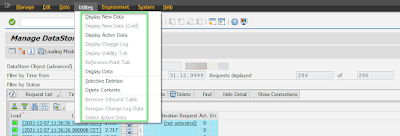
The t-code itself allows to manage the data requests like: navigate to the request’s monitor screen, delete/activate/find the request, change its technical status), refresh the requests list, change behavior of the aDSO (planning vs loading), jump to t-code SE16 screen to see the New/Active/Change Log data (depending on aDSO type), perform: Delete Contents, Selective Deletion  etc.


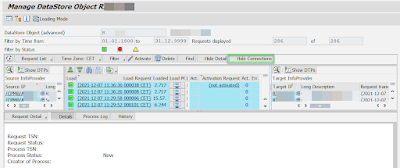
One more interesting feature is “Show Connection” button to analyze the data target by its “connection”. The feature enables quick review of source objects/DTPs that were used to load data to chosen data target.


I find the RSMNG very useful. I do not advice to anyone to use it as SAP may decide to “delist/defunction” it anytime in future releases of the BW as the main environment for BW/4 is above mentioned Cockpit and/or Studio. Also, I do not expect that SAP will enhance the RSMNG any further. From my point of view, there is a lack of DTP integration into it. A description of the DTP could be shown in table grid. For example, an ALV table grid could be customizable so user could choose from a list of available fields what is shown. Similarly, having an options like to copy/delete the DTPs from this t-code would bring further benefit. Anyhow, I find the t-code very useful. 

PS: the RSMNG t-code started to appear in classic BW as well. In particular BW 75 systems.


More information:

BW/4 related posts

SAP BW/4HANA (B4H) versions

SAP BW/4HANA (B4H) – what is it?

SAP BW4/HANA related t-codes

BW/4HANA specific objects

SAP BW∕4HANA Cockpit

2859559 - How to use GUI transaction instead BW Cockpit in BW/4HANA 2.0

Monday, December 21, 2020

BW request types: RSSM vs RSPM

 Traditionally in SAP BW systems there are the BW request types of two kinds, representing a request and status management (RSSM):

1. Request ID (e.g. DTPR_59IOI42WSEVCH90JCT5TCKNZZ) or so called Data Transfer Process Request. It describes a list with calls that is generated from the template of a Data Transfer Process (DTP). In addition, there is information how data in a BW is loaded from a source object to a target object, and which data is transferred to the target object under these conditions.
Data element that represent the Request ID is RSREQUID and it is CHAR30 data type. The value can consists of up to 30 characters literal (numbers and strings).


2. SID (e.g. 395.609) or so called key number of a request is the internal encryption of the request number that is allocated by the scheduler. The SIDs are sorted into ascending order. They are used in this maintenance for rolling up and compressing the InfoCube.

Data element that represent the SID is RSBKREQUID and it is INT4 data type. The number can be from interval: -2.147.483.648 to +2.147.483.647


Each request has both representation Req ID and SID. They can be converted from one form to another and vice versa. These numbers can be seen in t-code like RSA1 where they represent particular data load. T-code RSRQ (Data Load Monitor for a Request) allows to enter both type of the request.

The Req ID and SID that are based on 0REQUID are referred as called classic request and status management.

In general, all these terms like Request ID, Data Transfer Process (DTP) Request, SID or key number of a request area more less synonyms. One may find all these terms mixed.

3. In BW 7.5 there is a 3rd type of BW request type available. It is called Process Transaction Sequence Number (TNS). It has a formal like below:

{2020-05-12 17:18:11 000001 CET} = 20201512151811000001000

Even t-code RSRQ is extended in BW 7.5 to include this type of the request. It is based on timestamps.  Data element that represent the SID is RSBMREQUID and it is DEC data type with length of 23 and 9 decimals.

More over in BW/4HANA based systems the classic request and status management is not available. It was replaced by the TNS (0REQTSN) and it is referred as request status and process management (RSPM). It is used not only for loading processes but also for data staging, distribution, streaming, and planning processes for InfoObjects, aDSO, and Open Hub Destinations.

Below is a picture how t-code RSRQ looks like in BW lower than BW 7.5 and in the BW 7.5 or in BW/4HANA.


More information:

2482164 - BW4SL - Request and Status Management

2462639 - BW4SL - Interfaces and Customer-Specific ABAP Development


Saturday, December 19, 2020

t-code RSPM_MONITOR - BW Process Monitor

Within highest SPs of BW version 7.4 (higher than SP08) in BW version 7.5  (higher than SP03) and in BW/4HANA there is a t-code RSPM_MONITOR available to support BW Process Monitoring in general. Its purpose is to manage load request of aDSO objects.

There is a handful of things can be achieved in this t-code:

1. Changing process status: Active data load request (process) can be forcefully set to red. There is an icon “Change status to red” available for this operation on toolbar. Technically done by ABAP program report RSPM_CLOSE_FAILED_PROCESSES.


2. Monitor the process: The BW process can be monitored. Directly here either in the t-code RSPM_MONITOR or user can jump to the particular DTP, Process Chain or to Manage screen of the involved InfoProvider. 

Notice that since BW 75 a terminology changed a little bit. Data load term is in high level referred as process. This t-code serves to handle all process regardless of what they are. By the process following operations in BW are considered:

·        DTP Load Data (DTP_LOAD)

·        API Load Data (DATA_LOAD)

·        Move Requests (MOV_REQ)

·        Delete Request (DEL_REQ)

·        Activate DSO (ADSO_ACT)

·        Integrated Planning (PLAN)

·        Selective Deletion (SELDEL)

·        Deletion of Master Data (MD_DEL)

·        Remodeling (ADSO_REMOD)

·        DSO Table Conversion (REORG)

·        Data Mart (DMART)

·        Set manually status of Load Request (DTPR_UST)


The t-code support regular BW data loads request in form of:

·        Request ID (e.g. DTPR_59IOI42WSEVCH90JCT5TCKNZZ)

·        SID (e.g. 395.609)

·        Process Transaction Sequence Number (TNS, e.g. {2020-12-15 17:52:27 000001 CET})


More information:

2574738 - aDSO: Data target &1 is locked by process &2

Sunday, July 28, 2019

Planning (e.g. APO) requests in BW InfoProviders

Planning application like APO, BPC, IP etc. are using special data load request type. Normally planning data is stored under one Request ID that starts with prefix 'APO_*' in real-time InfoProviders. One can observe it in Manage screen of a BW info provider in this way. I mentioned those APO_* request already my earlier post here.

Information about the APO_* requests are visible in tables RSREQDONE and RSSELDONE however not much information about them is available (no InfoSource, DataSource and so on). Most of information available in these tables is the same that can be found in Manage screen of a BW info provider. However
In administration of an InfoCube, the "Type Of Data Update" field is not filled in the request list if there is an APO request.

Since almost nothing exists for APO requests (no Source/InfoSource, DataSource, Source System and so on), the type of data update for the APO request is also unclear. Just a "Type of Data Update" field is populated with the "Full Update" value.


In addition, notice that a data, which was loaded into a real-time InfoProv via an InfoPackage/DTP (so-called BW load of BW request), cannot be changed with the Demand Planning. Thus if key figure not zero and it originates from BW request then the key figure becomes a read-only. Such KF needs to be copied to other if it needs to be changed in the planning app.

Friday, July 7, 2017

Delete data load requests from Open Hub

Loads to Open Hubs (OH) are pretty much automated. This is meant in a way that there is normally not needed any manual user interaction. However in case load has failed and it needs to be deleted there are not many options left.
One of the options is to just see DTP associated with the OH. There is icon on tollbar called on "Last Request". This gets to data load request maintenance screen. By manipulating the request status via "Where-used List" button we can influence the load e.g. to delete it via setting it to failed status - red.

Another option is to run FM RSB_API_OHS_REQUEST_SETSTATUS. This FM set the status of the OH in load monitor. As input parameters an request ID, desired status (R   = Red; G = Green; N = New; O = Data Request) and finally message – text that will be shown in monitor. All 3 params are mandatory. Once the FM runs the OH request is set to the desired request status.