Showing posts with label migration. Show all posts

Tuesday, February 22, 2022

What to consider while moving to BW/4HANA

There are few areas that need to be considered while moving an SAP BW Classic system to BW/4HANA based system. Just in general it always helps if the BW system undergone a cleanup up of unused objects before the migration.  It is useful if a whole the data flows, all the objects that are there sitting and not being used are deleted. 3.x fashion BW objects should really not be present in BW 7.x based system. Sooner they are migrated/removed less problems will pop up during the BW/4 move. SAP BW statistics can be used to see what objects are not used. Objects are to be deleted manually in t-code RSA1 or in automated way via ABAP prg RS_DELETE_TLOGO. Other things that can be done much prior before the migration are:

·        BW/4 Sizing report (ABAP prg /SDF/HANA_BW_SIZING), see Note 2296290

·        Custom code scan (ABAP prg RS_B4HANA_CODE_SCAN), see Note 2577045

·        BW Authorization concept status review

See my other blog post Converting BW system to BW/4HANA for details on those activities.


1. Modelling/Administration

BW development/modelling moved to Eclipse (SAP HANA Studio) and similarly BW administration moved to web. There is not much of emphasis for using SAP GUI anymore for BW related tasks. In most of the cases, you can still use the SAP GUI but main SAP BW’s t-code the all mighty RSA1 has a limited scope in is BW4/HANA based systems. Anyhow even with a relatively new t-code like RSMNG for data target administration the web for administration and Eclipse modelling are the preferred tools.

On the attempt to use traditional SAP BW t-codes on BW Transformation object you can only get to display mode while system throws a following information message popping up:

Transformations can only be edited in the BW Modeling Tools in Eclipse


2. Queries

Usage of BEx Query Designer in BW/4HANA system is obsolete and on an attempt to do so you end up with following information message:


Info: BEx Query Designer not supported in SAP BW/4HANA – use BW Modelling Tools.

Message no. R9E065

While using the BEx Query Analyzer in the same system may end up with following messages:
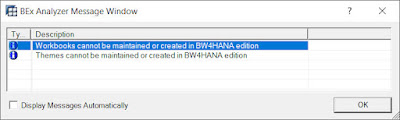

Workbooks cannot be maintained or created in BW4HANA edition

Themes cannot be maintained or created in BW4HANA edition

In short, you can still view the queries definition in BEx Query Designer but no changes are allowed. Similarly BEx Query Analyzer of BW 7.x version only version within the versions of BW 7.0 to BW 7.51. Needless to say that SAP HANA Studio (Eclipse) BWMT are replacing the BEx Query Designer and Analysis for Office (AfO) is a preferred the tool of choice for reporting in BW/4HANA. See details here. Moreover, there is a pure cloud based solution SAP Analytics Cloud that can consume BW/4 objects too.

Other old front-end objects are not available in BW/4HANA:

·        SAP Crystal Reports (published to SAP BW)

·        SAP Xcelsius Dashboards (published to SAP BW)

·        BW Enterprise Reports


3. Analysis Process

T-code RSANWB for Analysis Process Designer (APD) is not present in the BW/4HANA system. All APDs needs to be converted to new HANA optimized objects. Those can be either HANA views or HANA Analysis Processes (HAP). Then perhaps Open Hubs or BW transformations can be considered for replacement too.


4. Source Systems

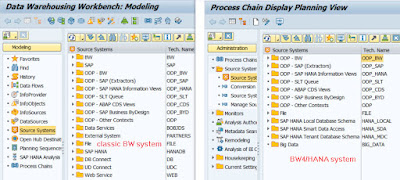
A large set of different source systems was simplified in the BW/4HANA system edition. SAP and BW source systems are replaced by ODP one (ODP_SAP and ODP_BW). There are no DB Connect, UD Connect, External or Web source systems. SAPI based extraction framework is replaced by the OPD. The BW/4 does not support SAP source system anymore.


5. 3.x Data Flows

Old flows in 3.x fashion that haven’t been migrated when system was moved to 7.x version do not run any more in BW/4HANA based system edition. These flows involves legacy transfer or update rules within the data flows and have to be converted to 7.x fashion of the data flows. There are an automatic migration tools available to support that. See Tools for migrating to SAP BW/4HANA (B4H).


6. Generic Data Sources

There are usually plenty of generic data sources in every BW system. Those are either table, view domain or custom function module based data sources. They are sometimes called as Service API data sources. Are the generic DS supported in BW4/HANA? In short, an answer is no. T-code RSO2 is still around but you can only see existing DS and not maintain new one anymore. However if you “migrate” such the DS during a period that BW/4 system is switched to Compatibility Mode (see for details here) in BW/4 Transfer Cockpit then it will run later when you move B4H mode too. However, it is not advisable. Here are options how to replace those type of datasources:

·        ABAP CDS (allowing for some logic as well)

·        HANA Calculation Views (e.g. on top of External Views of InfoProviders)

·        BADI Provider as ODP-BW Provider


7. Export Data Sources

Export Data Sources were used in classic BW systems to transfer data from a source BW system into a target BW system. It was possible to generate them on top of cube, DSO or infoobject – in names space 8<object_name>. These export Data Sources are obsolete and invisible in BW/4. ODP-BW context is to be used in instead. That means in case of:

·     BW/4 InfoProv there is the ODP-BW provider capability that allows transferring data to other SAP BW or SAP BW/4HANA via ODP.

·      For any database tables that sits on top of BW/4 system an ABAP CDS Views for data transfer. Such the data source then appears in ODP-CDS Source System target system. To get more flexibility of the BW/4 system you can define the CDS view with parameters.


8. Reporting: Customer exits

Classic customer exits for BEx variables (RSR00001) called via Function Module EXIT_SAPLRRS 0_001 are not supported anymore. Exits for the variables need to be handled via BADI. Enhancement spot RSROA_VARIABLES_EXIT_BADI (RSROA_VARIABLES_EXIT) is designated for the migration.


9. Authorizations

Old reporting authorizations in 3.x fashions are not supported in BW/4. Nevertheless, that was valid even for 7.x version based systems. That means that 3.x reporting fashion of authorizations needs to be replaced by Analysis Authorizations. Moreover if there are objects used in the roles that are not supported anymore in BW/4 (e.g. infocubes, PSA, HybridProv, MultiProv, TransietProv, VirtualProv, InfoSet) then need to be replaced with corresponding objects mostly type of aDSO.


10. Add-ons compatibility

As BW/4 aims to simplify BW Classic’s complexity, some add-ons installed onto BW system may not be compatible with the BW/4. See SAP Note 2189708 for particular list of what add-ons are/are not supported. In case the add-on is not supported there is a chance that the add-on can be de-installed. See post: How to uninstall SAP ABAP add-on.


11. Impact on planning solutions

The BW/4HANA does not support planning functionality (SEM, BPC), as we know it from SAP BW Classic (based on SAP NetWeaver platform). There are versions of SAP Business Planning and Consolidation based on BW/4HANA (including BW-IP/PAK). However, in case of some planning add-ons that are not supported they need to be migrated while the system is being upgraded - when BW/4HANA Starter Add-on is installed.


12. Business Content (BCT)

Software components BI Content (BI_CONT) and BI Content Extended (BI_CONT_XT) are not present in BW/4 systems. Instead there are objects of the Business Content that are optimized for BW/4HANA. They are separated into two software components (add-ons):

·   SAP BW/4HANA Content BASIS Add-On (BW4CONTB): contains InfoAreas, Application components, InfoObjects, Variables, Conversion exits and Master data read classes.

·        SAP BW/4HANA Content Add-On (BW4CONT): SAP HANA optimized BW content (aDSOs, Composite Providers), InfoSources and transformations.

Notice that there are no Data Sources as part of the BCT anymore as the DS are maintained in source system like S/4 HANA.

Check also what Business Function are used in the BW system. 


13. Technical Business Content

Technical content in BW/4 was replaced by the ABAP CDS views. See online docu for details. Old tech BCT objects can be deleted using program RS_DELETE_TECHNICAL_CONTENT.


14. Technical InfoObjects

Technical BW InfoObjects (e.g. 0IOBJNM, 0LANGU, 0INFOPROV, 0UNIT, 0CURRENCY, etc.) are still needed to have a functioning BW4/HANA system. However, activation procedure for those IOs has changed in BW/4HANA. T-code like RSTCO_ADMIN (and subsequently ABAP program RSTCO_ACTIVATION_ADMIN) are not to be used anymore to for those IOs. The t-code RSTCO_ADMIN even does not exist anymore in SAP BW/4HANA.

Following task lists are supposed to be used for activation of the tech IOs:

SAP_BW4_SET_OPERATION_SCOPE: only technical IOs needed for this Operating Scope

SAP_BW4_SETUP_SIMPLE: tech IO activation plus many other tasks are performed

SAP_BW4_AFTER_UPDATE: is used after importing new support packages to sync any changes or additional technical InfoObjects coming in with later Support Packages


15. BW statistics

Good old tables that stores BW statistic data like RSDDSTAT are still in place plus new tables are introduced in BW/4HANA system.


16. Dependency on S/4 as source system

There are many objects that have been changed in S/4. Just to name a few. Simplified data model (many new tables e.g. in FI module BSEG -> ACDOCA), domain extended (e.g. MATNR from 18 to 40 characters). These changes needs to be reviewed and impact on BW assessed. For BW extractor in S/4 overview see SAP Note 2500202 - S4TWL - BW Extractors in SAP S/4HANA.


For general FAQ on BW/4 see SAP document.


More information:

2473145 - BW4SL - SAP and BW Source Systems

2603634 - BEx Query Designer not supported in SAP BW/4HANA; use BW Modeling Tools R9E 065

2817202 - BEx Analyzer 7.0 on BW4HANA

When SAP BEx will die?

Overview of BW 3.x to 7.x migration possibilities per BW objects

Tools for migrating to SAP BW/4HANA (B4H).

Something about BEx’s variables

2478384 - BW4SL - Reporting Authorizations

2468657 - BW4SL - Standard Authorizations

2458521 - Conversion of obsolete customer exits (CMOD) to enhancement spots in SAP BW

2684463 - FAQ: User-Exit/BAdI in data loads from ODP SAPI source systems

2626183 - Generic datasource in BW/4 HANA

2443863 - BW4SL - S-API DataSources (SAP BW/4HANA as Source)

How to uninstall SAP ABAP add-on

2189708 - SAP BW/4HANA Add-On Handling and Usage

2673734 - BW4SL - BI Content

2500202 - S4TWL - BW Extractors in SAP S/4HANA

2467074 - BW4SL - Administration Cockpit and Technical Content

BW statistic

Wednesday, January 12, 2022

Revisions of SAP BW/4HANA migration tools

SAP is offering a set of tools to help migration of BW systems to SAP BW/4HANA. So called readiness check is needed to be performed first to find out if there are an objects present in the system that are not supported by the BW/4HANA and thus they need to be reworked before the migration itself. Here are the tools that supports this task:


1 t-code RSB4HCONV - SAP BW/4HANA Transfer Cockpit (BW/4 Conversion) aka* SAP BW/4HANA Transfer Toolbox or Toolbox for conversion, program RS_B4HANA_CONVERSION_CONTROL, main SAP Note 2383530 - Conversion from SAP BW to SAP BW/4HANA

2 t-code RSB4HTRF - Transfer of Scenarios aka* Transfer of Scenarios program RS_B4HANA_TRF, to set the BW4 transfer scenario: in-place/remote/shell. See here.

3 t-code RSB4HAPD - APD Transformation Tool, program RS_B4HTAPD_ANALYZE

4 t-code RSB4HAPDR - APD Conversion Remote, program RS_B4HTAPD_APD_LIST


*- as there are several names of the tools mentioned in the SAP Notes, here I put “also known as” ones too


The tools are delivered via so-called revisions. The revisions are represented by SAP Notes. Each of the Note is normally dedicated to specific phase of BW to BW/4HANA conversion like: discovery/prepare, explore/realization, pre-check, source, in-place, target, code scan, post-conversion, etc.


As of 2022.01 there are following revisions available:

Note 1: that this is not comprehensive list of the revisions, there may be much more of then that these. Therefore, always upgrade the BW4 tools to the latest revisions available!

Note 2: I was trying to determine what tool does the particular SAP Note bring the revision to. However, in case of some revisions it was not clear. That is why some of the Notes are not associated with the tool name. Rule to decide what is the tool where does it below to should be that if it is in-place or target it is Transfer of scenarios tool.


2503455 - BW4HANA: Starter add-on changes (Transfer Toolbox Version 1)

2508989 - BW4HANA: Starter add-on changes (Transfer Toolbox Version 1 - INPLACE)

3066387 - Revision 1 - PREPARE_BW4 - SOURCE and PREPARE scopes of the transfer tool from BW/4 to Data Warehouse Cloud BW Bridge

2478899Revisions (Corrections) 1 & 2 on BW/4 Transfer InPlace Tasks

2586774 - Tools 2: APD (PREPARE), version 2 of APD Transformation Tool

2509205 - Revision 3 on BW/4 Transfer Toolbox InPlace Tasks

2537300 - BW4HANA: Starter add-on changes (Transfer Toolbox Version 1, Revision 4 - ADDON)

2555390 - Revision 5: ADDON Fixes of BW/4 in-place conversion (Transfer Cockpit) in systems where it is not possible

2594459 - Revision 5: (Transfer Cockpit) ADDON4750 (checks only), same as above but for BW systems of versions 750 and SP Level between 05 and 11

2555584 - Version 1.5 (Revision 5) of the SAP BW/4HANA Transfer In-Place Tasks (Transfer Cockpit)

2608859 - Revision 6: ADDON4750, Pre-Check Tasks of the Toolbox for Conversions to BW/4

2637856 - Revision 7: ADDON, Pre-Check Tasks of the Toolbox for Conversions to BW/4

2689663 - Revision 7 Hotfix: Table Fields missing for InfoSet Transfer

2637796 - Revision 7 - PREPARE & SOURCE of Transfer Toolbox

2726886 - Revision 8 – TRANSFER, revision Toolbox for Conversions to BW/4

2726850 - Revision 8 - PREPARE & SOURCE (Toolbox for Conversions)

2749972 - B4H conversion: Code scan report (revision 9), Transfer toolbox

2751585 - Revision 9 - INPLACE und TARGET

2748962 - Revision 9 - PREPARE & SOURCE

2792595 - Revision 10 - INPLACE und TARGET

2777672 - Revision 11: new check tool (7.3 - 7.5), Transfer of scenarios

2847587 - Revision 11: ADDON (7.5), Transfer Cockpit

2860021 - Revision 11 - PREPARE & SOURCE, Transfer Cockpit

2876024 - Revision 12 - CODESCAN, check program (RS_B4HANA_LOG_DISPLAY) for BW to BW/4HANA migration readiness. It scans ABAP code in the BW system and store all findings in a DB tables and is more flexible as the old application log-based check. More information about the scanning tool is available in Note 3119274 - Code Scan tool for migrations to BW/4 HANA.

Also older ABAP program RS_B4HANA_CODE_SCAN can be used. However, the older one does not store data to the DB tables. It uses SLG1 logs instead

2876006 - Revision 12 - PRECHECK

2876013 - Revision 12 - ADDON < 7.50, Transfer Cockpit

2908621 - Revision 13 - ADDON_750, INPLACE und TARGET, Transfer of scenarios

2940373 - Revision 14 - SOURCE und PREPARE, Transfer Toolbox

2940365 - Revision 14 - ADDON_750, INPLACE and TARGET, Transfer of scenarios

2964092 - Revision 15 - ADDON_750, INPLACE und TARGET

3001909 - Revision 16 - PRECHECK (please note: There are no Revisions 13, 14, 15 for PRECHECK)

3044301 - Revision 17 - ADDON_750, INPLACE and TARGET

3044272 - Revision 17 - PRECHECK

3044273 - Revision 17 - SOURCE and PREPARE, BW/4HANA transfer tool needed for in-place, remote and shell transfer.

3075477 - Revision 18 - SOURCE and PREPARE, BW/4HANA transfer tool needed for in-place, remote and shell transfer.

3075502 - Revision 18 - ADDON_750, INPLACE and TARGET, BW/4HANA transfer tool needed for in-place, remote and shell transfer

3102493 - Revision 19 - SOURCE and PREPARE, BW/4HANA transfer tool needed for in-place, remote and shell transfer


More information:

Converting BW system to BW/4HANA

Tools for migrating to SAP BW/4HANA

Wiki - New Features SAP BW/4HANA conversion

3061594 - SAP Readiness Check for SAP BW/4HANA

2575059 - SAP Readiness Check for SAP BW/4HANA

Friday, February 28, 2020

Programs for migrating a BW systems

In SAP BW (as well as APO) systems, a report SAP_BW_MIGRATION exists. It contains help routines for different activities that are normally performed with the BW systems: migrating of BW systems between different DB or OS systems, system copies, UNICODE conversions, etc. In some BW systems similar report called NW_SAP_BW_MIGRATION can be available as well. Although the report was more important in older (pre-HANA DB) BW releases it is will available there.


Additionally there is a report RS_BW_PRE_MIGRATION which is focused on providing an information related to DB platform range partitioning. Result might be useful to identify potential issues relate to the partitioning.


More information:

615531 - DB6: How to migrate a SAP BW 2.x system to DB6
543715 - BW Migrations and System Copies for BW 2.0B / 2.1 Content
674489 - NW_SAP_BW_MIGRATION


Saturday, January 20, 2018

Tools for migrating to SAP BW/4HANA (B4H)

Today I post a similar blog as I did for BW to HANA (BoH). It is with regards to Tools for migrating BW to HANA (BoH) but this time for tools to migrating to SAP BW/4HANA (B4H).

There are few differences with regards to SAP BW/4HANA comparing to “regular” BW systems as we know them. SAP BW/4HANA is not delivered via the SAP NetWeaver stack. The underlying platform is SAP HANA DB and components like DW4CORE, SAP_BASIS, SAP_ABA, SAP_UI, SAP_GWFND of ABAP application server.


Other differences include: (this is not a list of all differences just few important ones)
·         A new request management for all staging/loading processes is in place. It is called transaction sequence numbers (TSN). The request looks like DTPR__request – it contains not of request itself, timestamp, time zone etc.

·         Changes to official interfaces to BW objects (e.g. RSNDI, RSDRI)

·         All “old” things like customer exits (CMOD) and BAdI methods for e.g. BEx/BW exit variables are replaced by corresponding enhancement spots.

·         SAP claims that more than 5 million lines of SAP BW’s ABAP code have been deleted. There is an impact on custom code where non-released ABAP interfaces/code is used. This may be tricky if your development includes non-released objects. Check your custom code first!

First of all there is a bunch of prerequisites for SAP BW/4HANA (B4H). Major one is that it can only be installed on top of SAP BW version 7.5 systems. In particular SAP BW 7.5 SP 5 powered by SAP HANA is needed. In case cases staring point also can be SAP BW 7.0 or higher on AnyDB.
Another important point is with regards to version of HANA DB. Minimum HANA DB version must be Revision 122 or higher in case of HANA 1.0 SPS 12 and Revision 1 or higher in case HANA 2.0 SPS 0.

Now in case existing BW system is going to be converted to the SAP BW/4HANA system following tools can be leveraged for this purpose (tools are not sorted in a sequence of how they shall be executed always refer to particular migration scenario!):

SAP BW Note Analyzer - This tools analyses status of implementation of SAP Notes in particular system and also installs other tools (like Transfer Toolbox) that are needed for migration to B4H. It can be started by report Z_SAP_BW_NOTE_ANALYZER. The SAP BW Note Analyzer can be installed via SAP Note 2383530

SAP BW/4HANA Transfer Toolbox - it converts SID of the SAP BW system either to new one (new system) or existing one. This can be done either via in-place conversion (full system is converted) or remote conversion (selected arts of system like data model will be converted to new system). The tool can be started by a call of t-code “STC01” and executed by task list “SAP_BW4_TRANSFER_INPLACE”

Precheck Tool – so called SAP Readiness Check - Simplification Item Check. The tool analyses the impact on system to be converted based on simplification items. There are two types of check integrated into the tool. Relevancy/Consistency checks.  It can be started by report /SDF/RC_START_CHECK. See Note 2399707.

SAP BW/4HANA Starter Add-On - formerly known as SAP BW, edition for SAP HANA. It needs to be installed on top of SAP BW 7.5 system to enable the conversion to SAP BW/4HANA.

Transfer Toolbox for BPC – similar tool as SAP BW/4HANA Transfer Toolbox but crafted specially for BPC add-on in BW.

Report RS_B4HANA_CONVERSION_CONTROL - it executes and realizes the phase of system conversion to B4H.

Useful information:
2383530 - Conversion from SAP BW to SAP BW/4HANA
2591784 - SAP Readiness Check for SAP BW/4HANA - Preparation
2575059 - (pilot) SAP Readiness Check for SAP BW/4HANA       
2567324 - SAP Readiness Check for SAP BW/4HANA - Object Compatibility
2421930 - Simplification List for SAP BW/4HANA
2513088 - SAP BW/4HANA Conversion Cockpit - System Setup & Pre-requisite
2399707 - SAP Readiness Check - Simplification Item Check

Wednesday, July 12, 2017

How to prepare for start /stop of SAP BW system

A quiet while ago I posted blog about BW specific report RS_SYSTEM_SHUTDOWN to be used to shut down and start up BW processes. Actually I think SAP Basis people will agree that a topic of starting/stopping of BW system is bit more complex.

For restarting of the BW system SAP recommends to perform so called soft shutdown (sometimes called graceful shutdown). This means that while shutdown is triggered it waits for transactions to be completed instead just hard shutdown. The some waiting times can be configured via profile parameters to assign them specific time out. See more about these parameters here.

Here are points to consider from the BW system perspective while the soft shutdown is going on.

- Process chain related processes/jobs

- Real time data acquisition daemons (RDS) jobs

In case of PCs I there are these active it just continue to run during the wait time that was given in report RS_SYSTEM_SHUTDOWN on its selection screen. No new background processes (like process chains) are started by scheduler. If there are some of the PCs waiting for execution they will be executed after the restart.

In case of RDS jobs during the soft shutdown are terminated but without stopping the daemons or closing open requests. Successor jobs for the RDS are scheduled using immediate start.

There are also other tools that can be used in case soft shutdown is not an option. For (let's call it) “hard” shutdown there is an ABAP report BTCTRNS1 (no new jobs are started during the shutdown) for “hard” restart report BTCTRNS2 (jobs are scheduled back after the restart and are started as well.

More information:

Monday, January 2, 2017

BW: Conversion of DB tables to from Row Store to Column Store

Within a move of SAP NetWeaver based system from any DB to HANA DB there are many steps involved. Also a step of converting tables from row to column based is one of them.

Running the system on HANA DB you can have the table regardless of it store type (either row store or column store). Then depending on type of the system (OLTP or OLAP) majority of tables are set to one of the store types. E.g. in case of OLAP system (e.g. SAP BW) most of the tables are type of column store tables because it delivers a better performance in case of data warehouse data processing (running queries, transforming the data, etc). Also it delivers better compression rate in case of OLAP. On other side in the systems like OLTP it requires balanced approach whereas for some table a row store might be better and for others column store concept.

During HANA migration (or even before that to minimize downtime) an ABAP report called RSDU_MOVE_TO_COLUMN is used convert the tables based on row store to column store. However the program can be run even after the migration to find out what are tables that have potential to be converted to column store. The report has several modes of runtime. In the “Check only” mode a list of biggest row store tables is provided.

Also to see to what store type a particular table is set; see table DD09L (DD: Technical settings of tables) and its field (ROWORCOLST - For distinction between Row or Column Store) in particular.

More information:

2044047 - Pre-BW7.4 SP08 RowStore-to-ColumnStore conversion

Sunday, January 17, 2016

How to recognize between 3.x and 7.x BEx query?

SAP BW in its versions starting with 7.0 introduced many changes to BEx queries.  This resulted in a situation that there are two types of queries. First there are “old” or 3.x based queries. These were created with BEx Query Designer 3.x tool. On other hand we have “new” or 7.x based queries created in BEx Query Designer 7.x tool.

As a side note sometimes in SAP documentation they refer to 3.x BEx as “Business Explorer 3.5” or “BI BEx Suite 3” or “NW 2004” and to 7.x as “NW 2004s” or “BI BEx Suite 7” or “BEx 7”.

SAP advised to perform 3.x based queries migration to 7.x fashion right after the 7.x version popped up. However customers were neglecting it. The fact is that even in SAP BW 7.3 the 3.x based queries still run without problems. In version SAP BW 7.4 the BEx tools (Query Designer and Analyzer) of version 3.x are not available but Analytic Engine of BW 7.4 can still execute these queries.

Even we still can run the 3.x queries in BW 7.4 it is highly advisable to migrate it finally at this point of time. The BEx queries have gotten many new features in BEx 7.x. Also new BEx Query Designer of 7.x was redesigned so therefore it makes no sense to keep the query in old fashion.

Now how to recognize what queries are in the SAP BW system which the 3.x based? Version of the BEx tool that was used to edit particular BEx Query elements is captured in table RSZCOMPDIR. The table has column called VERSION which hold information about version of the reporting component. And exactly this is the field that tells us either it is query of 3.x or 7.x. As per value of the column; if it is higher than 100 it means that 7.x query if it is less than 100 means it is 3.x.

In case you want to perform the migration of old queries you might be interested to read further. The migration is quite easy in fact. All that needs to be done is to open the BEx 3.x query in BEx 7.0 Query Designer and save it. Once you hit SAVE button on the toolbar the query is migrated. It means you can open it only in 7.x BEx Query Designer and it can’t be opened in BEx 3.x Query Designer again. On such an attempt you will get a following message:

This component was edited with a more recent version of the Editor. You also have to use the more recent version to edit further. Further processing not possible. Update your front end'.

There is one more thing. If you open the old query in new BEx Query Designer the system performs automatic backup of the query. It stores the backup of the query and its component which was originally created in 3.x version of BW. The backup components can be recognized by value “B” of column OBJVER of table RSZCOMPDIR. Unless the query is saved in the BEx Query Designer 7.x it still can be opened in old BEx QD even it has backup version. There is an ABAP report (COMPONENT_RESTORE) provided which can be used to convert migrated query to 7.x back to 3.x version. Needless to say this is not foreseen to be used too much; of course. Also notice that once restore is done then all modifications done with QD 7.x are lost.

There is a possibility to prevent creation of the backup version of the query. It can be achieved by implementing following parameter in the table RSADMIN and setting its value to X: QDEF_NO_3X_BACKUP


Useful information:
1932461 - SAP BW 3.5 BEx tools / BW 3.5 frontend add-ons are incompatible with BW7.4
1807522 - BEx 3.5 Objects Migration to BEx 7.0
1097674 - NW2004s: Administration of backup object version
949330 - NW04s: Query backup and restore
1410878 - Maintenance for BW 3.5 front-end add-ons

Tuesday, July 26, 2011

BW specific ABAP report RS_SYSTEM_SHUTDOWN


This report is used to prepare BW system for activities like system restart or system copy. To list at least some of basic activities for which shutdown is required:

·         Start and stop of system for some reason (e.g. error no OS level, file system etc.)
·         Migration, system copy
·         Saving and recovering data (back or restore of system)

Report was introduced with BW 7.1 version which is version of BW just used by used by Business ByDesign (ByD). Before ABAP Stack based BW systems is shutdown activities that are in progress in BW must be stopped. In case you going for soft shutdown which means BW system is not prepared for restart all active background jobs are canceled. Similarly data acquisition daemons (RDS) jobs are terminated without stopping the daemons.  No open data requests are closed. We can avoid issues like this while using this report. 


Report basically does following activities:
·         Stop/ restart  process chains
·         Stop/ restart  real-time data acquisition

After properly executed system restart you can use same report to start demands again. As of Support Package 07 for SAP NetWeaver 7.1 BI (SAPKW71007) report is RFC enabled.

Reference material: