Showing posts with label RSMNG. Show all posts

Thursday, September 22, 2022

Setup of t-code RSMNG

T-code RSMNG is useful replacement of former administration part of RSA1. It comes handy also in case you do not prefer web environment (SAP BW∕4HANA Cockpit) based administration of BW/4 bases systems. However, after some time of using it I realized it has its drawbacks. Most annoying thing for me is its performance. This comes to picture in cases when I do administration of an aDSO object that has large (tens of thousands) number of data load requests.

In such case, it takes time (several minutes) to get into the administration screen. The RSMNG t-code has following two filter options that have an influence on how many request are displayed on the admin screen.

Filter by Time – options like Today, Yesterday and Today, In the Past Week, This Month and Last Month, This Year and Last Year, Free Data and No Time Restriction are available here to choose from. This screen is more less the same as on Process Chain’s log selection screen.

Filter by Status – OK, Error, Running and Deleted are data load request status to choose from.

In case you used filter by time and set it to No Time Restriction position of a radio button on object that has very few data load request - all is fine. However if you meanwhile jump into another aDSO that has a lot of the data load requests you will be waiting till all of them are read and the screen is finally displayed. Therefore, this is the bummer.

There is a database table that stores the setup of the RSMNG t-code. The table name is RSDSO_MNG_DYNSET (ADSO manage: dynamic user settings). The table is managed by Function Module RSDSO_MNG_SET_PARAM. The FM itself is called from RSMNG framework build in ABAP class CL_RSAWBN_AWB. I find myself in a position to change the table entries in case I realize my settings are set e.g. to No Time Restriction and I run to the very large aDSO.

The settings of the table are stored per a user. Means each user (column UNAME) running the RSMNG t-code has its own settings. This is actually causing this issue that if I set time filter to No Time Restriction value it is valid for all the aDSOs I used in the t-code. To avoid situations like this it would be better if table could store the RSMNG settings on particular aDSO (or IO objects as that can be managed here too) level. However, at this time BW/4 2.0 SP06 it is not supported.

There are different tables that stores the RSMNG setup data per infoprovider:

RSDSO_MNG_DYNSET – for aDSOs

RSDMD_MNG_DYNSET – for InfoObjects

RSBOH_MNG_DYNSET – for Open Hubs


In a below pictures you can see how is the table columns mapping done against the particular filter settings of the RSMNG.


Sunday, December 19, 2021

t-code RSMNG – Administration of data targets in BW/4

In BW/4 a primary environment of BW administration has moved from SAP GUI to either web or into SAP HANA Studio. In case of the web, it is an FIORI app called SAP BW∕4HANA Cockpit. The BW/4 cockpit can be start from the SAP GUI via t-code BW4WEB (also known as “BW Fiori Launchpad”). Needless to say that in case of the SAP HANA Studio it the modelling part of the BW tasks that is performed in the Studio.

However, in case the BW/4 system is freshly installed/upgraded the Cockpit may not be functioning right off the bat. In addition, there might be issues while installing security certificates of web server, activating web service, obtaining proper authorization, etc. All of these can prevent you from starting to use the Cockpit. On other hand, some old-school BW folks may still prefer to use SAP GUI for administrating of the BW data targets. One strong argument for this is also performance of the web. In case huge data targets (like aDSOs) that are loaded with couple thousands of data requests to browse the requests in the web environment can be tedious. For situations like these, there is a fallback scenario.


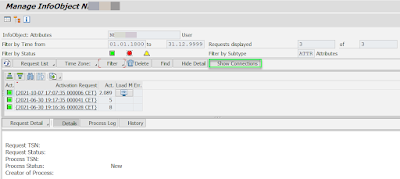
It is a t-code RSMNG – with official title as “RSPM MNG UI” or “Administration of RSPM managed targets (aDSO)” or just "MNG UI" or "administration UI". It serves to purpose of managing objects like aDSOs, Characteristics (InfoObjects) and Open Hub Destinations. It is a kind of old “RSA1 -> Modelling -> e.g. InfoProvider -> right click: Manage” navigation; screen - look alike thing. 

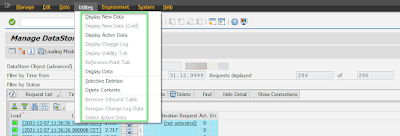
The t-code itself allows to manage the data requests like: navigate to the request’s monitor screen, delete/activate/find the request, change its technical status), refresh the requests list, change behavior of the aDSO (planning vs loading), jump to t-code SE16 screen to see the New/Active/Change Log data (depending on aDSO type), perform: Delete Contents, Selective Deletion  etc.


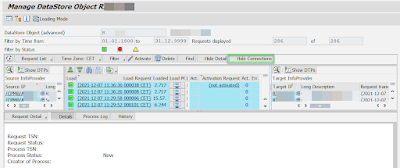
One more interesting feature is “Show Connection” button to analyze the data target by its “connection”. The feature enables quick review of source objects/DTPs that were used to load data to chosen data target.


I find the RSMNG very useful. I do not advice to anyone to use it as SAP may decide to “delist/defunction” it anytime in future releases of the BW as the main environment for BW/4 is above mentioned Cockpit and/or Studio. Also, I do not expect that SAP will enhance the RSMNG any further. From my point of view, there is a lack of DTP integration into it. A description of the DTP could be shown in table grid. For example, an ALV table grid could be customizable so user could choose from a list of available fields what is shown. Similarly, having an options like to copy/delete the DTPs from this t-code would bring further benefit. Anyhow, I find the t-code very useful. 

PS: the RSMNG t-code started to appear in classic BW as well. In particular BW 75 systems.


More information:

BW/4 related posts

SAP BW/4HANA (B4H) versions

SAP BW/4HANA (B4H) – what is it?

SAP BW4/HANA related t-codes

BW/4HANA specific objects

SAP BW∕4HANA Cockpit

2859559 - How to use GUI transaction instead BW Cockpit in BW/4HANA 2.0