Showing posts with label master data. Show all posts

Saturday, May 31, 2025

Generated program GP_ERR_RSDGTMPLIR

When there is an issue related to master data loading following technical program is created in the system: GP_ERR_RSDGTMPLIR. The load itself indicates an error RG 102 - Syntax error in &1, row &2 (-> long text). The error occurs during the generation of master data routines. In particular it is related to SID generation. Characteristics that is effected is listed in the report in its header:


Solution to solve this issue is very easy It is just to reactivate the characteristics.


Friday, March 18, 2022

Generating master data for Time Characteristics

There is a handful of so-called virtual or fixed system infoobjects that do not really have a data stored persistently in database. Instead, those data is generated on the fly in a memory. There can be several issues with such a characteristics. Mostly some time/calendar/date entries can be missing in case of IOs like 0FISCPER, 0CALMONTH, 0FISCPER, 0DATE etc. That normally means that master data for the particular characteristics is missing. In addition, entries cannot be seen in reporting or in F4 values. While running the reports.

Normally the master data need to be maintained but as those characteristics are virtual, it can’t be maintained via master data app in BW/4 cockpit (in BW/4) or in the master data maintenance web (in case BW 7.4 and higher) or via t-code RSD1 (alternatively via FM RSDMD_MDMT) in older releases of classic BW.

Just a side note; running above mentioned FM for 0CALYEAR would end up with a message: says: RSDMD 172 No master data maintenance possible for characteristic 0CALYEAR.

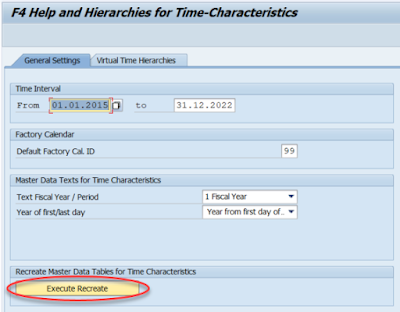
Therefore, there is a t-code RSRHIERARCHYVIRT (ABAP prog SAPLRSR_HIERARCHY_VIRT) for that. It is also available in BW’s customizing via following paths in SPRO t-code:

Classic BW or SAP Netweaver based BW systems: SAP Netweaver -> SAP Business Information Warehouse -> Report-Relevant settings -> General report settings for Business Explorer -> Set F4 help and Hierarchies for Time chars / OLAP settings

SAP BW4/HANA based BW systems: -BW4/HANA Customizing -> SAP BW4/HANA -> Analysis -> Set F4 Help and Hierarchies for Time Characteristics/OLAP Settings


The t-code RSRHIERARCHYVIRT allows create some general OLAP settings for time characteristics and generate the data/hierarchies itself. Complete rebuild of the data can be achieved by button “Execute Recreate” placed on General Settings tab”. The button technically calls a method REBUILD_TIME_MD_TABLES of an ABAP class CL_RS_TIME_SERVICE.


Further checks that can be performed in case you face issues with TIME related characteristics are following:

ABAP Report RSD_TIME_TCT_MREADCLASS_CHECK – it checks what is the master data class that is used to read characteristic's master data.


t-code RSRV -> Tests in Transaction RSRV ->All Elementary Tests -> Transaction Data -> Consistency of time dimension for InfoCube.


More information:

Virtual Time Hierarchy

2582961 - How to fill master data table of 0CALMONTH (time characteristics)

2194279 - Check report for technical characteristics and time characteristics

2237679 - Time Characteristics and Current Member Variables


Friday, July 17, 2020

MD maintenance: maximum number of hits

Webdynpro app of master data (MD) maintenance can be sometimes annoying as there is max number of hits defined as 200. That number is sometimes not very convenient. I understand that had to put something in there to prevent performance issues, timeouts etc. However, perhaps some higher number would suit the purpose better.


Luckily, there is an option how to override that default setting of 200. First, there can be an parameter introduced into RSADMIN table called RSDMDM_MAX_NO_HITS. This parameter started to appear in BW version 7.4 SP16. Setting the parameter the no of the hits becomes valid system wide. As always, when it comes to BW switches a user parameter wins over RSADMIN parameter. Thus, it is possible to setup user value via menu System -> User Profile -> Own Data. It must have same name as the RSADMIN table parameter - RSDMDM_MAX_HITS.

If no value exists for the user parameter and if no RSADMIN table parameter value is maintained, 200 is used as the maximum number of hits, by default.

More information:
2344879 - InfoObject master data maintenance: Configuring maximum number of hits system-wide

Thursday, July 16, 2020

Deleting BW Master Data

There are few possibilities how to delete master data in SAP BW. Normally this activity is done via SAP GUI. There are few possibilities how to do it.

1. RSA1 -> InfoObject/InfoProv right click -> Delete Master Data


2. ABAP report RSDMDD_DELETE_BATCH


Selection report of the report is similar to popup that follows after right click -> Delete Master Data on InfoObject

3. Master Data Maintance (WebDynpro app)
While user is in RSA1 in InfoObjects area or in t-code RSD1 there is a button Maintain available that triggers webdynpro (WD) application called rsdmdm_md_maintenance_app. The WD allows master data maintenance like adding, deleting and changing the master data.


The WD app was introduced in BW74. I wrote about it here. If someone does not like the WD way of MD maintenance there is still a chance to go back to SAP GUI way.

Also comparing how fast is the data maintenance done via WD vs SAP GUI the GUI way wins. For example deletion of few records done in WD takes sometimes minutes whereas in the SAP GUI it is matter of seconds based on my experience.

In a newer versions of BW system that use Hana Studio (Eclipse based) the maintenance of master data is going on there. In the newest BW like BW/4 it is done via a new web based tool called “SAP BW∕4HANA Cockpit”. See online docu here.


More information:

Wednesday, August 23, 2017

Sequence of loading data in SAP BW

While loading data into SAP BW systems one aspect of it comes to the picture. It is the one related to sequence of data loading. Normally in general the data loading sequence shall be like following. Master data loads come first followed by transactional data loads.

Loading sequence within the master data (MD) shall be as follows. First to load MD attributes then texts and finally hierarchies. But the attributes and texts can be loaded in parallel. Due to more complex operation while loading of the hierarchies are going on I suggest to put the hierarchy loads as last step of MD loads.

Now on topic of loading MD before transaction data (TD). All MD shall be loaded before TD is loaded. If it is not the case the TD loads triggers insertion of MD rather empty master data entry. What is meant by insertion here is that SID needs to be generated for the characteristic attributes, and new records have to be inserted in the MD tables. 

This can cause performance issues as the load can take twice as much due to inserting the MD during load of TD. Also if there are parallel loads in place there may locks appear in SID table update. Another issue that can happen is while there are master data lookup in the transformation of the TD. If the MD is not present then there is nothing to be looked up and as a result there is a data quality issue.

More information:
652856 - Loading hierarchies with process chains

1597364 - FAQ: BW-BCT: Extraction performance in source system

Monday, May 11, 2015

BW 74: Master data maintenance: web based environment

This is one of the changes in BW 74 which is a bit controversial. Whereas occasional end user may like it hard core business users and BW administrators tent to dislike it. Issue is that complete screen for IO data maintenance was moved from SAP GUI screen to web environment. It is related to tcode “RSDMD - Master Data Maintenance w.Prev. Sel.” - which is not based in GUI anymore. Functionality is based on ABAP WebDynpro technology. The change is available in BW as of version 7.40 SP 05.

To enable web based MD maintenance following services must be active in tcode SICF:
RSDMDM_MD_MAINTENANCE_APP
RSDMDM_MD_NEW_APP

URL of the web dynpro has following structure:


Old way:

New way:

While promoting the change SAP claims that new web dynpro based app is capable of maintaining very long characteristics which very introduced in BW 74. Like CHAVL (extension of RSCHAVL 60+ chars) and XL Texts. That is for sure very true. But how many customers have already start using longer values of IO? For most of them ti would be extremely useful to have possibility to choose which way they want to maintain their MD. There must be definitely possibility to let the user to choose either old way (before 74) or new way (74) shall be used when starting tcode RSDMD. However at present this possibility is not in place. There is something which SAP has to deliver soon or later. There are already a “hacks” available to get the old behavior back. One example is manipulating function module RSDMD_MDMT which is called by ABAP program RSDMD_MDMT_WITH_F4 (the program is behind the tcode RSDMD). By implementing this “hack” user can decide either old or new way will be used. There is only one downside within the hack. Which is that is a change of SAP standard code. While doing it; it may cause issues during next upgrade of the SAP BW system as SPAU/SPDD adjustment will be needed.


Useful information:
help.sap.com - Creating and Changing Master Data
1913238 - Master data maintenance in Web Dynpro BW7.40 SP05
1997402 - Master data maintenance is not possible in old GUI based one
1969105 - Master data maintenance for InfoObjects does not start

Tuesday, January 27, 2015

New version of the Master Data deletion

In BW 7.0 SP23 a major change related to master data deletion was introduced. An aim is to overcome issue with the MD deletion like performance, memory overflows, dumps etc. The change is visible on dialog of master data’s IO deletion. The dialog box iis available e.g. in tcode RSA1 -> right click on IO -> Delete Master Data:


There are few more options available for the deletion now. I’m not going to the details about them. I refer you to SAP Notes listed below to get the details.

Just one more information is related how to switch this functionality ON. It can be done in RSA1, menu Settings -> Global Settings. Thick ON check box called: 'Pack.Mas.Data.Del'. If you do not have the check box available they you are running on newer version of BW because as of release 7.3 this is default deletion option. So to choose new MD deletion option is only available in release below 7.3

More information:
1370848 - New Master Data Deletion - Information
1705824 - Old master data deletion is obsolete