There
are few transaction codes not very known for processing of list outputs. Actually
they are not real transaction codes but are user interface codes (sy-ucomm)
instead.
First
one is very helpful while you are in screen’s output where no standard System menu
is available. If this menu is in place you have a choice to go via
System->List->Save->Local file. In case when this System menu is not available
you can simple enter %PC into
transaction code field:
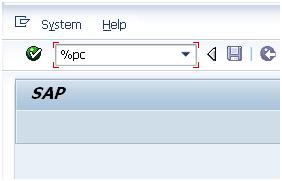
Afterwards
you get pop-up where you can enter format of the file into which you want to save this particular output. So to sum it up you can you %PC to same any lists as
local file.
Furthermore lists can
be searched with another transaction field code %SC:

Again
it is very helpful in case no standard icon of binocular is available in the
toolbar of SAP GUI menu. Also continued search with can be
achieved by transaction field code %SC+.
Few more command fields related to handling of SAP GUI sessions:
·
/n<t-code> terminates current transaction and calls other transaction
indentified by its t-code
·
/o<t-code>
opens a new session and starts transaction t-code in this
session
·
/n terminates
the transaction
·
/nend terminates
all separate sessions and logs off (same as via menu "System -> Log
off")
·
/nex terminates
all separate sessions and logs off immediately (without any warning)
·
/o0 opens a new session without
starting a transaction in it
·
/o lists existing sessions and
allows deletion or opening of a new session
·
/i terminates
current session (same as via menu "System -> End session")
·
/i1
, /i2 ,... terminates
the session with the specified number
·
.xyzw to support
menu navigation so called "Fast path", in situations in which it is
not possible to navigate via mouse (faulty mouse device), where
"xyzw" refers to the underlined letters in the menu
More command fields related batch input processing:
·
/n terminates current
background input t-code and closes it as "Failed"
·
/bdel deletes the current background input
transaction
·
/bend terminates background input processing and sets
the session to "Failed"
·
/bda switches from "Display errors only"
to "Process in foreground"
·
/bde switches from "Process in foreground"
to "Display errors only"
More information:
Resetting
buffers: t-codes /$*
Starting
up ABAP debugger
26171 - Possible
entries in the command field ("OK code")


