Showing posts with label command field. Show all posts

Monday, July 23, 2012

Not very known transaction codes for lists

There are few transaction codes not very known for processing of list outputs. Actually they are not real transaction codes but are user interface codes (sy-ucomm) instead.

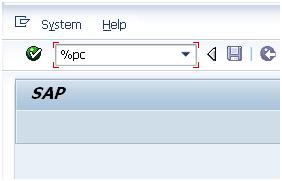
First one is very helpful while you are in screen’s output where no standard System menu is available. If this menu is in place you have a choice to go via System->List->Save->Local file. In case when this System menu is not available you can simple enter %PC into transaction code field:


Afterwards you get pop-up where you can enter format of the file into which you want to save this particular output. So to sum it up you can you %PC to same any lists as local file.


Furthermore lists can be searched with another transaction field code %SC:


Again it is very helpful in case no standard icon of binocular is available in the toolbar of SAP GUI menu. Also continued search with can be achieved by transaction field code %SC+.


Few more command fields related to handling of SAP GUI sessions:

·        /n<t-code> terminates current transaction and calls other transaction indentified by its t-code


·        /o<t-code> opens a new session and starts transaction t-code in this session


·        /n                terminates the transaction


·        /nend          terminates all separate sessions and logs off (same as via menu "System -> Log off")


·        /nex            terminates all separate sessions and logs off immediately (without any warning)


·        /o0              opens a new session without starting a transaction in it


·        /o                lists existing sessions and allows deletion or opening of a new session


·        /i                 terminates current session (same as via menu "System -> End session")


·        /i1 , /i2 ,...   terminates the session with the specified number


·        .xyzw           to support menu navigation so called "Fast path", in situations in which it is not possible to navigate via mouse (faulty mouse device), where "xyzw" refers to the underlined letters in the menu


More command fields related batch input processing:

·        /n      terminates current background input t-code and closes it as "Failed"


·        /bdel deletes the current background input transaction


·        /bend terminates background input processing and sets the session to "Failed"


·        /bda  switches from "Display errors only" to "Process in foreground"


·        /bde  switches from "Process in foreground" to "Display errors only"


More information:

Resetting buffers: t-codes /$*

Starting up ABAP debugger

26171 - Possible entries in the command field ("OK code")


Tuesday, October 28, 2008

Resetting buffers: t-codes $*

 There is a pair of SAP transactions which might be used when you need to reset data from SAP database tables temporarily stored in buffers. Actually, those codes are not real transactions but so called OK fields that are able to be entered in field of transaction (sometimes called as command field) within SAP GUI. The below codes manipulates with different buffers of the application server.


/$TAB RSADMIN    refreshes buffers for specific tables e.g. RSADMIN

/$TAB                    refreshes all table buffers + the program buffer


/$SYNC                  refreshes all table buffers, except the program buffer

/$SYNP                  probably the same as above


/$CUA                    refreshes a CUA (central user administration) buffers


/$DYN                    refreshes a screen buffers

/$DYNP                 probably the same as above


/$NAM                   refreshes a nametab buffers


/$OTR                    refreshes a OTR (Online Text Repository - central storage location for texts and its translations) buffers


After successful execution of those transactions you are suppose to get messages like:


All buffers were reset

Message no. 00012


TAB buffer reset

Message no. 00044


More information:

Starting up ABAP debugger

Not very known transaction codes for lists

Saturday, October 4, 2008

Starting up ABAP debugger

There are following different option of starting ABAP debugger via transaction field (also known as ok-codes or command fields) of SAP GUI:


  • "/h"               a very common way, it start ABAP and classic dynpro debugging


  • "/hs"             starts ABAP, system and dynpro debugging


  • "/ha"             starts ABAP Debugging only


  • "/hx"             end of debugging


  • "/hmusa"      creates memory snapshot


  • jdbg              in TA SM37 restart of a finished or crashed background job for debugging


  • /ron              start ABAP Runtime Analysis measurement (transaction SE30)


  • /roff              stop ABAP Runtime Analysis measurement (transaction SE30)
  •  
  • /$st              Switch on and off Memory Consumption Display (it ia available in menu "System -> Utilities -> Resource Usage"


A letter "h" in command like /h /hs /ha /hx comes from a word "hoppeln" which is German word that means something like lollop.


Other posts related to transaction field of SAP GUI:

Resetting buffers: t-codes $*

Not very known transaction codes for lists


Other posts on ABAP debugger topic:

Remote ABAP Debugging and more

Starting up ABAP debugger

SAP system behavior while debugging

Endless loops in ABAP

Debugging of BW IP's planning functions

Debugging of BEx's text variables