Showing posts with label Administration Cockpit. Show all posts

Wednesday, January 26, 2022

BW4: Maintain a process chain variant in web

Normally in BW/4HANA based system, most of BW administration activities are performed in web environment. The BW4 has a REST API Framework that does that. The web administration environment is called SAP BW∕4HANA Cockpit (aka “BW Fiori Launchpad”) and it can be start from the SAP GUI via t-code BW4WEB.

SAP supports BW
admistrators to move from SAP GUI based administration to web administration. One of the places where this initiative can be notices is t-code RSPC1. In BW/4 based systems there is a new icon the t-code toolbar. The icon is associated with tooltip called “Show chain in web-UI (Shit+Ctrl+O)”.

Same function is available via menu: View -> Show Chain in Web-UI (Shift+Ctrl+0).


What it does is that it opens a new SAP GUI session with the SAP BW∕4HANA Cockpit’s page of particular PC – so called Process Chain Editor.
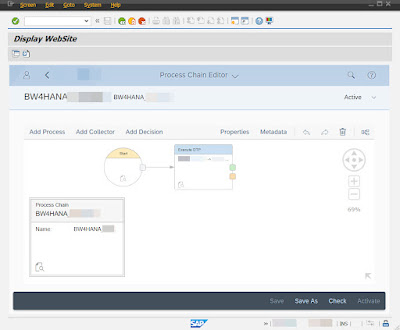


Technically the function is implemented by a call of FM RSPC_CHAIN_MAINTAIN_WEB in ABAP include LRSPC_FRONTENDI01. The FM first constructs an URL of REST API Framework by calling a Uniform Resource Identifier registry () and then rendering a web browser instance by creating an GUI container. There are two buttons available on this screen (called Display WebSite). One button is to open the same URL in separate session of the web browser.

Other button is to display URL of the PC administration web page in pop-up window. Technically the URL is the same that BW∕4HANA Cockpit uses.

https://hostname:port/sap/bc/ui2/flp?sap-language=EN&sap-client=010#BWProcessChain-change?chainId=PC_NAME

Monday, August 31, 2020

BW statistics not collected for certain BW object or object type

Normally BW statistics data is being collected into BW statistics technical tables like RSDDSTAT, RSDDSTATAGGR, RSDDSTATINFO, RSDDSTATAGGRDEF, RSDDSTATEVDATA, etc. Particular table is used depending on BW object type. For example statistics details about DTP processing is stored in table RSDDSTATDTP.

In case BW statistics data is missing in particular tables, the BW statistics customizing needs to be checked. In most cases, customizing is missing for either particular BW object or BW object type. Main table that stores the BW statistics for customizing is RSDDSTATOBJLEVEL - objects such as Queries, InfoProviders, Web Templates and Workbooks are to be maintained in there in order to collect the BW statistics. Those particular BW objects can be maintained directly via t-code RSDDSTAT.

More over other BW objects or objects types needs to be entered into the RSDDSTATOBJLEVEL table manually via SE16/SM30 t-code.

Therefore, if no statistics written to the statistics tables always check if the corresponding entry in the RSDDSTATOBJLEVEL table exists. Once customizing entry is there then the BW statistics data must be collected by the BW system.


More information:

934848 - Collective note: (FAQ) BI Administration Cockpit

2470847 - How to Delete BW statistics Data

Wednesday, August 13, 2014

Missing report RSIM_CHECK_REP_DATA in your BW system

Recently I was activating BI statistics into newly installed BW system.  While I was doing so I set couple of standard BW process chains to run. One of them called Check Report Data Availability [0TCTHC_CHECK_REP_DATA] which uses ABAP report RSIM_CHECK_REP_DATA in its ABAP process variants has failed.

I was looking why that happened. Output of failed chain was a red process and behind it an ABAP dump “Internal session terminated with a runtime error LOAD_PROGRAM_NOT_FOUND (see ST22)”.  The dump said “Program "RSIM_CHECK_REP_DATA" not found.”


At first sight it looks completely strange that standard SAP program is missing in BW system. But so it was the case. Report RSIM_CHECK_REP_DATA was not there. Reason being is very simple. SAP decided that for standalone BW systems as of 730 and higher releases this report is not needed. The report was/is present only in BusinessByDesign (ByD) systems. In SAP Note “1890206 - Process Chain 0TCTHC_CHECK_REP_DATA is failed” it is also said that references to above mentioned chain will be removed from standard delivery of the further BW releases.

Wednesday, April 10, 2013

Importance of BW objects – BI Admin Cockpit (TA RSTCIMP)

Define Importance is activity within installing BI Admin Cockpit. The Cockpit 
sometimes also known as BW Admin Cockpit (SMP component BW-BCT-TCT)
is BW’s functionality for monitoring of BW’s performance. The Cockpit enables 
you to see utilization of your BW systems in terms of data loading and query
runs.  It is based on the technical BI content for runtime and status data 
for BW objects and activities. It was previously in BW 3.x known as 
BW Statistics. 
 
You can setup the cockpit as per step-by-step guide in SAP Note: 934848 
collective note: (FAQ) BI Administration Cockpit. IMG path to set it up is as 
follows:
SPRO -> SAP NetWeaver -> Business Intelligence -> Settings for BI Content 
-> Business Intelligence -> BI Administration Cockpit.
 
Within the setup there is optional IMG activity (Define Importance, TA 
RSTCIMP), you can assign importance of BW objects. Importance is then 
useful while you analyze statistics data (for example for filtering or sorting).
 
You can set up the importance for following objects:
·         Queries
·         MulitProviders
·         InfoSets
·         InfoCubes
·         DataStore objects
·         Process chains


Importance is basically number from range 0-100. By default all the BW
objects are having importance value set to 50. You need to uncheck 
default value checker Inh (Inherit values from related objects) to enable 
yourself to enter different value. Data of importance is stored in table 
RSTCIMPDIR.  


Sunday, July 8, 2012

Inconsistency in delta administration


Recently I encountered following error related to delta mechanism:

Inconsistency in delta administration RSM1363


Message appeared in my case when I attempted to browse an InfoPackage. If you get this error message InfoPackage is not accessible at all. I research on this message. I came across interesting site which pointed me into way how to resolve this error.
Basically root cause seem to be in tables on ECC and on BW sides storing information on delta initialization requests. It might be that in BW table RSSDLINIT contains entry for initialization for specific data source. On other hand table ROOSPRMSC in ECC does not contain entries for the same.

According note 852443 - Dump in include LRSSMU36/RSSM_OLTPSOURCE_SELECTIONS there are five scenarios that could happened. Two of them are mentioning ABAP report RSSM_OLTP_INIT_DELTA_UPDATE. This tool can be used to delete init selections in the 'Scheduler/Init selections in the source system' menu in the InfoPackage.

Notice that before you do any changes into the BW system you need to study above mentioned note and also other listed below:


Sunday, August 1, 2010

Difference between DB and BW statistics

Terms like database (DB) and BW statistics are often referred in SAP documentation, Notes or even in SDN forums. We always hear that it is important to maintain statistics in order to achieve good performance of SAP systems. Especially in BW area performance topic is very important. Here it is often discussed that we must keep the DB statistics all the time for SAP BW. Then we hear that BW statistics mull be keep up to date as well. You can get easily confused with mixing a meaning of those two terms.

So basically what DB statistics is all about? Underlying database systems are using sophisticated algorithms to determine “a path” how to execute SQL statements. In detail a path is comprised of type of DB access (index access, full table scan, join types, memory requirements, table stats, index stat, column stat, histogram, partitioning, parallelism, clustering, etc.) how particular SQL statement is performed. In order to determine it DB engine is evaluating DB statistics which is basically about evaluation of how many I/O DB operations would take to perform DB statement with different DB access. The DB access with the fewest I/O DB operations is then executed to fulfill SQL statement. DB statistics is depended on type of used DB platform. E.g. in ORACLE there is a component of DB engine called Cost-Based SQL optimizer (CBO). Therefore sometime we call this type of statistics as an Optimizer statistics. This tool is in charge of SQL statement execution governing. This component is evaluating DB statistics. On other DB platform such a component is commonly called Query optimizer.

Now the questions would be how can we build DB stat? DB statistics can be build from BW perspectives within process chains via process called “Construct Database Statistics”. From basis point of view most common is to use BRTOOLs to build this statistics in case of ORACLE DB. Another option is to use transaction DB20 or report RSANAORA.

For more information about DB statistics see SAP Note 588668 - FAQ: Database statistics.

What about other term - BW statistics? It is a part of technical Business Content which helps to evaluate performance of SAP BW system. There are two main areas of performance evaluation: OLAP processor and Warehouse Management (WM).

Within OLAP processor gives an information how BW reporting is performing. A way how statistics data is collected If is like following. Every navigational step within the reporting that requests data from the database is saved in transparent table in BW backend (tables RSDDSTATHEADER, RSDDSTATINFO, RSDDSTATEVDATA). This includes characteristics, navigation attributes and hierarchies were involved. Here an event concept is used. Event is uniquely identifying each step in the process. From DB tables statistics data are loaded into BW statistics InfoCubes via technical process chains.

In case of WM statistics or Data Load statistics it is determining performance of loading, transforming the data and all the others staging operations. In principle system is gathering the data about process chains, DTPs and InfoPackages. Here e.g. time of execution is stored along other data load statistics data. Table where data is written is RSDDSTATWHM. WM statistics is customized via transaction RSDDSTAT.

BW statistics is a part of BI Administration Cockpit. See 934848 - Collective note: (FAQ) BI Administration Cockpit, for BW 3.x see: 309955 - BW statistics - Questions, answers and errors.

Notice that BW statistics was redesigned in BW version 7.x and it does use different tables comparing to BW 3.x.


More information:

588668 - FAQ: Database statistics

555030 - Deactivating BW-initiated DB statistics

1013912 - FAQ: Oracle BW performance