Monday, July 20, 2015

Versions of SAP Java Connector (JCo)


I introduced SAP JAVA Connector (JCo) in my previous post. While integrating JAVA and SAP applications one may come to issue because of usage of different version of JCo with combination of different Java JDK/JRE versions. Therefore in this post I briefly go via versions of JCo. In table below see different version of the JCo delivered over the years. Notice that is cases of some versions release dates are just approximate.

Release
Release Date
Note
Maintenance ends
1.x or 1.1
Pre 2002
n/a
December 31, 2003
2.0.2
18.06.2002
December 31, 2008
2.0.3
26.07.2002
2.0.4
12.08.2002
2.0.5
02.09.2002
2.0.6
04.11.2002
2.0.7
09.12.2002
2.0.8
31.03.2003
2.0.9
22.07.2003
2.0.10
19.11.2003
2.0.11
16.12.2003
2.0.12
20.07.2004
2.1.1
06.08.2003
March 31, 2013
2.1.2
20.11.2003
2.1.3
10.03.2004
2.1.4
13.10.2004
2.1.5
10.02.2005
2.1.6
20.07.2005
2.1.7
19.05.2006
2.1.8
05.09.2006
2.1.9
06.03.2009
2.1.10
26.04.2010
3.0.1
18.11.2008
Maintenance will be provided at least until December 31, 2017;
Maintenance and support ends one year after release of a successor version or on December 31, 2020 at the latest, whichever occurs first.
3.0.2
16.04.2009
3.0.3
15.09.2009
3.0.4
10.11.2009
3.0.5
16.02.2010
3.0.6
22.09.2010
3.0.7
05.05.2011
3.0.8
03.11.2011
3.0.9
09.01.2012
3.0.10
31.07.2012
3.0.11
30.09.2013
3.0.12
09.05.2014
3.0.13
14.04.2015
3.0.14
22.12.2015
3.0.15
02.08.2016

3.0.16
15.12.2016

3.0.17
21.07.2017

3.0.18
29.03.2018

3.0.19
22.12.2018

3.0.20
25.9.2019


To download the newest version of JCo see directory "SAP Java Connector" - "Tools & Services" at SMP quick link: service.sap.com/connectors or see Note 1672418 - Downloading the SAP JCO or 1944049 - Old release of SAP Java Connector (SAP JCo) download.

Last update on: 9.2.2020
3.0.20

SAP Java Connector (JCo)

SAP JAVA Connector (JCo) is an API that allows bidirectional communication of a Java application with any SAP system. It is very much used while interfacing SAP application from JAVA based applications. It allows Java programs to connect to SAP systems and invoke Remote Function Modules (BAPI). It also allows parsing of IDocs (SAP Intermediate Documents) amongst other things. Both types (in/outbound) of the communication are supported.

The SAP Connector leverages following out-of-box libraries provided by SAP:

SAP JAVA Connector - is an API that allows bidirectional communication of a Java application with any SAP system

SAP JAVA IDoc Class Library – a suite of libraries providing an API which helps navigating, reading, filling, and modifying IDocs.


Both SAP libraries are part of JCo. The JCo libraries are coming licensed without additional license fees as part of the respective SAP solution or SAP component license for SAP customers.


service.sap.com/connectors -> SAP Java Connector (SAP JCo)
SMP component: BC-MID-CON-JCO

Further investigating of SAP BW dumps

There are different types of ABAP dump one may encounter while working with SAP BW. Many of them are quite tricky to read. Even skilled BW developer or ABAP developer can be surprised at the end what really an issue was about. I just name few examples that can be seen here or here. What is an issue is that actually there are many areas within the dump that need to properly reviewed in order to come to conclusion of what is going on. Basically what we use once we look at the dumps is that we just review it very briefly w/o detail look at some of areas.
What I found recently is that following areas of the dumps are worth to look at:


Chosen variables - area lists out variable values at the time of dump. In many cases there might be values which may lead us to solution or at least gives us a clue of what is going on. In example below there was a very generic dump: UNCAUGHT_EXCEPTION / CX_RSR_X_MESSAGE. Symptoms of the issue was that load to DSO was just failing w/o any obvious evidence of what is wrong. 


 Monitor of the data load request was just read, no log or anything else was present. Finally someone took at this this part of the dump and there was an IO mentioned = 0WEEKDAY1. While looking up the IO name in support.sap.com an SAP Note (2079842 - Time check: Termination _CHECK_PART_TIME_WO_FINEST-6-) with solution was found. Therefore always pay attention to this part of the ABAP dump!


Sunday, July 19, 2015

What are SAP GRC solutions?

Term GRC in enterprise software refers to Governance, risk management, and compliance. This is the umbrella term covering a company's approach across these three areas:

1. Governance - combines processes established and executed within company that reflect the company's structure and how it is managed and led toward achieving goals.

2. Risk management - predicts and manages risks that could hinder the company to achieve its objectives.

3. Compliance - with the company's policies and procedures, laws and regulations. It helps to measure this compliance as it is considered key to an organization's success. Automated risk and compliance monitoring activities can help prevent and/or mitigate risk events across company.

In other words the GRC integrates and manages IT operations of company that are subject to regulation. The GRC solution typically combines applications that manage the core functions of GRC into a single integrated package. Speaking very simply; such a software issues roles to the user in addition it collects information who and when requested an access to particular function or data in the SAP system. It tracks who and when approved the access etc. among other things.

SAP has few GRC solutions for different LoBs:


1. SAP GRC Access Control - is a suite of tools to monitor, test, and enforce access and authorization controls across company. It complies with regulatory mandates (e.g. Sarbanes-Oxley). Using these tools companies can identify and remove access and authorization risks from its systems. Also preventive controls in business processes to stop segregation of duties (SoD) violations are supported. The solution has following capabilities:
1.1 Compliant User Provisioning (CUP)
1.2 Enterprise Role Management (ERM)
1.3 Risk Analysis and Remediation (RAR)
1.4 Superuser Privilege Management


2. SAP GRC Fraud Management (powered by SAP HANA) - it enables frauds analysis across industries. Also it helps to prevent irregularities or fraud in ultra-high volume environments. Technically it is add-on application for SAP NetWeaver AS ABAP and the SAP HANA database. Sometimes SAP Fraud Mngt is referred as part of SAP Assurance and Compliance Software.

online docu SAP Fraud Management - SAP Assurance and Compliance Software 1.1 SP07


3. SAP GRC Process Control - is solution for internal controls management. It supports audit team in gaining better visibility into business processes and ensures a high level of reliability in financial statement reporting. Moreover it enables documenting control environment, testing and assessing controls, tracking issues to remediation, and certifying and reporting on the state and quality of internal controls. Using a combination of data forms, automated workflows, certification, and interactive reports, this solution enables members of internal control, audit, and business process teams to effectively manage compliance activities.


4. SAP GRC Risk Management - enables companywide risk management process as mandated by certain legal requirements and recommended by best practice management frameworks.


5. SAP GRC Global Trade Services (GTS) - Solution to support control of costs, reduce risk of trade penalties and fines. In addition it helps to clear inbound/outbound customs in fast manner. Automation of trade processes in case of international operations, ongoing compliance, and tight integration throughout your cross-border supply chain.


Useful links:

How to activate SAP NetWeaver Gateway

SAP NetWeaver Gateway is a solution which enables creation of OData services into ABAP Stack of NetWeaver to easily consume data from SAP system from outside systems. I introduced the Gateway here and here.

In this post I'd like to describe very basic step which needs to be done in the Gateway system. It is its activation of the Gateway itself. Without performing this activity no SAP NetWeaver Gateway services will start.

How to activate it? First we can go via following customizing path:

t-code SPRO-> F5-> SAP NetWeaver -> Gateway -> OData Channel -> Configuration -> Activate or Deactivate SAP NetWeaver Gateway.


Alternatively we can directly run t-code /IWFND/IWF_ACTIVATE which points to ABAP report /IWFND/R_COF_ACTIVATE_IWF. The report manipulates field IS_ACTIVE of table /IWFND/C_CFIWAT. Value of the field IS_ACTIVE has to be equal to X. Once we run this we get following confirmation pop-up window:


Once dialog is confirmed another ABAP report called /IWFND/R_MET_AGGREGATE is started. This one triggers job 'SAP_IWFND_METERING_DEL' which activates a bunch of SICF services needed to maintain SAP Gateway.

Definition of BAPI

BAPI or Business Application Programming Interface is standardized programming interface that allows external access to business processes and data in SAP System. SAP defines it further object in Business Object Repository (BOR) as methods of SAP business objects or SAP interface types. The BAPIs offer an object-oriented view of business components in the SAP system. They are implemented and stored as RFC enabled function modules in the Function Builder of ABAP Workbench.

The BAPIs are here since 1996 (with R/3 release 4.5*) where the concept was introduced. Having said that BAPIs are RFC enabled function modules is not enough. There are further criteria that BAPI must fulfill. Let's have a look at them.

1. BAPI naming convention - technical name must start with BAPI_*.

2. The BAPI must implement method of an SAP Business Object (e.g. financial document, sales order, etc.)

3. The BAPI must maintain static interface through different version of SAP systems

4. It must be enabled for remote (RFC) execution.

5. It must run to completion without need for any secondary user interaction. There is no connection to SAP via SAP GUI. Therefore complete completion of data changes (if any) is required.

6. The BAPI must handle all errors by itself. If situation potentially may lead to inconsistent state of data an ABAP statement RAISE must not be used. Else it would terminate the function immediately leaving the data and the function processing in undefined state.

7. It must not cause ABAP session change. There must not be used any ABAP statement which may cause current Logical Unit of Work (LUW) within SAP User Roll Area to terminate.


According SAP all 7 criterions are adhered by SAP.  Criterions no 4 - 7 must be followed also by customer while developing custom BAPIs. Moreover only SAP objects can follow criterions 1 - 3.


In closing words I'd like to point out that BAPIs were are not designed to cover API as we traditionally know this term. Even they are very often referred as API they basically do not completely comply with the API definition. Usually SAP BAPIs are missing some of API paradigm (e.g. communication based on web protocols; abstracts consumer from the backend app; placed on wrong abstraction level; functionality is duplicated by several BAPIs doing the same; etc.). Therefore it is important that we look at the BAPI as evolution that happened in SAP while striving to enable external data access.


Useful information:
BAPI User Guide (CA-BFA)


Wednesday, July 15, 2015

Process chain where used

Process chains (PC) are very commonly used to automate data loading activities and other tasks in BW. All activities carried out by the PC are referred as process within the PC. One PC can be included as a process in other PC. The PC which has as step/process other PC is called metachain. The PC which is included in met chain is referred as local PC. There is a process type called "Local Process Chain" within "General services" dedicated for process chains.


A usual question which is raised while talking about Local Process Chains is what are metachains where the local one is included. Or in other words a process chain where used type of thing. So how to find out this?
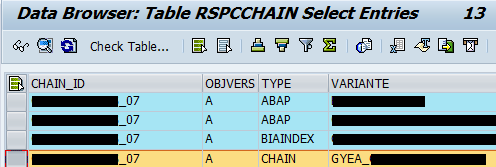
All is available in table RSPCCHAIN - a directory of the entire PCs. Meta chains are having value CHAIN populated in field TYPE which identifies Local Process Chain.


Now when we display entries of the same table just for Local Process Chain (GYEA_*) = VARIANTE with further filter on field TYPE = CHAIN we got a list of all metachains where it is used.


Wednesday, July 8, 2015

How to determine what BEx query is used in BW workbook

Workbooks are integral part of SAP BW. They are used very much within users as they are very helpful. Basically they allow having several worksheets having run there different BEx queries. Even several BEx queries can be placed in single workbook.

Setup of such a workbook is fairly easy. The Bex query (or queries) is just inserted into MS Excel while connected to BW backend system either via Business Explorer Analyzer or Analysis office.

The workbook can be saved in BEx favorites in backend system in user's favorites or in user's roles.


Usual question while dealing with the workbook is to get know what are Bex query or queries contained in there. Here either we recognize this directly as we are connected to backend via Analyzer or Analysis office. Second option is to lookup this relation in BW tables.


Table RSRWORKBOOK contains information on 'Where-used list' for reports in workbooks. Here we put the workbook ID into field WORKBOOKID. From this table we get a list of BEx queries in column GENUNIID. With this information we go to table RSRREPDIR where we put it to column GENUNIID. Finally in column COMPID we get BEx query technical name(s).

Tuesday, June 30, 2015

How to find TRFN concerned in ABAP dump?

ABAP dump is common place where monitoring team of SAP systems are talking look. Even Basis people usually observe tcode ST22 and they inform particular BW people about possible issues. So what actually we can read from the ABAP dump concerning BW failed transformation?
The ABAP dump related to failed BW transformation looks like following:

Category               ABAP Programming Error
Runtime Errors         GETWA_NOT_ASSIGNED

ABAP Program           GP00O2SPBAQDZP8PDSDOGUNVDYB


Afterwards an description of particular error follows. Main thing what we get out of it is just GP* report. It is generated report which contains whole logic of the BW transformation. The problem of the dump is that from the log that is provided we can't see what corresponding transformation is where issue occurred. This information must be lookup up. There is a table called RSTRAN which usually can be used to look up this info. The GP* report from the dump must be entered into field TRANPROG on selection screen of the table selection screen. Note that important is to remove first 2 letters "GP" from the name of the GP* report.


Here we go -> we got the transformation ID:


Now by using value in field TRANID we can look up the transformation in RSA1:


Here we go; the TRFN is found:


However this method doesn't work for all types of TRFN/loads.

Sunday, June 28, 2015

How to influence help input values (F4) on BEx report variable screen

Variable or selection screen of BEx queries are important to gather user input for later data retrieval for the queries. Input fields on these screens are provided with so called input values or F4 values which help users to enter proper values. The proper values mean the one which exists in the systems and which makes sense for the report.  Concept of F4 values was taken from classis ECC (former R/3) transactions where it was successfully used for years.


One may wonder what settings are available in BW system which may influence behavior of the input values. Main place where all the functions for F4 behavior are available is RDS1 or RSA1 -> Modeling -> InfoObjects -> Display characteristics -> tab Business Explorer. Here under General settings section following fields are available:


Display - controls the format in which characteristics values will be displayed. Options that are available are: No display; Key; Text; Key and Text; Text and Key.                                       

Text Type - controls which format of text is displayed. Options that are available are: Default; Short text; Medium text; Long text. This also depends what types of text table is maintained for particular IO on tab Master data/text. If case "default" option is selected then the shortest text available is displayed.

BEx description - Sets which description appears in BEx for particular characteristic. It is possible to choose between long and short description.
Selection - Selection restriction for characteristics. It describes how values of a characteristic in BWx query should be restricted. In case of value "Clear for every Cell" or "Unique for every cell" characteristic must be restricted to one value in every column and in every structure for all the queries. The characteristic cannot then be aggregated.

Query Def. Filter Value Selection - Selection of Filter Values for Query Definition. Determines how selection of filter values and restriction of characteristics function during query design time. Normally values from characteristics master data table are displayed. In case of characteristics without the master data table, the values from the SID table are displayed. Also it is possible to display only the values that are in the InfoProvider. This is available by giving option "InfoProvider Values Only".

Query Execution Filter Val. Selectn - Selection of Filter Values for Query Execution or so called "F4 read mode". Following options are available for executing queries:

- M mode: Values in master data table. All available MD values are read to the MD tables (P table, Q table).

- Q mode: Only posted values for navigation: Only those values that are part of the query results are read.

- D mode: Only InfoProvider values. Only the values of the characteristics that are updated in the InfoProvider (IC dimensions or DataStore) object are read. This mode is valid for InfoCubes and DataStore objects - a case when MultiProvider only consist of IC and/or DSO. Exception is for the characteristics that are designed as Line Item Dimension - mode D is not supported here. In case M or Q mode is selected, there might a message "No data found" while selecting F4 during query runtime.

Filter Value Repr. At Query Exec. - It determines how the display of filter values works when a query is executed. In some cases, it could be advisable to display the filter values with an appropriate control. If the characteristic has few characteristic values, you can display the values as a dropdown list box.


Useful information:
1843538 - Common issue with variable/selection/filter screen F4 value
1080863 - FAQ: Input helps in Netweaver BI
1133107 - Variable screen Web: Spaces as part of characteristic member
1483260 - Variable screen value display for Special Characters

Friday, June 26, 2015

BW transport's error 1: Error activating element xyz

Today I'm starting series of blogs related to common issues with BW transport. This time it will be about BEx Queries transports. One of very common errors is that Method Execution phase of Transport Request import ends like following:

            Start of the after-import method RS_ELEM_AFTER_IMPORT for object type(s) ELEM

            Error activating element 00733D5CMRY7U21O29QA1DU8V


What is going on is very clear even form the log. System tried to activate particular BEx query component/element but failed. We may want to identify what is the component that is missing. To do this a short lookup in the tables like RSZCOMPDIR and/or RSZELTDIR can be done. Most likely it will be a query name. However this will not solve our issue. What is needed is to identify what prevented the system to activate it. In other words what is missing in the system or in transport. In most cases it is that is a just forgotten object which was not added into the transport or maybe it was removed from the transport. Also the object is not missing; it exists in the target system but is it not there in active version.

In order to find out this SAP is providing report CHECK_MISSING_ELEMENTS. What it does is analyzing given objects (query, filter, structure, restricted KF, calculated KF, variable) and it returns inconsistent elements related to given input object. Notice that you have to run the report with object version as M on selection screen.


Once missing objects is discovered by the report CHECK_MISSING_ELEMENTS it just need to be added into the transport and the transport can be reimported.