Monday, July 4, 2011

How to work with RSADMIN table

RSADMIN table is important table from BW system customizing point of view. It does contain a lot of crucial parameters which are influencing BW system. For list of all parameters of consult to note 912367 - Composite Note: RSADMIN Parameter.

In case you need to either insert/update/delete any parameter of RSADMIN table you can use following ABAP report: SAP_RSADMIN_MAINTAIN
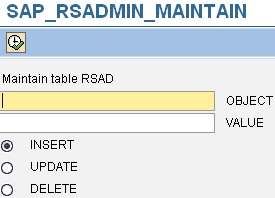


If you need to read parameter’s values on the fly e.g. from your routines in transformation you can use following function module: RSA2_RSADMIN_GET. 

There are couple of methods in ABAP classes which do the same however most of them are private one (e.g. CL_RSDRI_INFOPROV->_RSADMIN_PARAM_READ). Anyway nothing stops you to write short ABAP code snippet which would look like:

  SELECT SINGLE value INTO lv_par_value
    
FROM  rsadmin
    
WHERE object = lv_param.


- 08/03/2013 update – 

Best practice is to maintain parameters in the table separately in every BW system in your landscape. Simply speaking you should not have a necessity to transport entries of the table. However if for some reason you want to do it, it is possible:

Use TA SE10 -> Create new transport. Edit new transport manually with following entries:

Prog ID:        R3TR
Object Type: TABU 
Object Name: RSADMIN
Object Key:   names_of_parameters_that_you_want_to_transport

- 06/12/2022 update –

There is a dedicated ABAP class CL_RS_SWITCH and method GET_VALUE that can be used for reading an RSADMIN table entries. This class is used in reading the entries in most case s of BW4/HANA systems. Here’s an example how to use it:

  DATA:
    l_switch 
TYPE rsadmin-object VALUE 'BW_USER',
    l_value  
TYPE rsadmin-value.
  
  cl_rs_switch
=>get_value_with_initial_check(
    
EXPORTING
      i_switch 
= l_switch
    
IMPORTING
      e_value  
= l_value ).

OR

IF NOT cl_rs_switch=>get_value( 'RSPC_DYNAMIC_PREDICTION' ) = abap_true.

    RAISE not_possible.

ENDIF.

Wednesday, June 8, 2011

SAP NetWeaver 7.3

After almost 4 years there is a new major release of NetWeaver coming. Actually today we can count NetWeaver is 14 years old. As some components of NetWeaver started to being developed in year 1997. For details on this see this post. Just to do small repeating. It all started with development of SAP Basis, Portal, BW and Mobile Infrastructure. For details on NetWeaver component overview see this post.

There was first version started to be called as NetWeaver year of 2004. The name that time was SAP NetWeaver 2004 (also known as NW04). Afterwards in 2005 a version called SAP NetWeaver 2004s (also known as NW04s) later renamed as SAP NetWeaver 7.0 (also known as NW05) came. SAP NetWeaver 7.1 (or NW06) came in 2006. Notice that it is not that easy to reveal all the dates/years precisely. Version 7.1 was followed by 2 Enhancement Packages (EhP). In year 2008 there were NetWeaver components name changes announced. Obviously due to several components releases alignment version 7.2 was skipped.

Finally we are entering year 2011 when SAP NetWeaver 7.3 was introduced. Moreover on June 7th a general availability (GA) of this version was introduced. Notice that according SAP's Product Availability Matrix a release date is states as 30.05.2011 but GA is set later.

last update: 08JAN2023

SP21                                 12/2020        End of Mainstream Maintenance:          31.12.2020

SP20                                 12/2019

SP19                                 12/2018

SP18                                 01/2018

SP17                                 04/2017

SP16                                 09/2016

SP15                                 06/2016

SP14                                 10/2015

SP13                                 05/2015

SP12                                 08/2014

SP11                                 03/2014

SP10                                 09/2013

SP09                                 08/2013

SP08                                 03/2013

SP07                                 10/2012

SP06                                 04/2012

SP05                                 11/2011

SP04                                 09/2011

SP03                                 06/2011

SP02                                 03/2011

SP01                                 11/2010

SP00 (Init Shipment Pack)


Major differences are as follows: 7.3 is 64bit only, running on SAP JVM 6 (JAVA) and Unicode only.

See general online documentation here. See SDN homepage of 7.3 here. 

Thursday, May 19, 2011

Funniest SAP notes ever 4

There we go with another post in this series. This time it is about Report For Fax Tests: 


Quote: “A test requires certain test reports.”


Other post from this series:

Saturday, May 14, 2011

SAP GUI: operational system environment variables

First kindly notice that variables listed below are valid only for WINDOWS operational system. Some of them are very useful (e.g. to set path to ini file). On other hand some of them are not very known (e.g. RFC related ones). The list is not complete for sure; anyways here it is:

  1. SAPLOGON_INI_FILE – location of initialization file (saplogon.ini) with all the entries with connection strings to SAP systems
  2. RFC_TRACE_DIR – location where trace files (rfc*.trc) are stored
  3. SAP_CODEPAGE – to set code page for communication between GUI and SAP system (e.g. UNICODE systems). Used in cased when client has different code page (by default) then server.
  4. RFC_TRACE_TIME – runtime analysis on the external RFC communication
  5. DPTRACE – activating trace can be be activated using this variable
  6. ABTR_TRACE – trace between GUI and RFC; trace is written when this variable is set
  7. TDW_TIMEOUT – specifies timeout of connection to message server by default it is 10 seconds. 
  8. SNC_LIB - variable specifies the path to the gssntlm.dll file.

P.S: in order to set operation system environment variable in WINDOWS use set command. E.g.: SET SAPLOGON_INI_FILE=%APPDATA%\SAP\SAPLOGON.INI

Tuesday, May 10, 2011

SAP End-User Experience Monitoring (EEM)

Have you ever wonder about SAP BW report that was accessible from your location but was not accessible for user located on other half of globe? In such cases we need to consider possible network or infrastructure issues which may pop up. How to make sure that reports are available from all users’ location? You cannot sit everywhere to check out it. Having local IT to check it is in case of small offices also an issue. There must be some way how to automate it. There is a tool for that. It is called SAP End-User Experience Monitoring (EEM) and it basically does the evaluation of IT systems from end user perspective. By this your IT department can be informed about issues up front before users even recognize it. 

In my experience we just used in case of BW for checking either critical BW reports are up and running before users get into the offices. We set up several robots for report checking. Their results were collected in Solution Manager. IT is then notified by SOLMAN about any report outage.

For more details check out SDN’s wiki:

Few more BEx messages 3

Here series of pots related to BEx messages continues. Some month ago I wrote a post about maximum lines that BEx report can display. Here are warning messages related to this topic:

Result set too large (1019760 cells); data retrieval restricted by configuration (maximum = 500000 cells)
Maximum number of rows (65535) exceeded. Result is incomplete. BRAIN 67565535

Anyway conclusion is the same: You cannot get more then 65536 from Excel. For detail see How long BEx report in Excel can be?

More post on that topic:

Funniest SAP notes ever 3

Here we go again J with some funny BW SAP Note:
This time here a message: “This is only a dummy note”:


Other post from this series: